32
2.5.3 Connecting Power to PV500
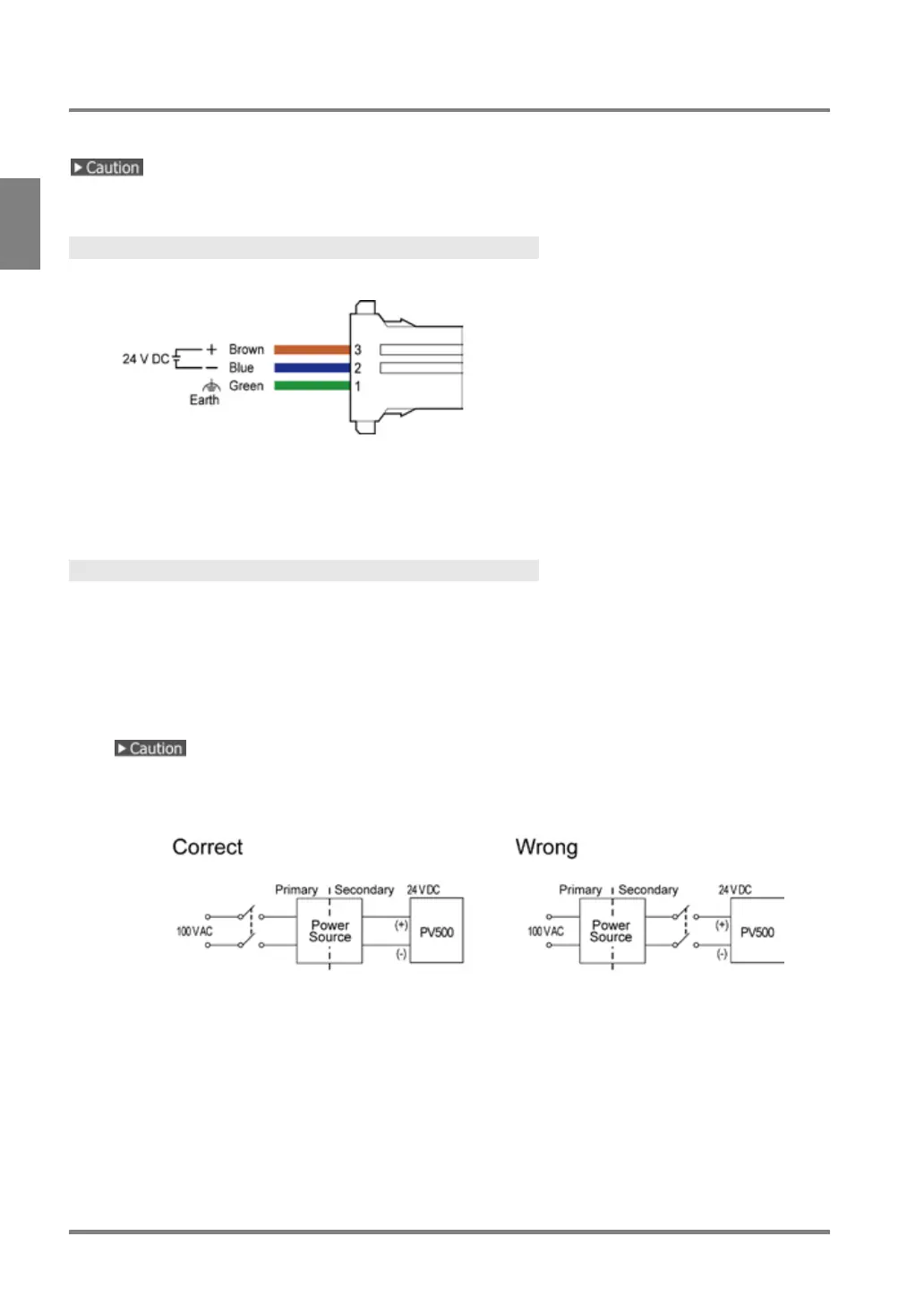
Connect the power of 24 V DC to PV500 with the included power cable.
Do not supply power until every connection has completed.
Power Cable
The arrangement of the cables is as follows.
- Wire size: AWG18
- Cable length: 1m
- Twist the electric wires for noise reduction.
Connecting Power
1.
Prepare a power supply unit which fulfills the following conditions and connect with the power
cable.
Conditions for power supply
- Power voltage: 24 V DC +/- 10 %
- Current capacity: 3.0A or more
- Insulated power supply with a built-in protection circuit
• Ensure to use the separate power supply for the PV500 from the power supply for power devices.
• Turn ON/OFF the power supply at the primary side. If you turn ON/OFF it at the secondary side, the
fuses of PV500 may melt down.



 To Next Page