386
Operation and Data Output through I/O Terminals
8.3.3 Type Switch (TYPE)
T1>1ms
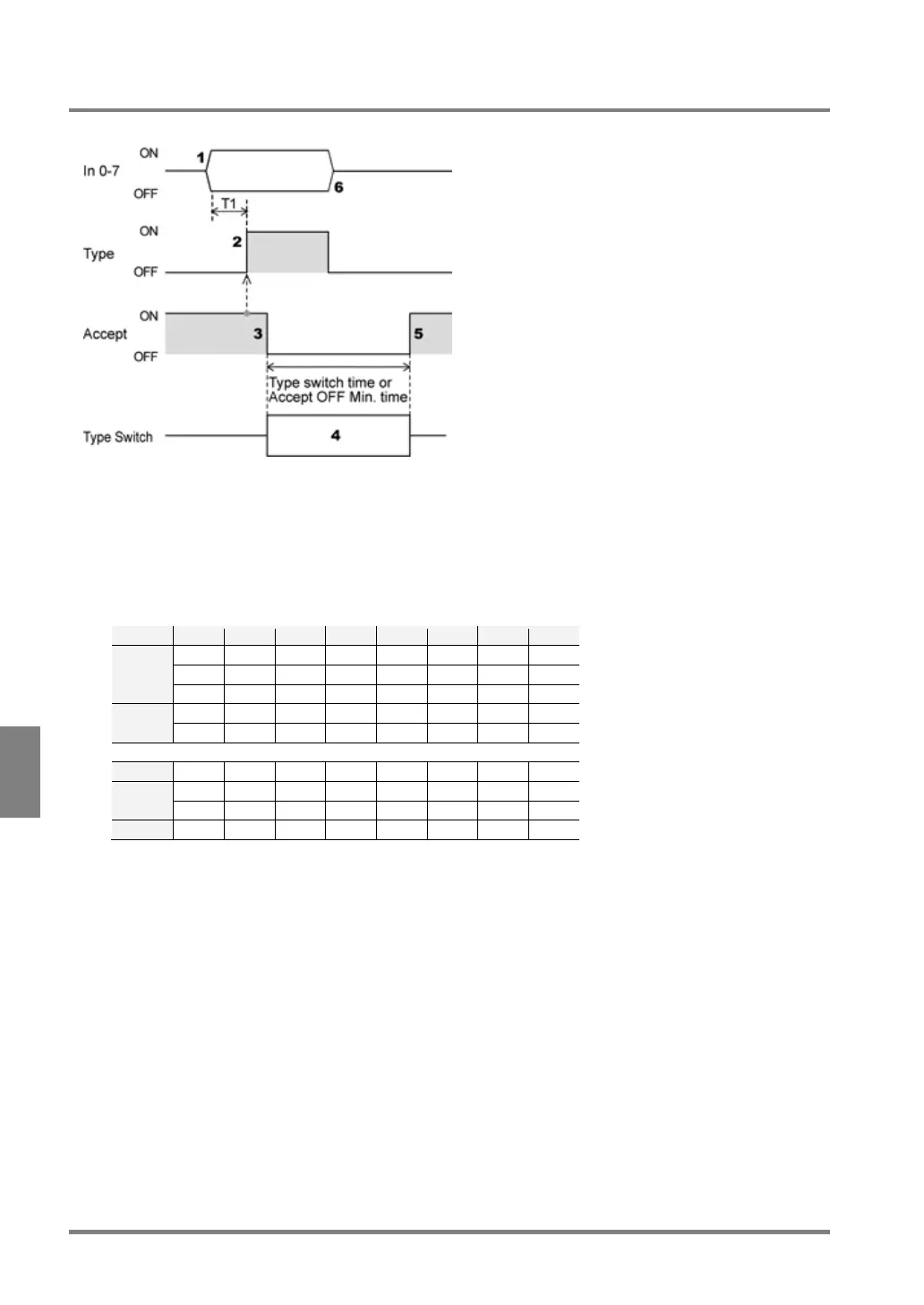
1. Specifying the number of the product type that you want to call using In0- 7.
Input IN0-7 more than 1 ms before TYPE signal input.
When “Type Switching Signal” is set to “PLC Communication” in PLC Communication Setting, input the
product number to switch in the specified register of PLC.
How to specify product number to IN0-7
2.
Check the ACCEPT signal ON and then input the TYPE signal (Type switch execution signal).
3. PV500 checks that ACKNOWLEDGE signal is ON and turns off STROBE signal
4. PV500 executes type switch.
5. After type switching completed, ACCEPT signal turns on.
However, when “ACCEPT OFF Min.” is set, ACCEPT signal turns on after whichever longer of the type
switch time or Accept OFF Min. time pasts.
6. Turns off TYPE signal and IN0-7 signals before inputting a signal, such as START, to PV500.



 To Next Page