127
3
Taking Pictures
6
Press the 3 button.
The camera returns to capture status.
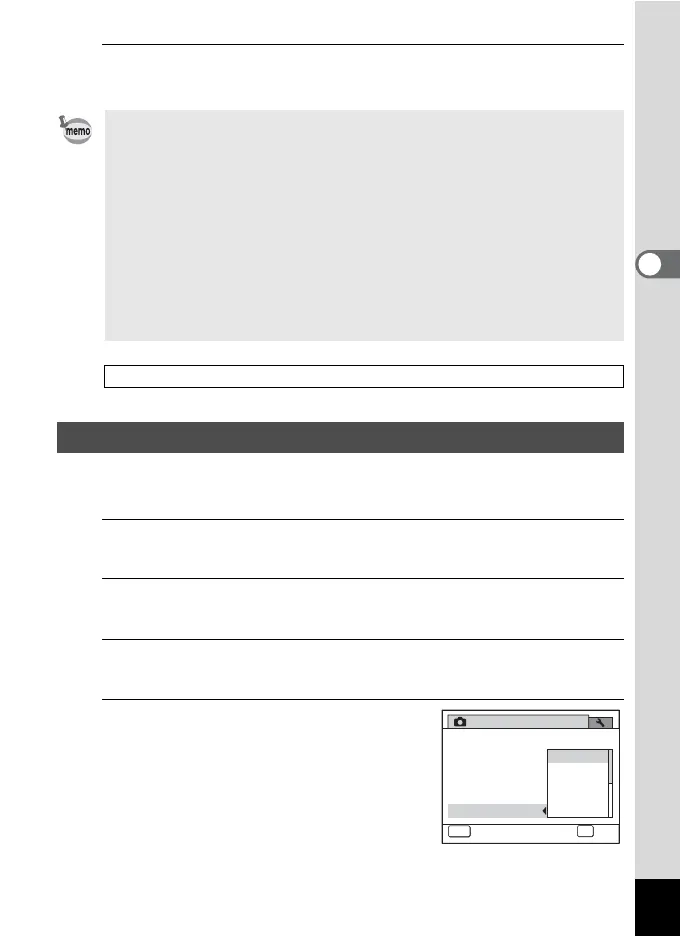
Set the sensitivity range when the sensitivity is set to AUTO.
You can select from 80-100, 80-200, 80-400, 80-800, and 80-1600.
1
Press the 3 button in A mode.
The [A Rec. Mode] menu appears.
2
Use the four-way controller (23) to select [ISO
Corction in AUTO].
3
Press the four-way controller (5).
A pull-down menu appears.
4
Use the four-way controller (23)
to select the sensitivity
adjustment range.
• When the sensitivity is set to 3200 or 6400, the number of recorded
pixels is fixed at f (2592×1944).
• When D (4000×2672), E(4000×2256) or F(2992×2992) is
selected, you cannot select 3200 or 6400.
• When set to c (Digital SR), 9 (Green) or C (Movie) mode and A
(Burst Shooting(L)), B (Burst Shooting(M)) or C (Burst Shooting(H))
is selected as the drive mode, only [AUTO] is available.
• When set to S (Fireworks) mode, the sensitivity is fixed to the
minimum value.
•In a (Manual Exposure) mode, you cannot select [AUTO].
• When [Highlight Correction] in [D-Range Setting] is set to O (On), 160
is displayed as the sensitivity instead of 80 or 100.
Saving the Sensitivity setting 1p.144
Setting the ISO Correction in AUTO
ISO80-200
ISO80-100
ISO80-400
ISO80-800
ISO80-1600
1/4
Bright
Rec. Mode
MENU
Cancel
Recorded Pixels
Quality Level
Sensitivity
ISO Corction in AUTO
White Balance
Image Tone
OK
OK



 To Next Page