140
3
Taking Pictures
Recording Movies
Use this to record movies. Sound is recorded at the same time.
1
In A mode, set the mode dial to C (Movie).
C mode is selected and the camera returns to capture status.
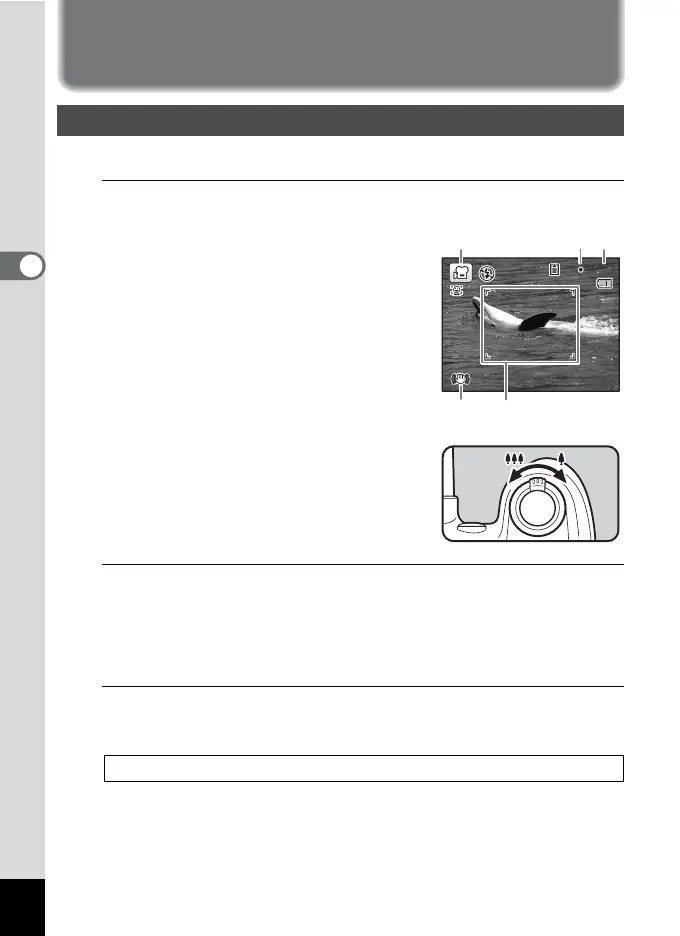
The following information appears on
the display.
1 Movie mode icon
2 Recording indicator (blinks during
recording)
3 Remaining recordable time
4 Focus frame (does not appear during
recording)
5 Movie shake reduction icon
You can change the captured area by
turning the zoom lever to the left or right.
Right (x) Enlarges the subject.
Left (w) Widens the area that is
captured by the camera.
2
Press the shutter release button fully.
Recording starts.
You can continue recording until the built-in memory or the SD
Memory Card is full, or the file size of the recorded movie reaches 2
GB.
3
Press the shutter release button fully.
Recording stops.
Recording a Movie
Playing Back a Movie 1p.149
07:34
02/02/2010
02/02/2010
14
:25
14:25
132
54



 To Next Page