231
8
Viewing Images on a Computer
1
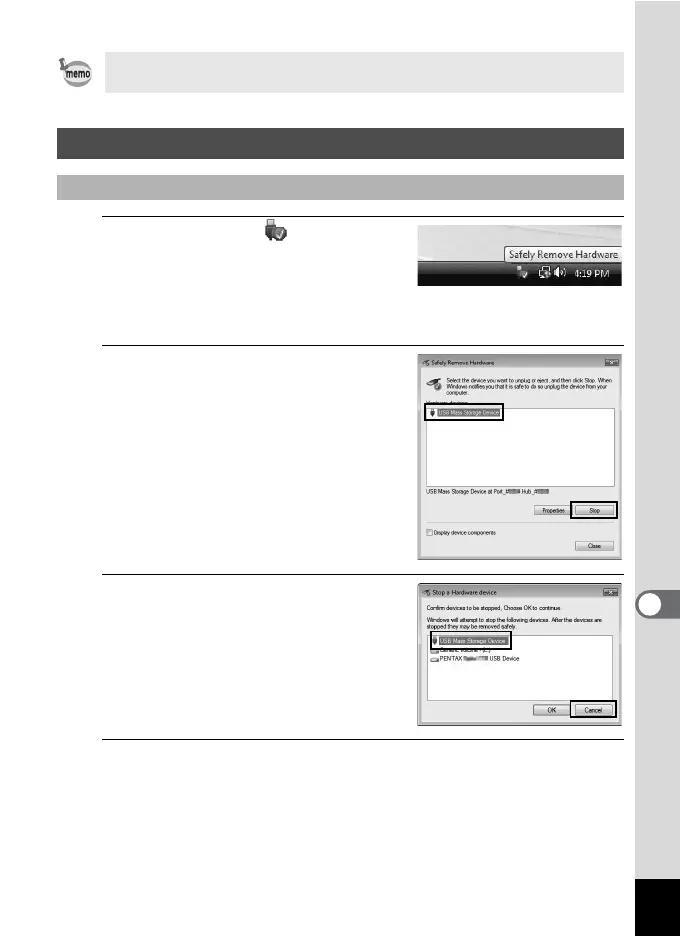
Double-click the [Safely
Remove Hardware] icon in the
task bar.
The “Safely Remove Hardware” screen
appears.
2
Select [USB Mass Storage
Device] and click [Stop].
The “Stop a Hardware device” screen
appears.
3
Select [USB Mass Storage
Device] and click [OK].
A message appears indicating that the
hardware can be safely removed.
4
Disconnect the USB cable from your Windows PC and
the camera.
If the images from the camera are not displayed in the import screen,
select [NO NAME] (or the volume label name) in [Get Media from].
Disconnecting the Camera from Your Computer
Windows



 To Next Page