182
5
Editing and Printing Images
8
Press the 4 button.
The image processed with the filter is saved.
5
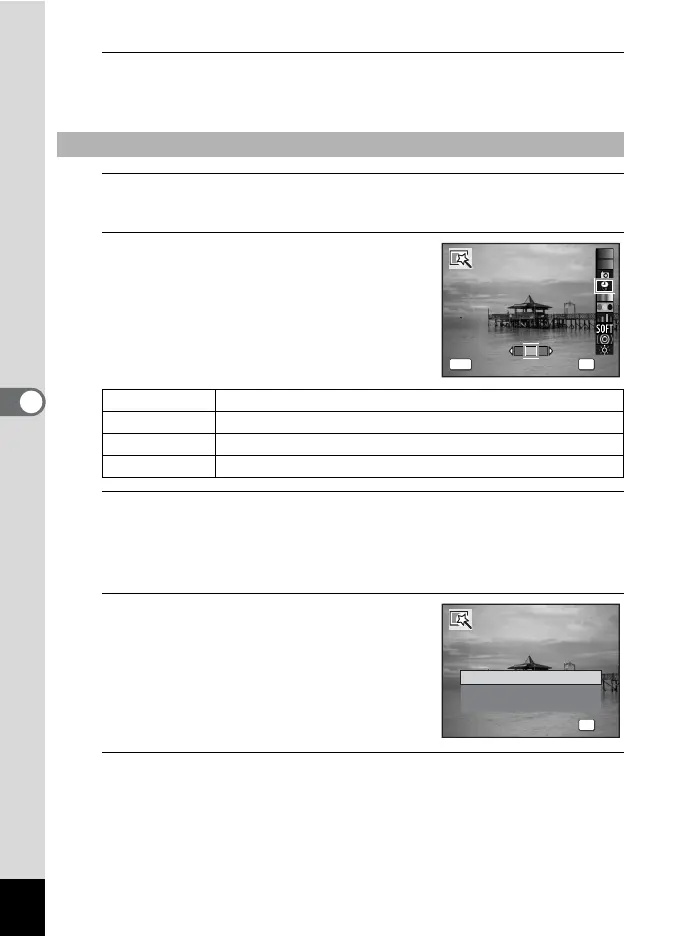
Use the four-way controller (23) to choose a filter.
The preview image of the result of the filter effect appears.
6
Use the four-way controller (45)
to choose the color.
The filter color changes in the following
sequence each time the four-way controller
(5) is pressed.
7
Press the 4 button.
A confirmation dialog for overwriting the image appears.
If the selected image is protected, the processed image is saved as a
new image and the following confirmation dialog does not appear.
8
Use the four-way controller (23)
to select [Overwrite] or [Save as].
9
Press the 4 button.
The image processed with the filter is saved.
To Select a Retro, Color, Extract Color or Color Emphasis Filter
Retro Original image → Amber → Blue
Color Red → Pink → Purple → Blue → Green → Yellow
Extract Color Red → Green → Blue
Color Emphasis Sky Blue → Fresh Green → Delicate Pink → Autumn Leaves
OK
OK
MENU
Cancel
Retro
OK
OK
Overwrite
Save as
Cancel
O v e r w r i t e
o r i g i n a l i m a g e ?
Overwrite
original image?


 To Next Page