10
10
12
TRIO Panel Formwork
Instructions for Assembly and Use – Standard Configuration
A1 Storage and transportation
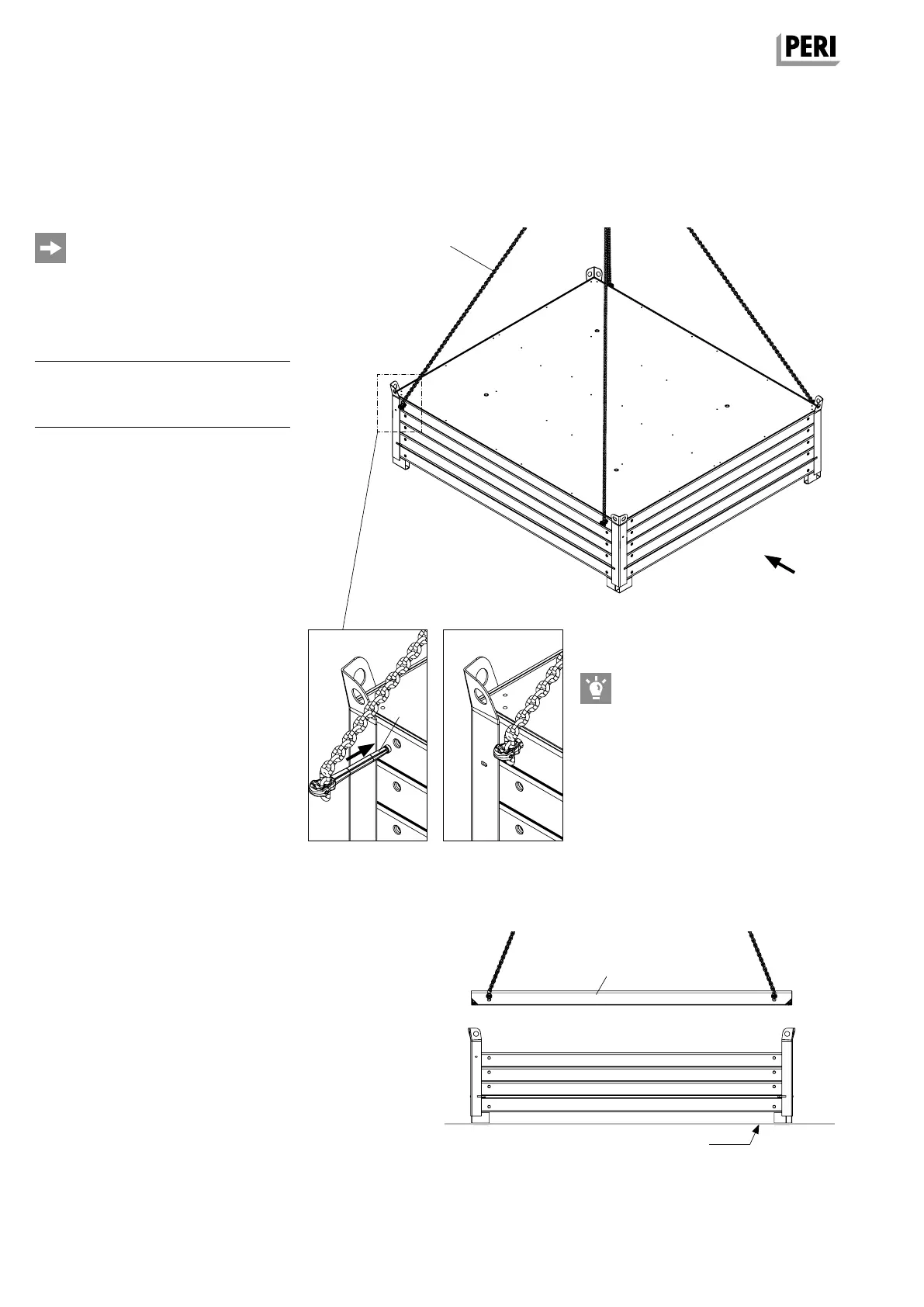
As an alternative to the locking pins
of the lifting gear (12), the locking pins
of the Lifting Gear Combi (11) can also
be inserted into the drilled holes of the
panels.
Setting down panels
individually
Remove panels (10) individually or max.
4 panels as a stack from the stacking
devices. (Fig. A1.04)
Pos.
Lifting accessory Item no.
10 Panel TR/4 according to size
11 Lifting Gear Combi MX 117321
12 Lifting Gear MX 117322
1. Insert locking pins (12.1) of the lifting
gear (12) into the drilled holes of the
top panel as far as possible – 4x.
(Fig. A1.04 + A1.04a + A1.04b)
2. Attach Lifting Gear MX to the crane.
3. Lift panel out of the stacking device.
(Fig. A1.05)
4. Place timbers on the ground.
5. Position the panel on timbers.
6. Remove locking pins – 4x.
Fig. A1.04
Fig. A1.04a
Fig. A1.05
Fig. A1.04b
Ground
View “X”
„X“
12.1
AuV TRIO EX.indb 10 11.10.17 09:44


 To Next Page