6-6
6 • Adding Postage/Connecting to Data Center
SV62261 Rev. C
Using a LAN Network (Constant Connection) to
Establish Communications with the Data Center
Constant Connection is a feature that allows you to connect your
system to the Pitney Bowes Data Center via a LAN network that
has Internet access. Internet connection is normally much quicker
than using the analog phone line option to download postage and
software updates to your machine.
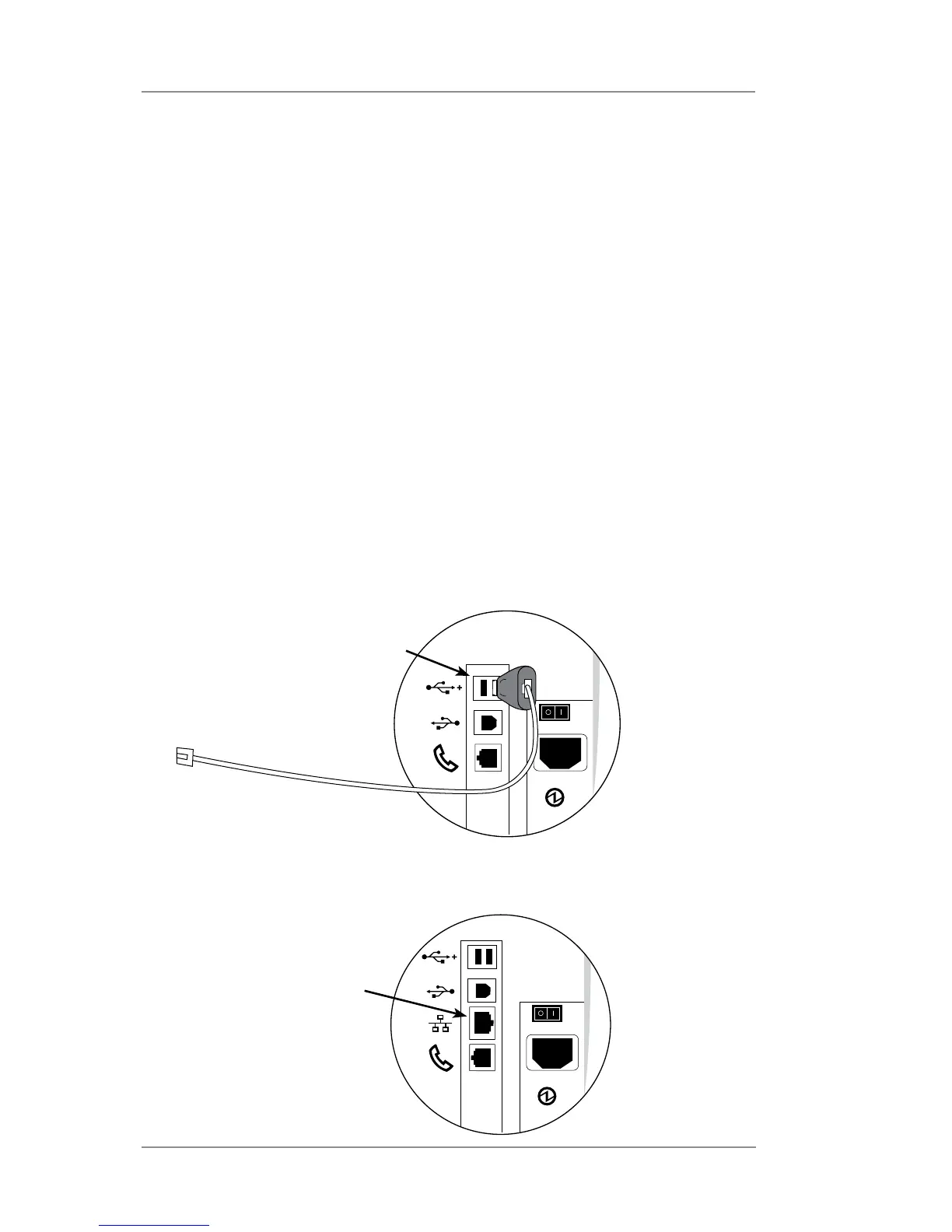
• DM300c/DM400c – plug one end of the Ethernet cable
(supplied) to your Internet LAN network port and the other end
to the LAN to USB adapter which plugs into the USB port on
the back of the machine (see figure below).
• DM475 – simply plug one end of the Ethernet cable (supplied)
to your Internet LAN network port and the other end to the LAN
connector on the back of the machine (see figure below).
You may leave this connected on a permanent basis; hence the
name "constant connection".
LAN Ethernet Cable
LAN to USB network
adapter plugs in here
DM300c/DM400c
DM475
LAN Ethernet cable
plugs directly in here














 To Next Page