13-12
13 • Troubleshooting
SV62261 Rev. C
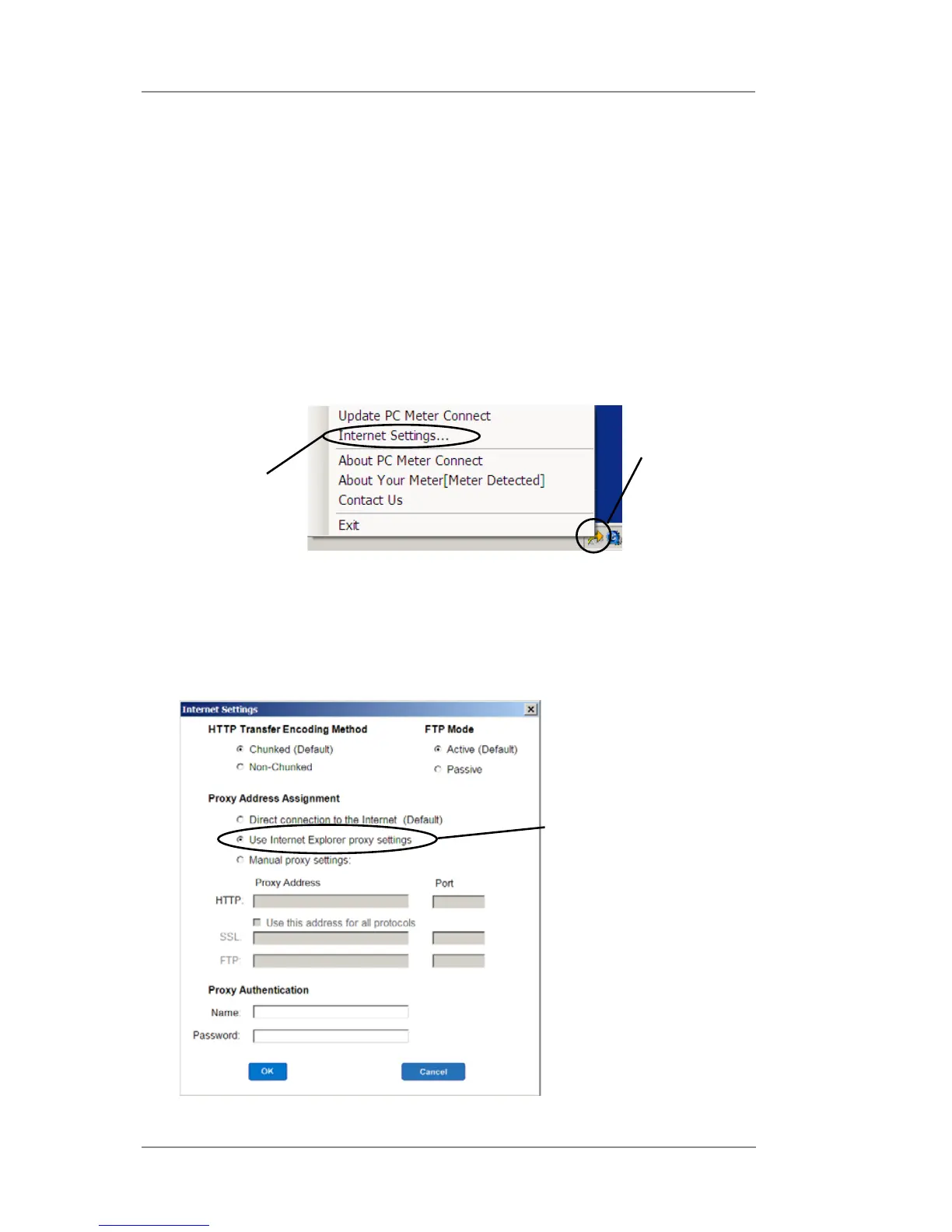
Use Internet Explorer
proxy settings
Problems Connecting to the Data Center via PC Meter
Connect™
You cannot access www.pb.com from PC using Internet Explorer
Contact your IT administrator for any special setup needed to enable
your PC and Internet Explorer to access the internet.
Internet Settings Screen in PC Meter Connect
™
Software
1. Right click on the PC Meter Connect
™
tray icon and select "Inter-
net Settings...".
You can access www.pb.com using Internet Explorer but PC
Meter Connect
™
software cannot detect the internet.
2. At the Internet Settings configuration screen, do either of the following:
Solution A - Set your PC Meter Connect
™
software to use the
same settings that Internet Explorer uses to connect to the inter-
net. Choose “Use Internet Explorer proxy settings” under Proxy
Address Assignment (see screen below) and click OK.
continued->
Right Click
on Tray Icon
Select
"Internet
Settings..."














 To Next Page