C-14
MacBAT 5 – USER GUIDE. Version 1.0
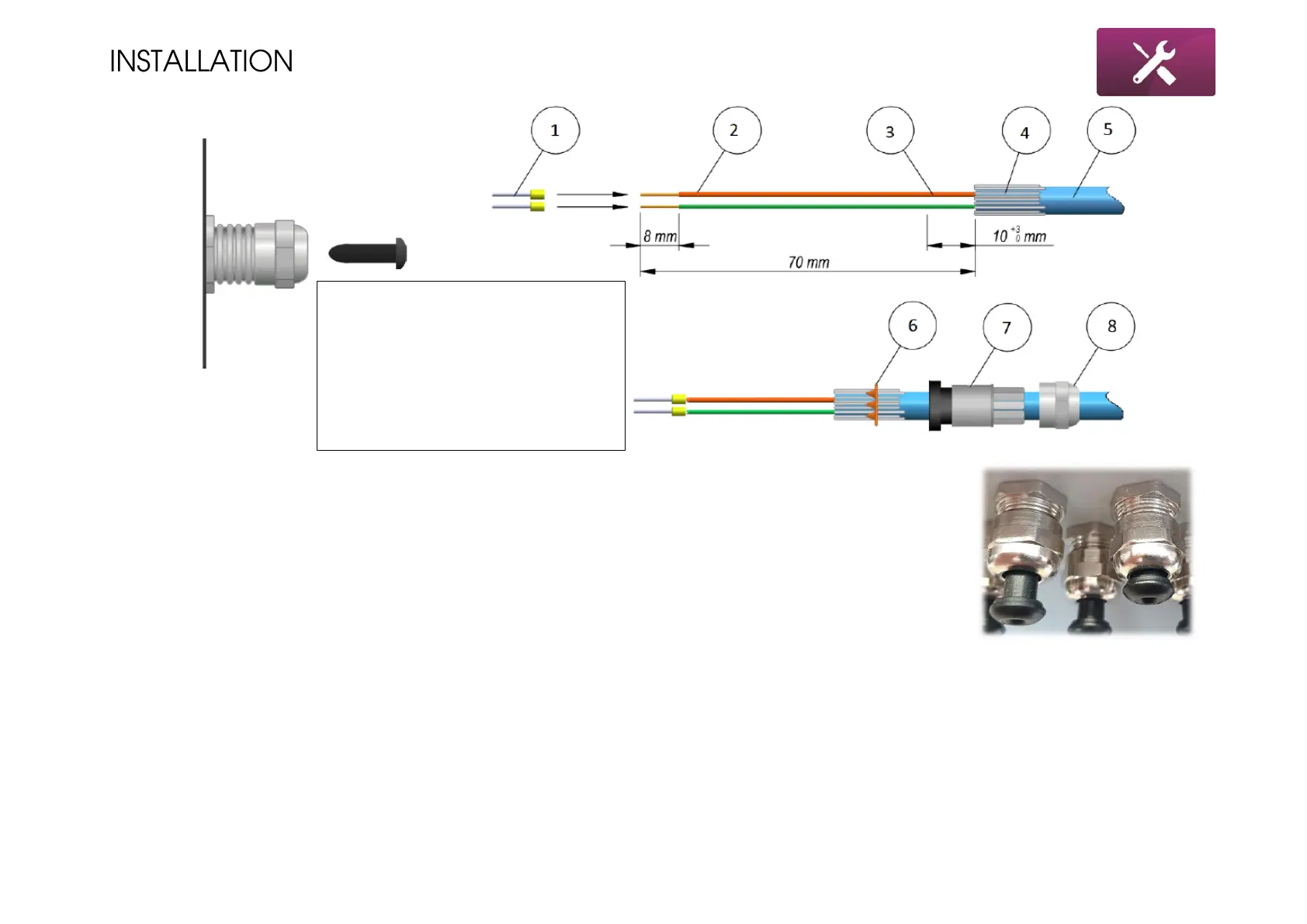
1. Push the black plug into the cable gland until the end – as shown in the picture. This will form the
crown (6) to fit into the cable shielding.
2. Untighten the cable gland nut (8), remove the rubber sealing (7) from the gland and place them over
the cable.
3. Remove the insulation over the cable for the length around 70mm. Cut the foil (3) cable shielding (4)
for around 10mm and roll the shielding over the insulation. Place the formed crown over the shielding.
Make sure it will stuck on the cable.
4. Remove the insulation over the single wires for the length around 8mm. Put the insulation sleeves on
the wires and use crimping tool to connect them rigidly to single wires.
5. Put the cable to the terminals chamber and tighten the cable gland. Remember to tighten it rigidly,
blocking with second wrench to avoid rotating the cable gland.



 To Next Page