Chapter 5 OFFLINE Mode
5-3
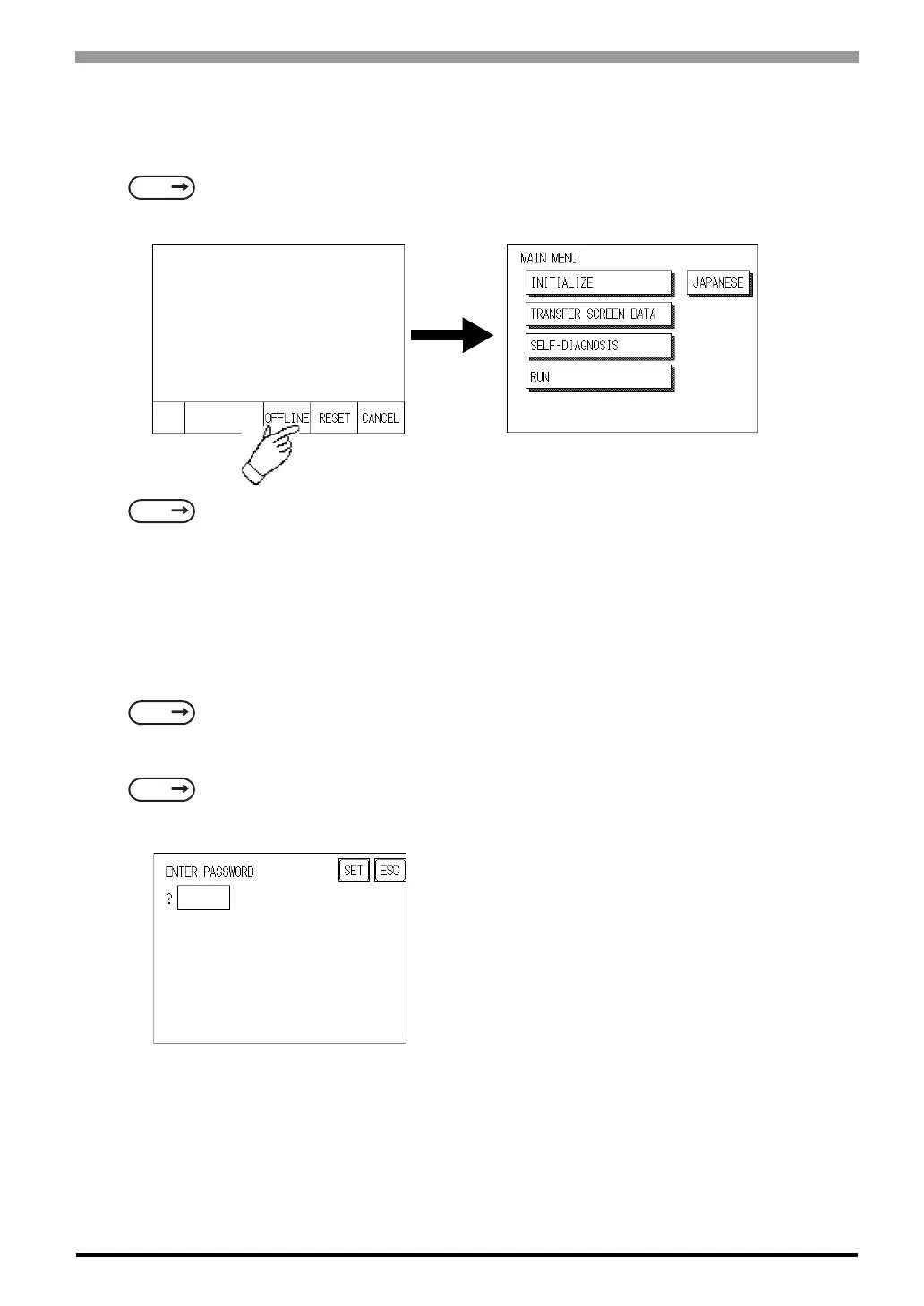
5.1.2 From the Menu Bar
From the ST unitís Menu Bar, touch the OFFLINE square and the OFFLINE mode Main Menu will appear
If a Password has been entered in the Initialize/ Set Up System area, before entering the OFFLINE mode, the
following screen appears.
Here, enter the password, then touch Set to enter OFFLINE mode.
When Passwords setting
For more information about ENTERING NUMBER
SEE
6.4.3 Set Up Touch Panel SYSTEM RESET MODE (Page 6-14)
SEE
GP-PRO/PBIII for Windows Device/PLC Connection Manual (included with the screen editor soft-
ware)
SEE
6.3.1 System Setup PASSWORD SETUP (Page 6-5)
SEE
5.3 Initialization Entering Numbers (Page 5-5)



 To Next Page