EIP Protocol PLX32-EIP-MBTCP-UA ♦ Multi-Protocol Gateway
User Manual
Page 76 of 156 ProSoft Technology, Inc.
March 8, 2018
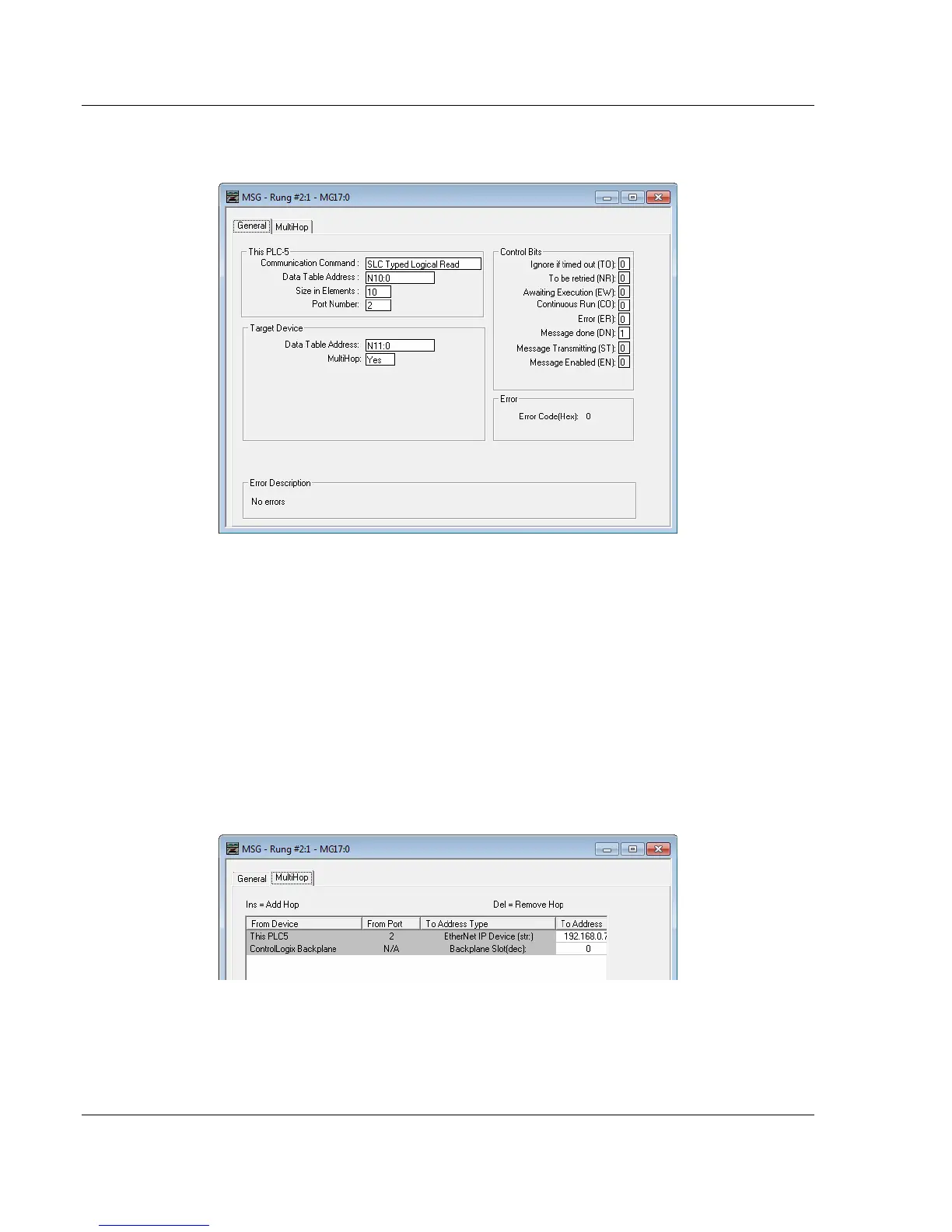
1 In the MSG object, click SETUP SCREEN in the MSG object to complete the
configuration of the MSG instruction. This displays the following dialog box.
2 Select the COMMUNICATION COMMAND to execute from the following list of
supported commands.
o PLC5 Type Read
o PLC2 Unprotected Read
o PLC5 Typed Read to PLC
o PLC Typed Logical Read
3 Set the TARGET DEVICE DATA TABLE ADDRESS to a valid file element (such
as, N11:0) for SLC and PLC5 messages. For the PLC2 Unprotected Read
message, set the address to the database index (such as, 1000) for the
command.
4 Set the MULTIHOP option to YES.
5 Complete the MULTIHOP tab portion of the dialog box as shown in the
following image.
6 Set the TO ADDRESS value to the gateway’s Ethernet IP address.
7 Press the INS key to add the second line for ControlLogix Backplane and set
the slot number to zero.



 To Next Page