RADWIN2000D+UserManual Release3.6.00 13‐2
UpgradinganInstalledLink Chapter13
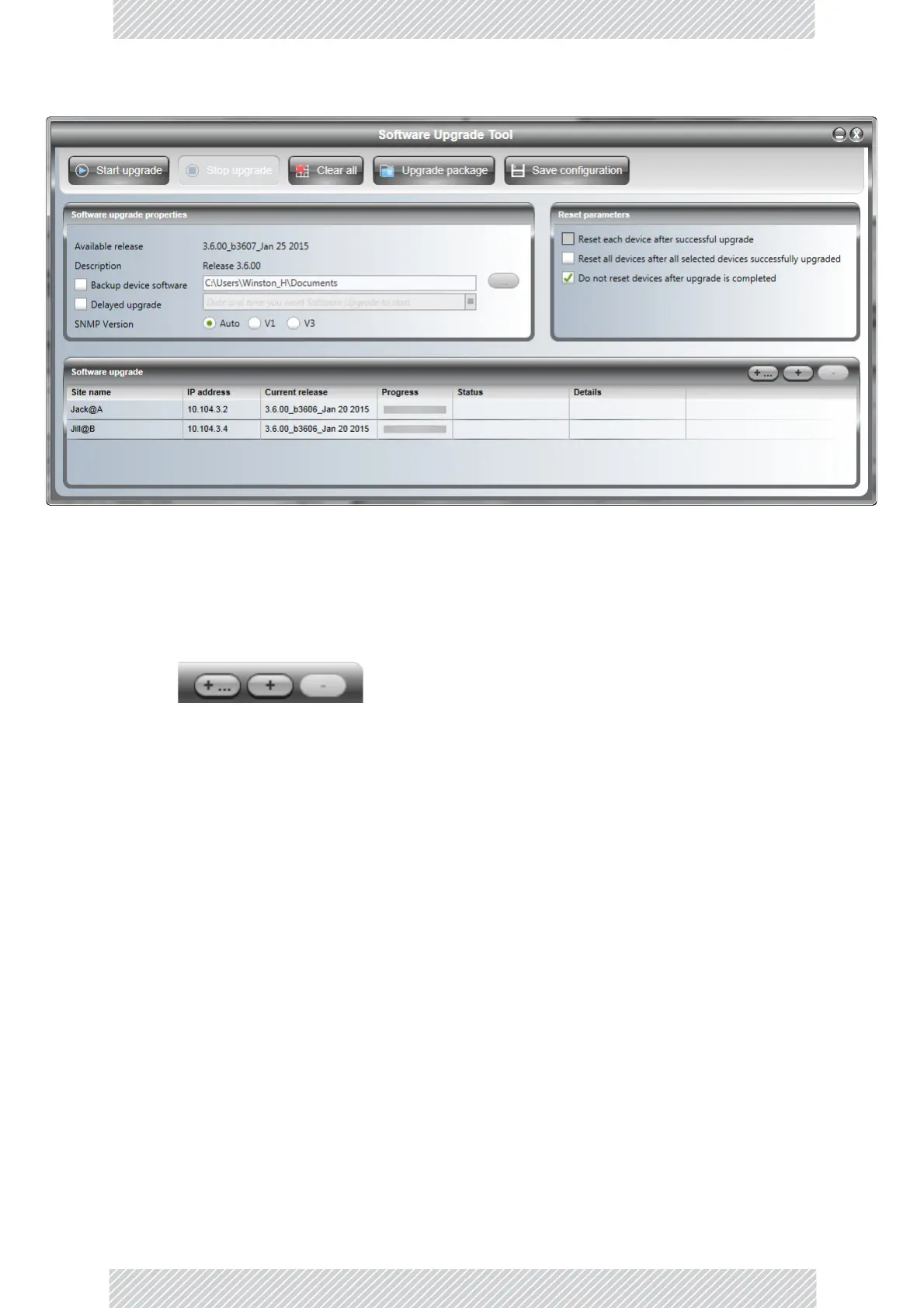
Figure13‐1:SoftwareUpgradeUtility‐Mainwindow
ThedefaultsitesshownintheSoftwareUpgradelistpanelbelongtothecurrently
installedsector.ThelistmaybeemptyifyouarerunningtheRADWINManager
“offline”.
2.TheSoftwareupgradelisttitlebarhasthreebuttonsontherighthandside.
Figure13‐2:Add/Removesitebuttons
TheleftbuttonopensupaWindowsfiledialogtolocatealistoflocationstoupdate.
Thelisthasthefollowingformat:
<IPaddress>,<Read‐Onlycommunity>,<Read‐Writecommunity>
Forexample:
10.104.3.2,netman
10.104.3.4,netman
ThelistshouldincludeRT‐A(HBS)sandRT‐B(HSU)sabletoacceptthesameupgrade.
Non‐upgradableitemswillresultinanerrormessage.ContactCustomerService
aboutupgradingthem.
Thecenterbuttonallowsyoutoaddasinglesite:


 To Next Page