RDL-3000 User Manual
70-00158-01-DRAFT Proprietary Redline Communications © 2010 Page 51 of 142 November 25, 2010
4.4.4 Subscriber Link Status
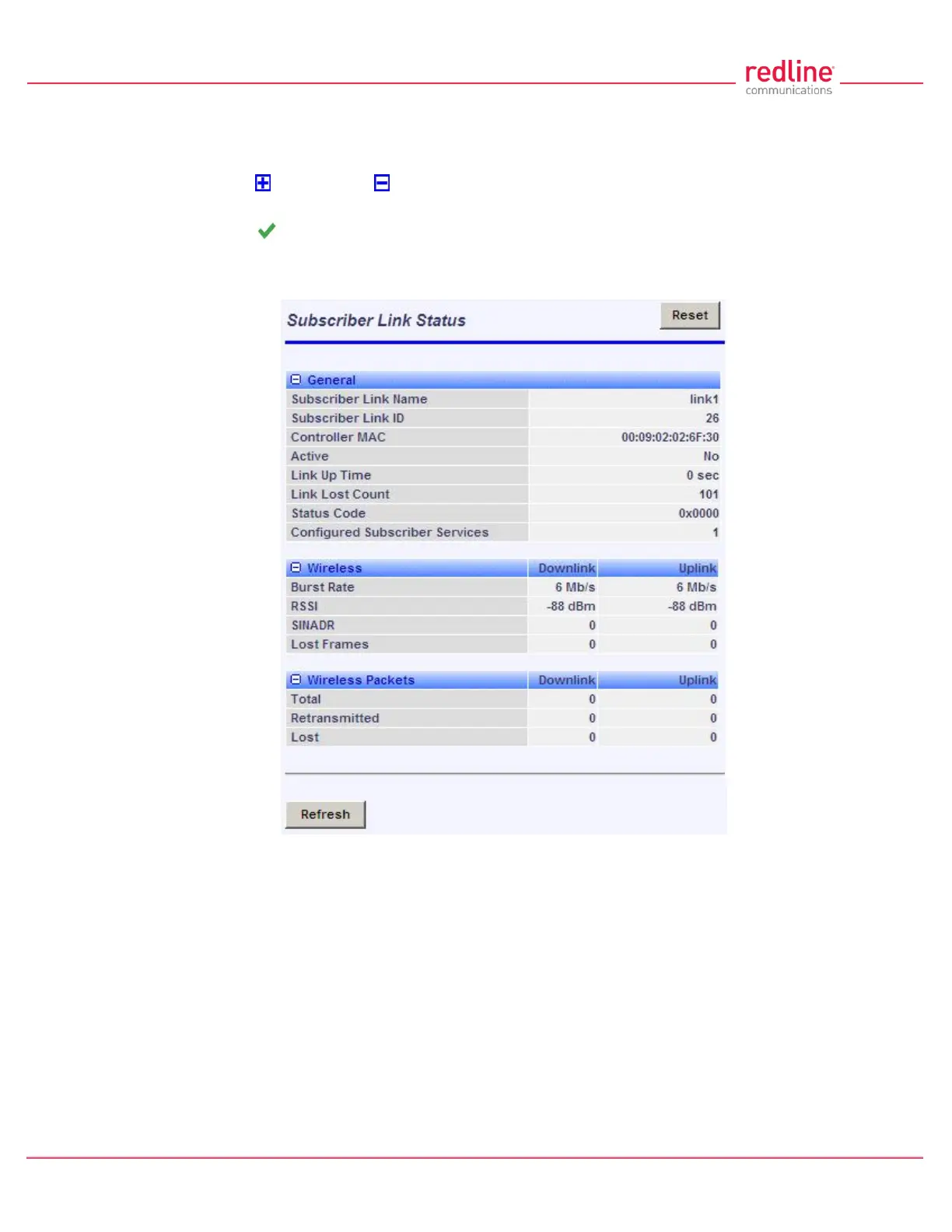
The Subscriber Link Status screen provides a summary view of the status of the
selected Subscriber Link. This screen is identical for the sector controller and subscriber
units. Click to expand or to hide fields.
SC: Click Provisioning->Subscriber Links in the main menu and then click on the Link
status (e.g., ) to display this screen.
SS: Click Link Status in the main menu to view the status of the wireless link for this
subscriber.
Fig. 32: Web - Subscriber Link Status Screen
General
Subscriber Link Name: User-assigned name for this link.
Subscriber Link ID: Unique number identifying this link.
Subscriber MAC: MAC Address of the subscriber.
Active: Indicates if wireless link is operational (Active=YES).
Link Up Time: Total time the wireless link has been operational.
Link lost Count: Number of times link has been out of service.
Status Code: Code indicating the condition of the RDL-3000 system.
Configured Subscriber Services: The number of Services provisioned on this link.


 To Next Page