RDL-3000 User Manual
70-00158-01-DRAFT Proprietary Redline Communications © 2010 Page 86 of 142 November 25, 2010
4.7 Utilities Screens
4.7.1 Spectrum Sweep
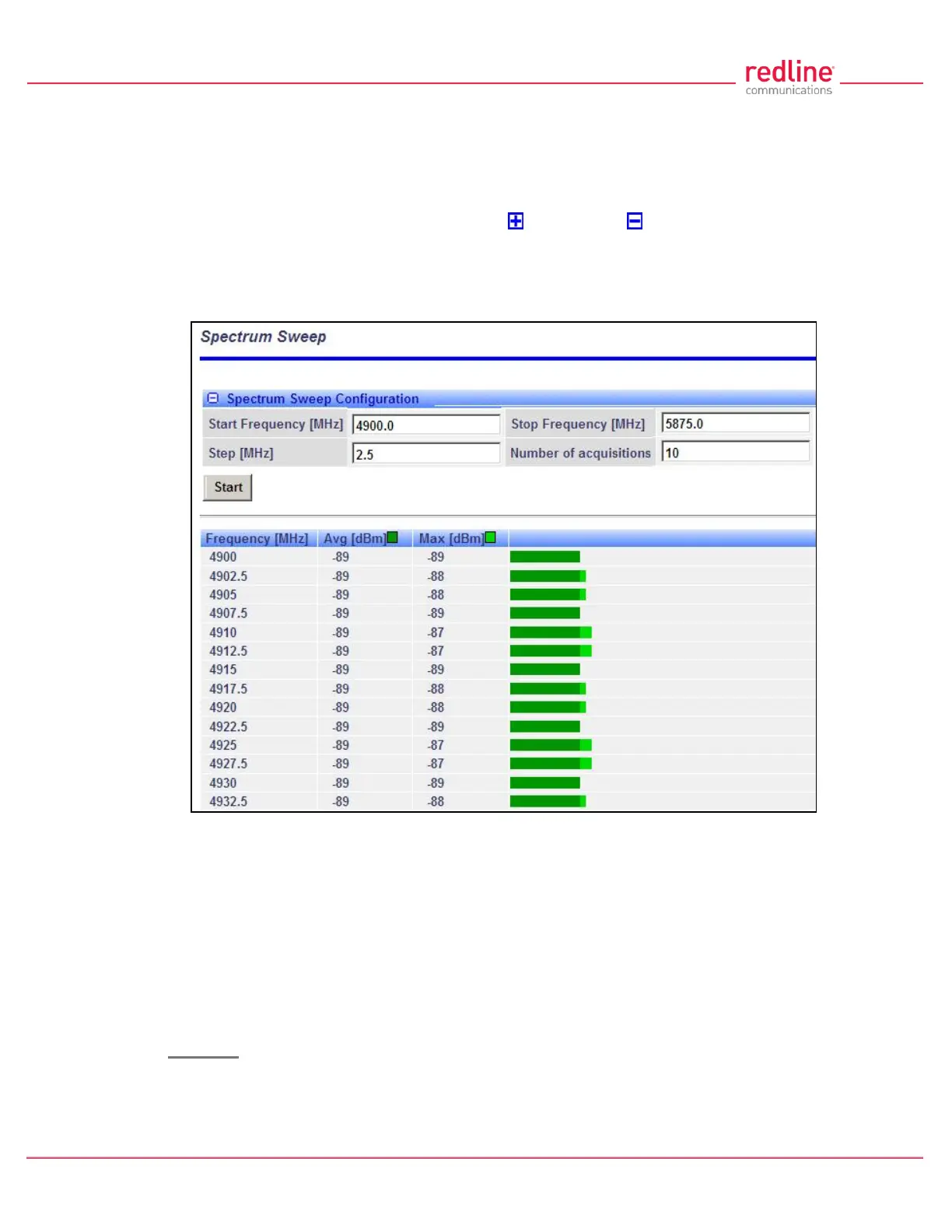
Use the RDL-3000 Spectrum Sweep feature to determine if RF spectrum is clear of
interference. Click Utilities -> Spectrum Sweep in the left hand menu to display the
Spectrum Sweep configuration screen. Click to expand or to hide fields.
Configurable survey settings allow you to scan a specific frequency range. Configurable
survey parameters include the high and low frequency limits, the step size, and the
number of samples at each step. The output graph displays the average (dark green)
and maximum (light green) RSSI measured at each step.
Fig. 56: Web - Spectrum Sweep Screen
Spectrum Sweep Configuration
Start Frequency (MHz): Enter center frequency of the lowest channel to be scanned.
End Frequency (MHz): Enter center frequency of the highest channel to be scanned.
Step (MHz): Enter the frequency step (MHz) to use when scanning from the lowest to
the highest frequency. The step selection must be a multiple of 2.5 MHz (e.g., 2.5, 5,
etc).
No. of acquisitions: Enter the number of times the frequency is sampled at each step.
The recommended range is 10 to 100 samples.
Controls
Start: Click to begin the scan.



 To Next Page