RDL-3000 User Manual
70-00158-01-DRAFT Proprietary Redline Communications © 2010 Page 79 of 142 November 25, 2010
4.6.3 Service Groups
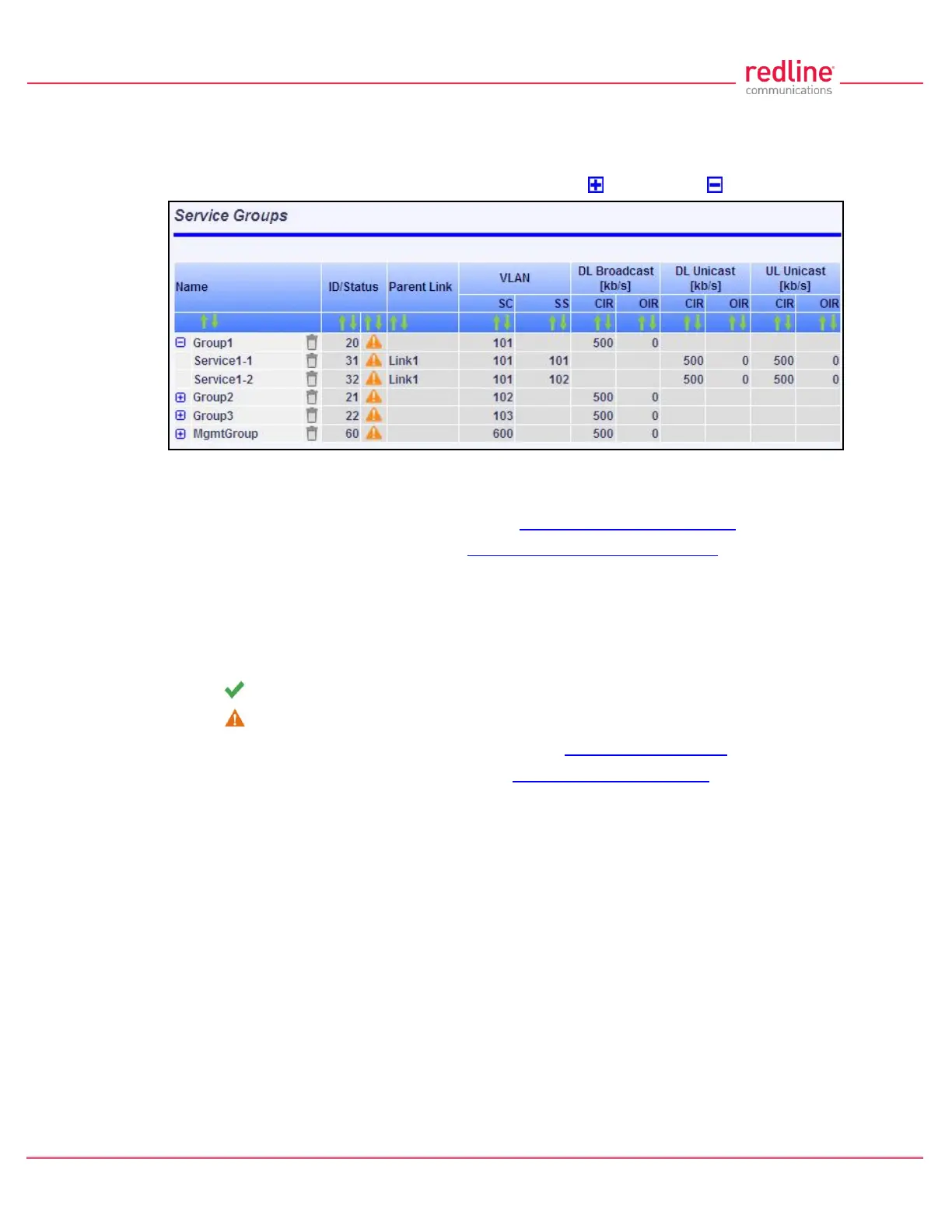
The Service Groups screen provides a summary view of configuration settings for all
Service Groups and provisioned Services. Click Provisioning->Service Groups in the
main menu to display the Service Groups screen. Click to expand or to hide fields.
Fig. 51: Web - Service Groups Screen (Master List)
Name: Identifies Service Groups and member Services.
Click the Service Group name to display the Service Group Configuration screen.
Click the Service name to display the Subscriber Service Configuration screen.
ID/Status: Identifier and status for the Subscriber Link or Service.
ID: Unique identifier for this Service Group or Service. A unique numeric ID
generated automatically when the Service Group or Service was created. This value
is required when using the CLI interface to modify Service Group or Service settings.
Status: The status of this Service Group or Service.
Service Group or Service is available.
Service Group or Service is unavailable (down/offline).
Click the Service Group status to display the Service Group Status screen.
Click the Service status to display the Subscriber Service Status screen.
Parent Link: The Service is assigned to this Subscriber Link.
VLAN: VLAN classification settings.
SC: VLAN classification setting at the sector controller (Service Group).
SS: VLAN classification setting at the subscriber (Service).
DL Broadcast (Kbps): Minimum rate for downlink broadcast traffic.
CIR: Operator requested bandwidth.
OIR: Assigned bandwidth.
UL Unicast (Kbps): Minimum rate for uplink unicast traffic.
CIR: Operator requested bandwidth.
OIR: Assigned bandwidth.
DL Unicast (Kbps): Minimum rate for downlink unicast traffic.
CIR: Operator requested bandwidth.
OIR: Assigned bandwidth.



 To Next Page