RDL-3000 User Manual
70-00158-01-DRAFT Proprietary Redline Communications © 2010 Page 95 of 142 November 25, 2010
5 CLI Interface
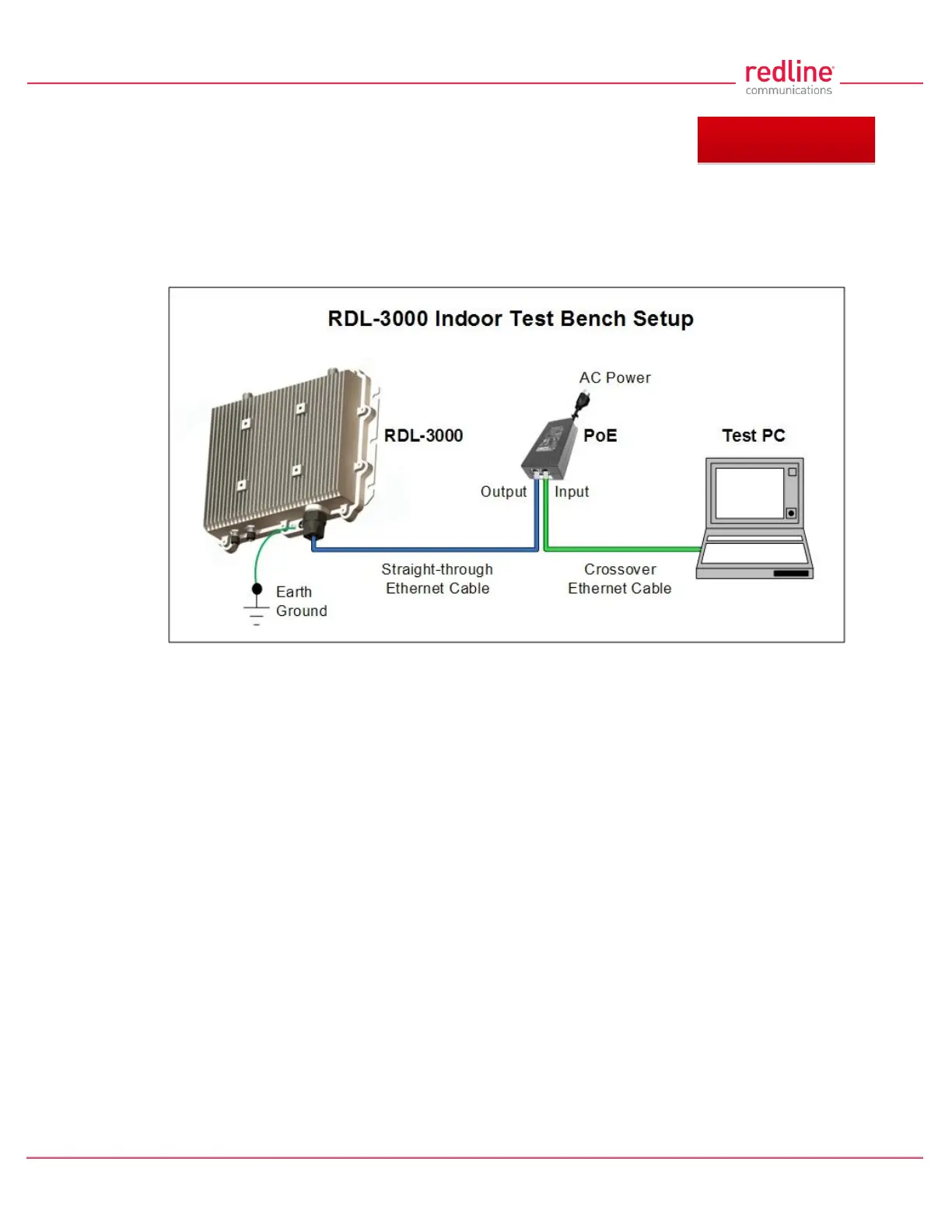
This section describes the procedures for configuring and operating the RDL-3000 using
CLI over a Telnet connection. The following procedures require a PC equipped with a
Web browser, Ethernet port, and an Ethernet Cat-5e crossover cable for connection to
the PoE power adapter.
Fig. 61: Telnet - Connecting a PC to the RDL-3000
The IP address and subnet mask of the PC must be on the same subnet as the RDL-
3000.
For example: IP address = 192.168.25.11, Net Mask = 255.255.255.0
5.1 Telnet Access
Use the following steps to establish a Telnet session with the RDL-3000. Refer to the
RDL-3000 User Manual section 5: CLI Interface for a complete description of the
available commands.
1. On the PC, open a Telnet client and enter the unit IP address. The factory default IP is
'192.168.25.2'.
2. Login to the RDL-3000 using the assigned username and password. The default username is
'admin', and the default password is 'admin'.
For example,
telnet 192.168.25.2
username: admin
password: admin
5.2 Command Summary
Online help is available for all commands, and the Tab key can be used for auto-
complete functions. The following table lists all RDL-3000 commands available from root
mode (default mode when you login).



 To Next Page