RDL-3000 User Manual
70-00158-01-DRAFT Proprietary Redline Communications © 2010 Page 53 of 142 November 25, 2010
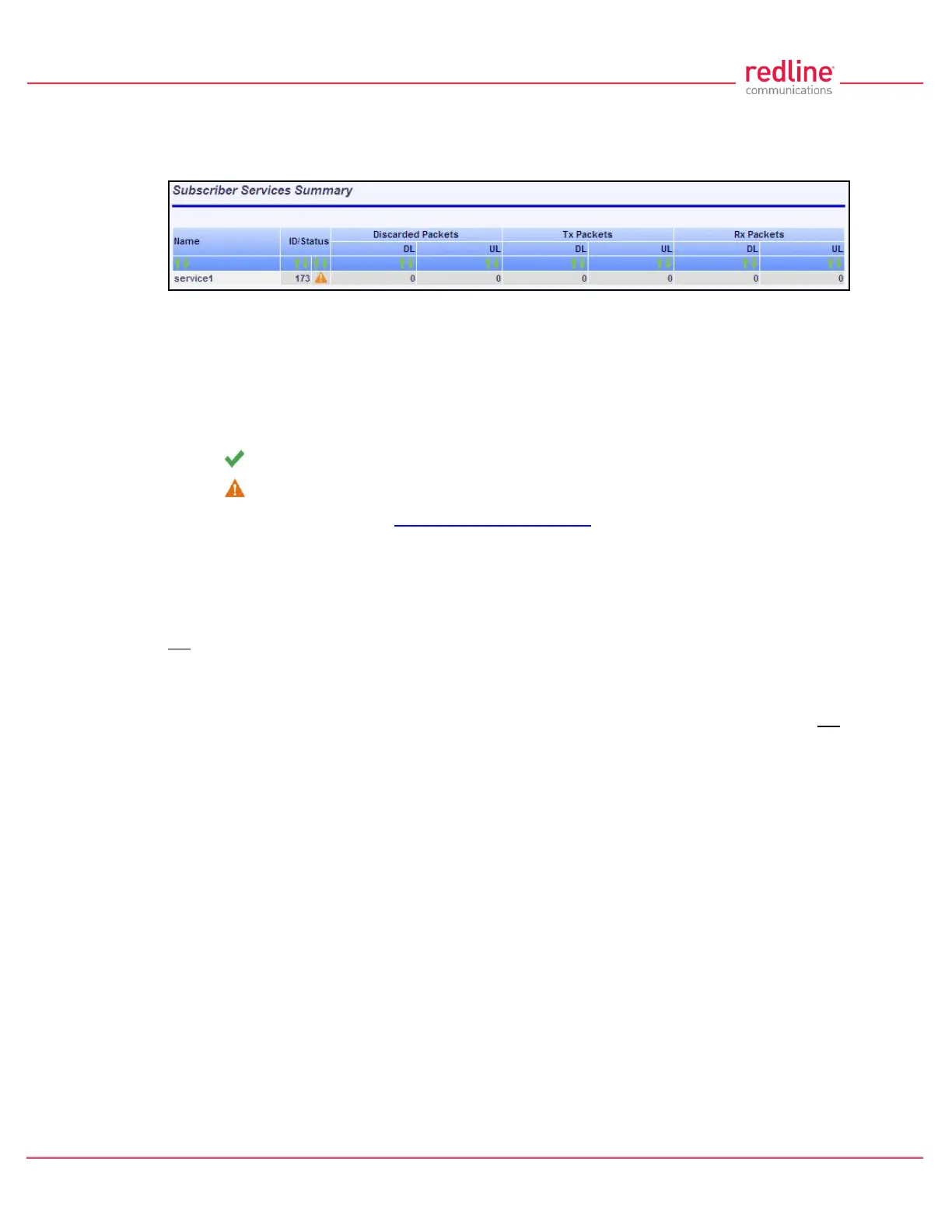
4.4.5 Subscriber Services Summary Screen (SS Only)
Click Services Summary in the main menu (SS) to view the status of all Services on
this subscriber. This screen is available only on the subscriber unit.
Fig. 33: Web - Services Summary Screen
Name: Operator-assigned name for Service.
ID/Status: Service identifier and status indicator.
ID: A unique numeric ID generated automatically when the Service was created. This
value is required when using the CLI interface to modify Services settings.
Status: Graphic indication of the status of this link or Service.
The link or Service is available.
The Link or Service is unavailable (offline or disabled).
Click the status to display the Subscriber Service Status screen.
Discarded Packets: Total number of packets discarded by the local system due to errors.
UL: Received wireless packets discarded.
DL: Transmitted wireless packets discarded by remote end unit.
Tx Packets: Total packets successfully transmitted over the wireless interface. Total does
not include discarded or errored packets.
DL: Total packets sector controller has reported transmitting to this subscriber.
UL: Total packets subscriber has transmitted to sector controller.
Rx Packets: Total packets successfully received over the wireless interface. Total does not
include discarded or errored packets.
DL: Total packets subscriber has received from sector controller.
UL: Total packets sector controller has reported receiving from subscriber.



 To Next Page