3-4 Monitoring and Diagnostics VisualMotion 9 Troubleshooting Guide
DOK-VISMOT-VM*-09VRS**-WA02-EN-P
3.2 Control Startup Messages
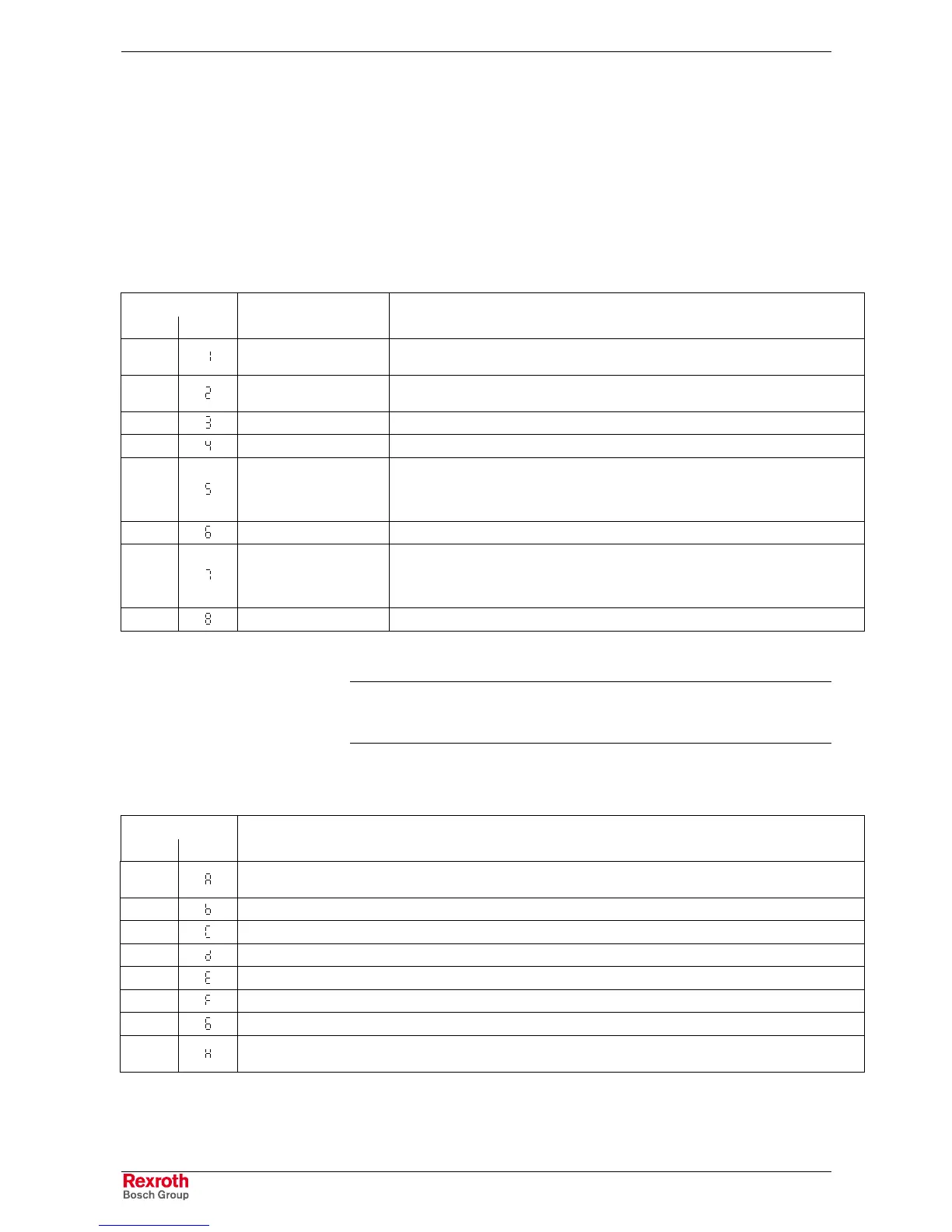
On power up, the control’s boot-up sequence displays a series of
numbers and/or letters on the H1 display. These represent each step in
the initialization process. The display stops on a numeric value if a step
fails. Additionally, a distortion LED flashes with a defined code if the
SERCOS loop is closed.
PPC Boot-Up Sequence
H1 Display
PPC-R PPC-P (Distortion LED) Description
-01 blinks 4 times on failure
Checksum test (Flash application) Flash encountered a programming error, hardware
failure in PSM module or hardware failure in PPC-R.
-02 blinks 5 times on failure
SDRAM test. Address or data bus is faulty.
Hardware failure in PSM module or hardware failure in PPC-R.
-03 no error evaluation Not present on current standard ROM versions.
-04 blinks 6 times on failure CRC32 Checksum test (Flash application)
-05 blinks 2 times on failure
Copies application code from FLASH to RAM and checks correct data using CRC32.
Initializes processor registers, data cache, instruction cache, disables interrupts and
initializes data area. Flash encountered a programming error, hardware failure in PSM
module or hardware failure in PPC-R.
-06 no error evaluation Initializes decrementer, floating point unit, interrupt controller and serial ports
-07 no error evaluation
Initializes operating system (pSOS, pROBE). Checks BSP variables Checksum and
initializes serial driver. Initializes global setup, pROBE I/O, BSP variables and
application variables. Adjusts runtime system variables. Builds component
configuration tables. Sets up lower serial driver in case settings changed.
-08 no error evaluation Start pROBE (which starts pSOS, which starts the application).
Table 3-1: PPC-R Boot-Up Sequence
Note: The distortion LED on the PPC-R is label H2 and located above the
SERCOS connections. The distortion LED on the PPC-PCI card
appears as a small dot at the bottom of the 7-segment display.
Control Firmware Sequence
H1 Display
PPC-R PPC-P Description
-20
Obtains hardware information and clears memory if new firmware is detected. Initializes diagnostic system, CRC
calculations and dynamic memory allocation.
-21 Initializes parameter system and path planner
-22 Initializes file system
-23 Initializes ELS system, CAM, PLS, PID, Oscilloscope, SERCOS and Link ring (if present)
-24 Initializes communication structure (serial and Ethernet) and PLC interface
-25 Creates and initializes several operating system task
-26 Starts several operating system task
-27
Enables interrupts, check battery (if present), initializes Fieldbus interfaces (if present), Option Card PLS (if present),
starts Link Ring (if present), initializes temperature sensor and starts operating system tasks.
Table 3-2: PPC-R Firmware Sequence
Afterwards, the normal system diagnostics and/or error messages will be
display.



 To Next Page