3-18 Monitoring and Diagnostics VisualMotion 9 Troubleshooting Guide
DOK-VISMOT-VM*-09VRS**-WA02-EN-P
414 Parameters were lost
System, task, and axis parameters were lost, and default values have
been loaded.
Cause:
This error has occurred for one of the following reasons:
• new firmware was loaded on the PSM memory card
• or an internal system error has corrupted the memory.
Remedy:
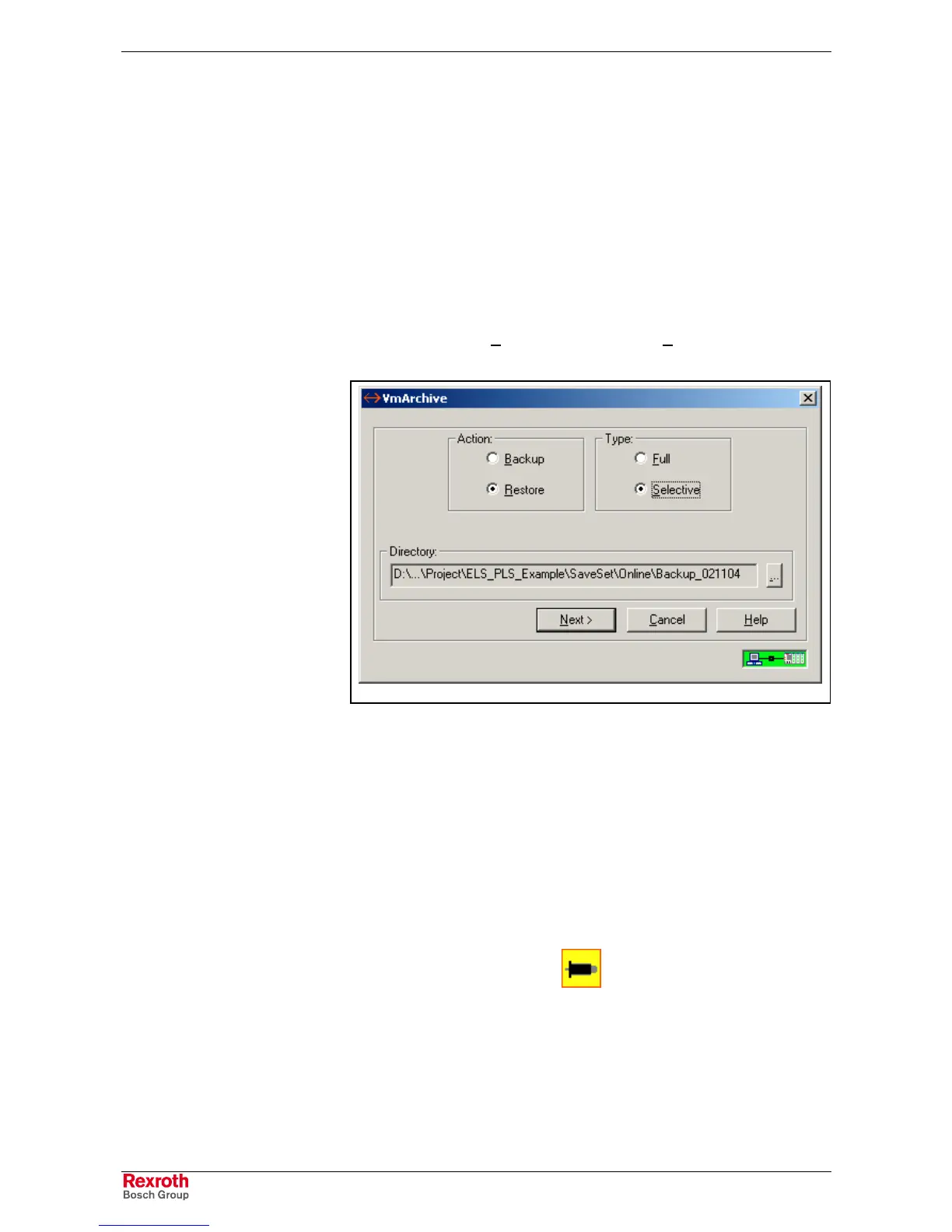
Perform a selective restore using VisualMotion’s Archive tool under
Commission ⇒
⇒⇒
⇒ Archive. Browse for the directory containing the latest
backup and click the Next button. Click on the H
elp button for details on
how to perform a selective restore.
Archive.tif
Fig. 3-8: Restore Archived System
415 Drive %d was not found
Drive %d (where %d = drive number) that is used in a program or
selected in the system parameters was not found on the SERCOS ring.
Cause:
1. The axis icon in the VisualMotion program is specifying an axis
number or name that is recognized by the system.
2. The SERCOS card addresses of two or more drives are set to the
same number.
Remedy:
1. Verify that the Axis icon
in the VisualMotion program is
programmed with the correct axis number or variable label.
2. Verify that all drives have unique SERCOS card addresses anywhere
from 1 to 40.



 To Next Page