3-12 Monitoring and Diagnostics VisualMotion 9 Troubleshooting Guide
DOK-VISMOT-VM*-09VRS**-WA02-EN-P
215 RECO I/O Failure, see ext. diag.
Cause:
This message is generated when GPP is configured to react to RECO I/O
errors with a warning.
Remedy:
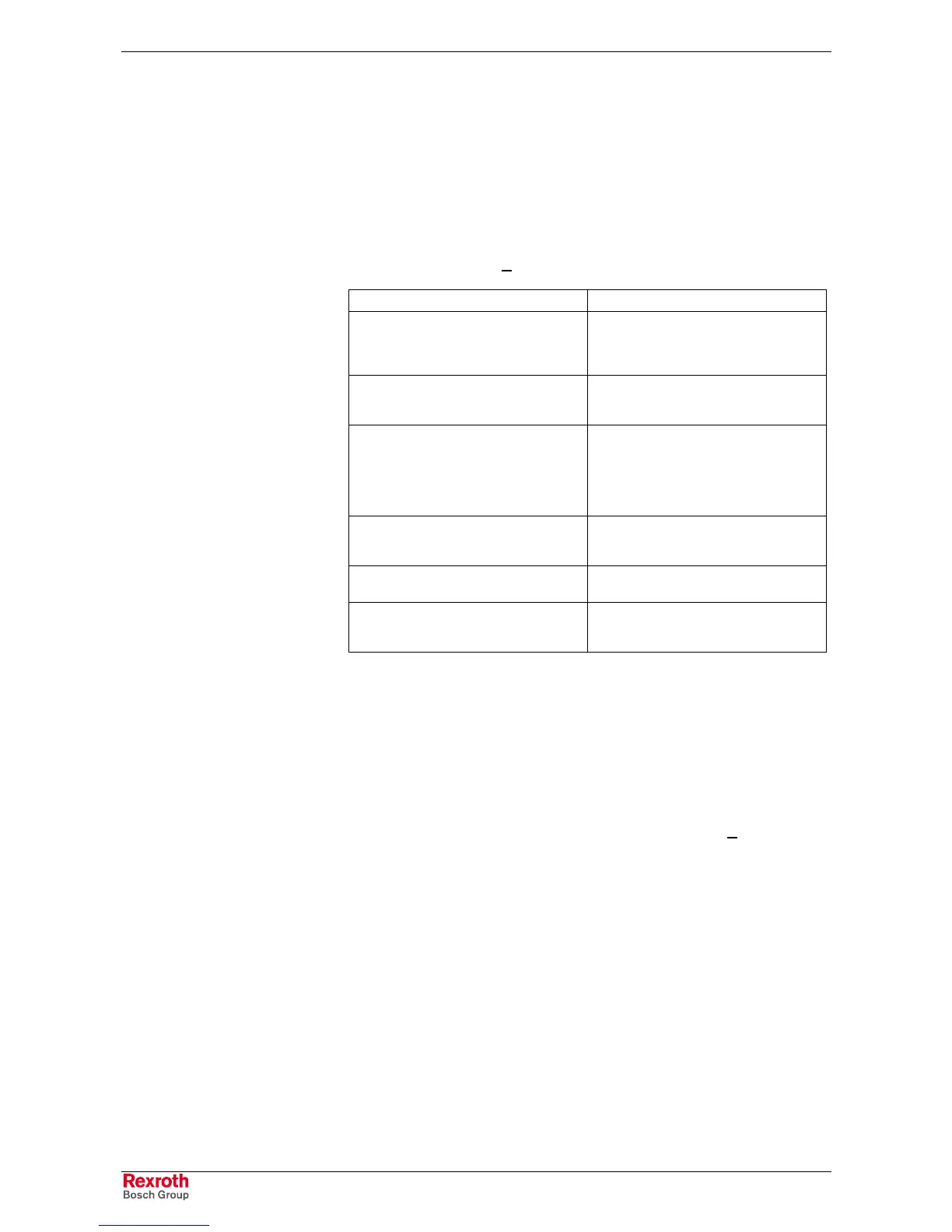
Refer to the extended diagnostics for details. Extended diagnostics can
be viewed by selecting Diagnostics ⇒
⇒⇒
⇒ System in VisualMotion Toolkit.
Extended Diagnostic C-0-0124 Description
Module Initialization Error, Slot 2, RECO3 An error occurred during the initialization
of the I/O module in slot 2 of the SERCOS
RECO controller rack at SERCOS address
3.
Cyclic Communications Error, Slot 3,
RECO 0
A cyclic communications error occurred
with the I/O module in slot 3 of the Local
RECO I/O controller rack.
Incorrect Module, Slot 4, RECO 3 The I/O module found in slot 4 of the
SERCOS RECO I/O controller rack at
SERCOS address 3 is not consistent with
the controller’s configuration. Hot-
swapping I/O modules will result in this
error and could cause permanent damage.
24V Error, Slot 3, RECO 0 A 24V error exists at the RECO I/O
module in slot 3 of the Local RECO I/O
controller rack.
Module Error Code 7, Slot 3, RECO 0 The I/O module in slot 3 of the Local
RECO rack is reporting error code 7
Unknown Error, RECO 3 An undefined error has occurred on the
SERCOS RECO I/O controller at
SERCOS address 3.
Table 3-4: Extended Diagnostics for RECO I/O Failure
216 Control PLS %d warning, see ext. diag
Cause:
A drive's primary or secondary encoder can be configured as a PLS
master and assigned to a PLS switch. This warning occurs when the
drive's modulo value, S-0-0103, is smaller than the value assigned to the
PLS switch. An extended diagnostic error message will indicate the PLS
switch. Extended diagnostics can be viewed by selecting Diagnostics ⇒
⇒⇒
⇒
System in VisualMotion Toolkit.
Example:
Drive's modulo value is 360° and the user enters the following values
for…
PLS1: Switch 1 is set to turn ON at 200° and OFF at 400°
The switch's OFF position is greater than the drive's modulo value.
Modulo values are dependent upon the application. For ELS applications,
the modulo value is fixed at 360°. For all other, the modulo value is set in
drive parameter S-0-0103 and dependent upon the application's
specifications.
Remedy:
Verify that the assigned PLS switch limits are correct for the application.
Correct any values that are beyond the drive's modulo value and
download a new PLS configuration to the control.



 To Next Page