3-42 Monitoring and Diagnostics VisualMotion 9 Troubleshooting Guide
DOK-VISMOT-VM*-09VRS**-WA02-EN-P
Remedy:
Verify that the current VisualMotion program is not using the same CAM
Indexer number in more than one instance.
534 Hardware Version Not Supported
Cause:
The control has detected an older version of PPC-R hardware
(PPC-R0*.1) that is not supported by the current version of GPP firmware.
Remedy:
Upgrade your current PPC hardware to a newer version (PPC-R0*.2 or
later) for support of the current GPP firmware. Contact Bosch Rexroth
service for assistance.
539 Invalid Parameter Number
Cause:
A Procedure command was instructed using the Command Icon with an
invalid parameter number. Allowable procedure command parameters
are as follows:
For Control: C-0-2903 and C-0-2905
.
For Drive: A list of allowable drive procedure command parameters can
be found in drive parameter S-0-0025.
Remedy:
Modify the parameter used in the Command icon. Next, compile and
download the user program.
540 Option Card PLS error
Cause:
General error message for Option Card PLS. It will always be
accompanied by an extended error message.
Remedy:
Refer to the extended diagnostics for details. Extended diagnostics can
be viewed by selecting Diagnostics ⇒
⇒⇒
⇒ System in VisualMotion Toolkit.
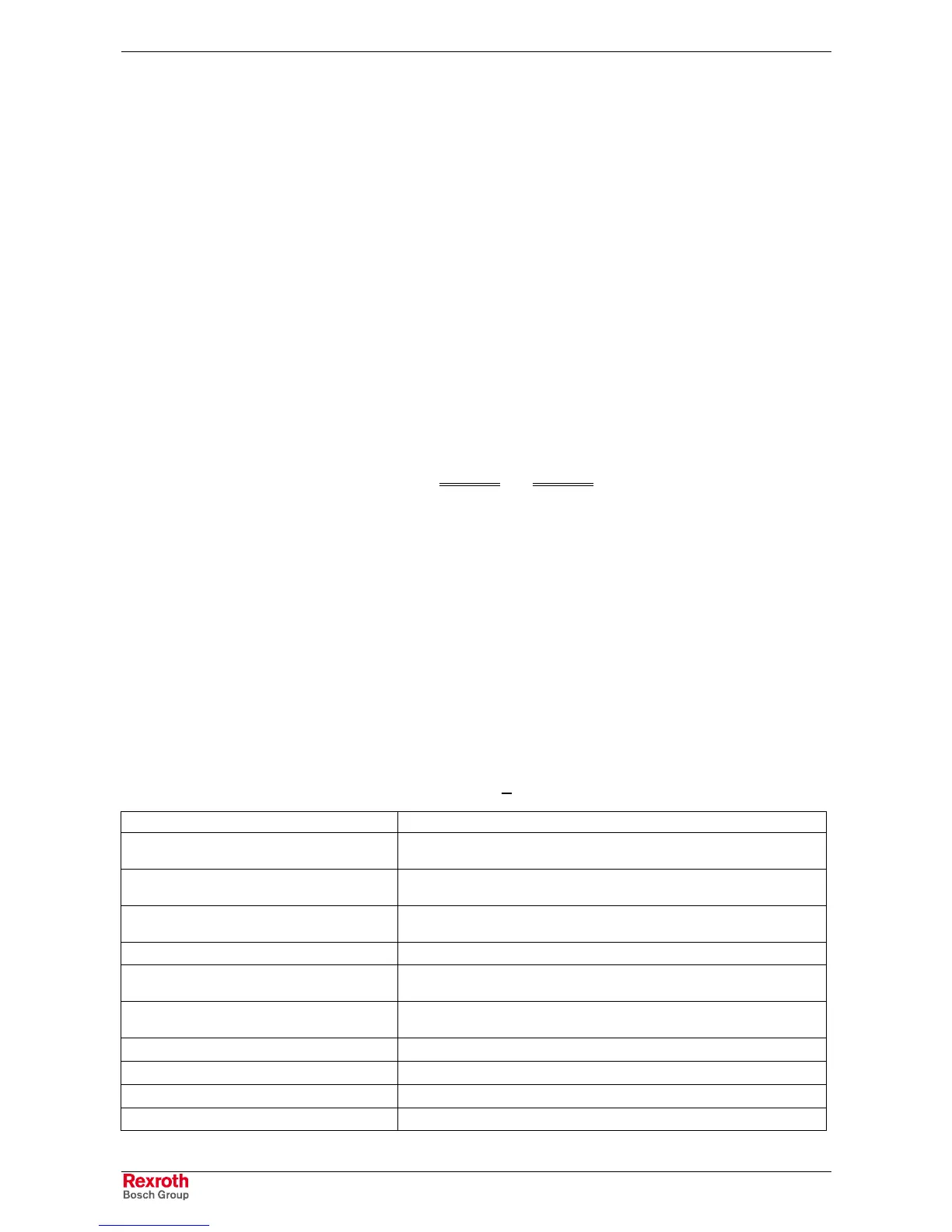
Extended Diagnostic C-0-0124 Description
002: Command locked xx
A command to the Option Card PLS could not be executed due to current
operation. This can happed during phase switching.
007: PLS could not synchronize xx
The hardware synchronization between the Option Card PLS and the PPC
failed. The SERCOS time must be between 2 and 8 ms.
008: Unknown output xx
The number for the output is unknown / illegal. Number must be in the range of
1 to 32.
011: Unknown master axis mode
012: Offset is larger than resolution xx
The offset of the PLS master axis is bigger than its resolution. Reduce number
in C-0-2943.
014: Illegal master axis, see C-0-2941 xx
The number of a master for a Option Card PLS master is not valid. Check
entries in parameter C-0-2941.
015: Master axis is not active xx
The PLS master axis is used, but this axis is not defined.
018: Run time error occurred xx
A software failure occurred on the Option Card PLS.
020: Unknown output byte number
031: Initialization error on PLS The Option Card PLS could not initialize



 To Next Page