Printer Status
• System
You can check the system status. To display detailed information, place the mouse cursor on
the status icon. If there are multiple statuses, the status of the higher priority is displayed.
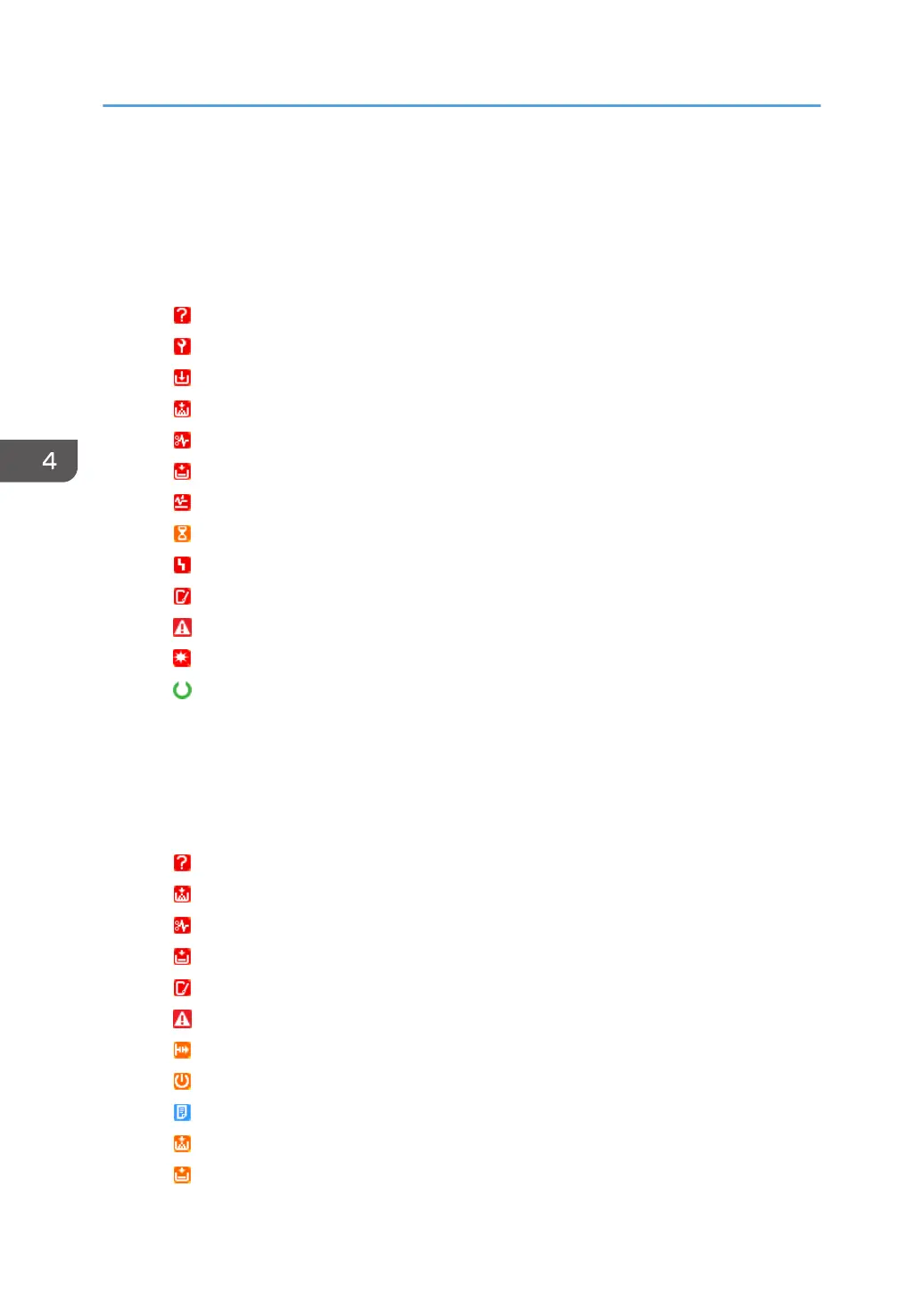
Descriptions of the icons indicated below are displayed in the order of highest priority.
: No response
: Service call
: Replace/supply
: Toner/ink exhausted
: Paper jam
: No paper
: Paper jam in ADF
: Performing maintenance
: Fax transmission error
: Open cover
: Miscellaneous error
: Access violation has been detected
: Ready
• Printer
You can check the statuses of the printer functions. To display detailed information, place the
mouse cursor on the status icon. If there are multiple statuses, the status of the higher priority is
displayed.
Descriptions of the icons indicated below are displayed in the order of highest priority.
: No response
: Toner/ink exhausted
: Paper jam
: No paper
: Open cover
: Miscellaneous error
: Offline
: Warming up
: Busy
: Toner/ink cartridge almost empty
: Paper almost empty
4. Device List
44



 To Next Page