Removing and Installing the Print Drum (Changing the Color)
114
Replacing and disposing consumables
6.5 Removing and Installing the Print Drum
(Changing the Color)
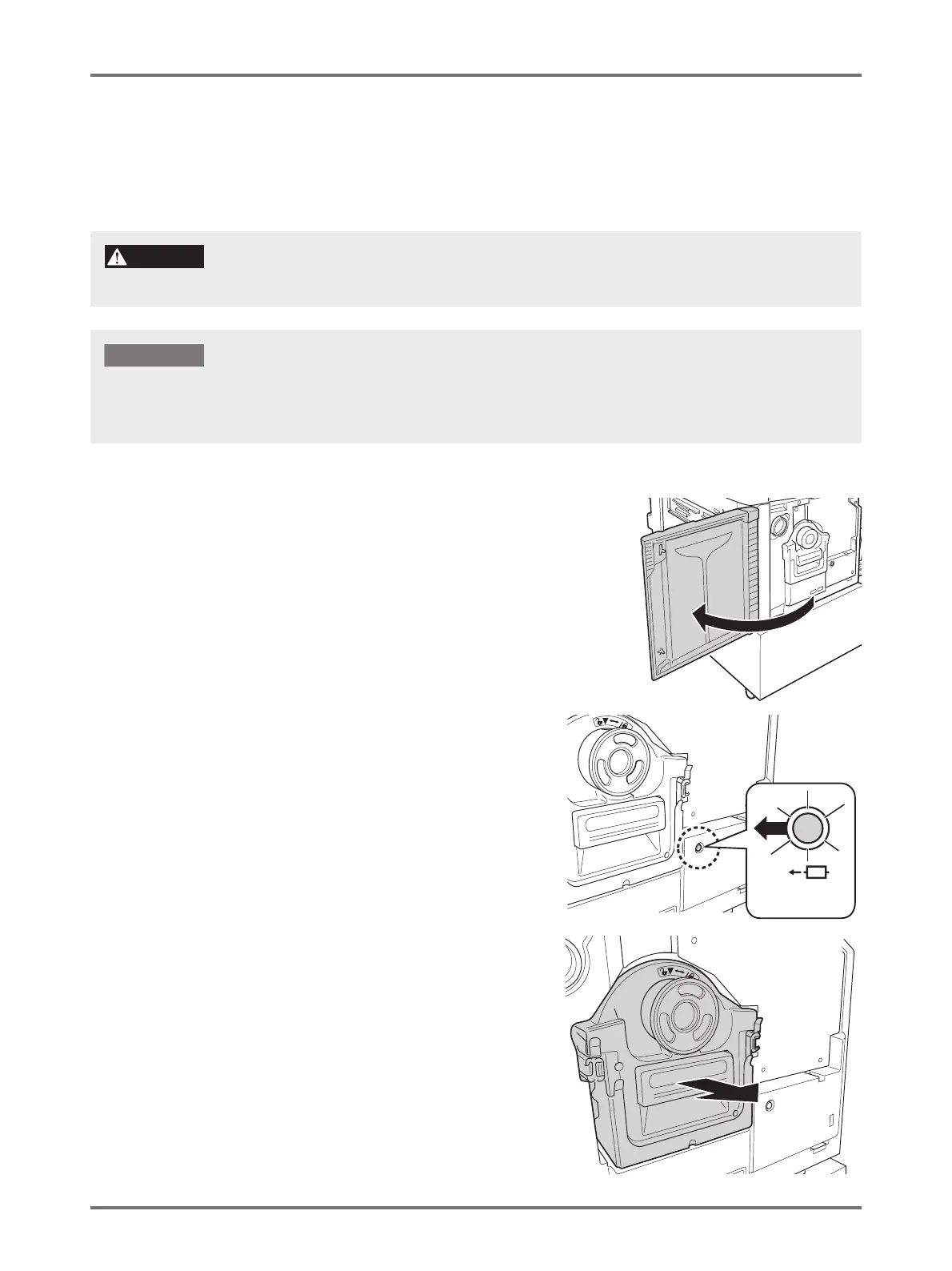
When replacing with a color drum to print out in a different color or dealing with paper jams, remove the Print Drum from the machine.
1
Open the Front Cover.
2
Check that the indicator of the Print
Drum Release Button is on.
If the indicator is off, press the Print Drum Release
Button to turn on the indicator.
3
Pull out the Print Drum.
Grasp the Print Drum Handle and pull out the Print Drum
slowly until it stops
Do not place and keep the Print Drum in an upright position. Ink may smudge the floor.
CAUTION
• Make sure to use the drum dedicated to the machine as recommended by Riso.
• Keep the power ON while removing or replacing the Print Drum.
• Make sure to place the replaced Print Drum in the drum case and keep it horizontal.



 To Next Page