2
Basic
Operation
20
Switch On!
Switch On!
WARNING
When print is not being performed, remove any loaded media or switch
off the sub power.
The continued application of heat at a single location may cause the release
of toxic gases from the media or pose a re hazard.
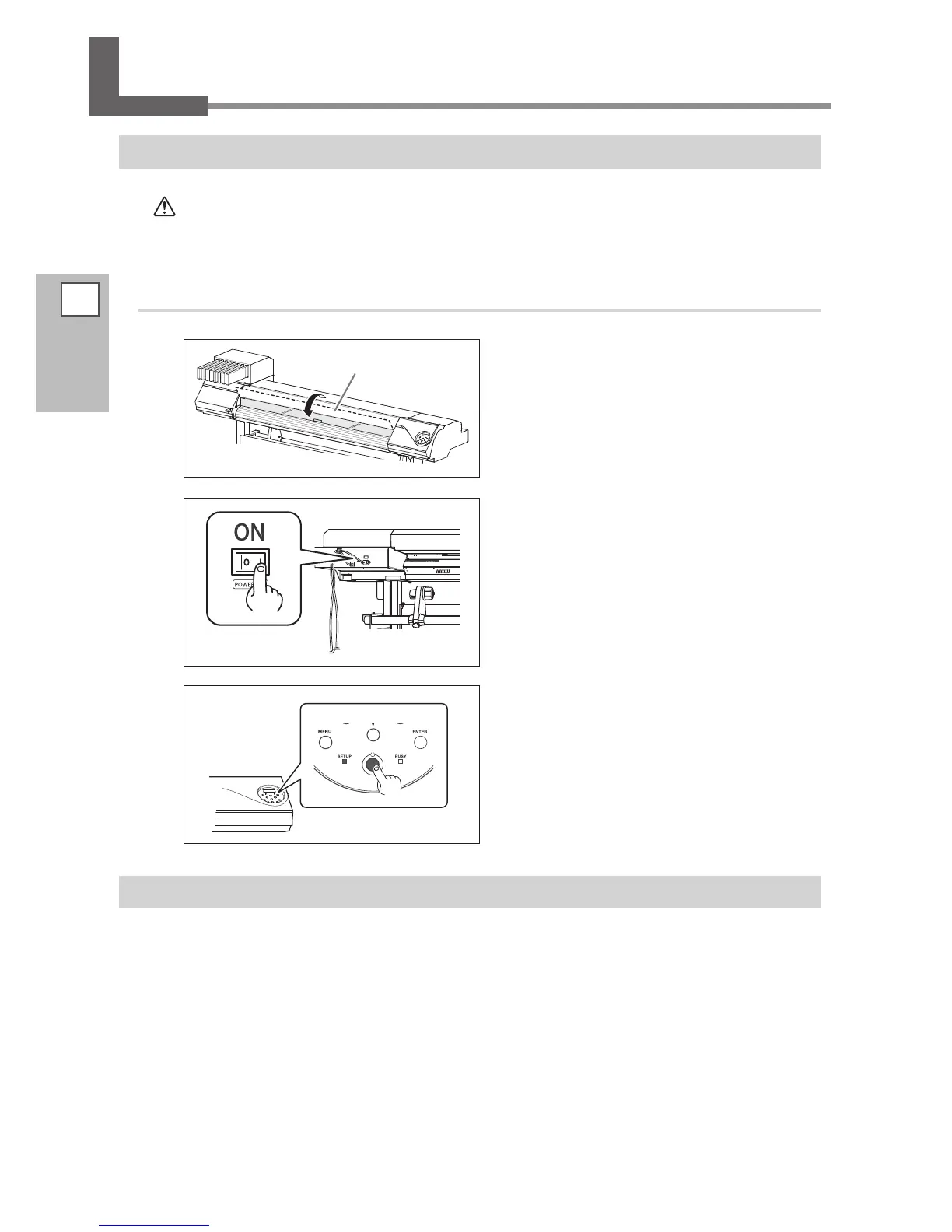
Procedure
Close the front cover.
Switch on the main power.
Switch on the sub power.
The Power-Saving Feature (Sleep Mode)
This machine is provided with a power-saving feature that switches to a low-power "sleep mode" when a
xed interval passes with no operation. The factory default for the time after which the machine switches to
the sleep mode is 30 minutes. When the machine is in the sleep mode, the sub power switch ashes slowly.
Using the operation panel or performing operations such as sending print data from the computer restores
the machine to its normal mode.
This setting of sleep mode can be changed. However, we recommend setting the activation time for the sleep
mode to 30 minutes or less to reduce power consumption and prevent problems such as overheating.
P. 102, "Setting the Interval Until Activation of the Sleep Mode (Power Saving Function)"
Sub power switch
Front cover
Main power switch














 To Next Page