2
Basic
Operation
39
Printing
Setting the Print-Start Location
You can set the print-start location at any location you prefer. (You can print even if you do not set this.) Note,
however, that this setting must be made for each individual page.
Procedure
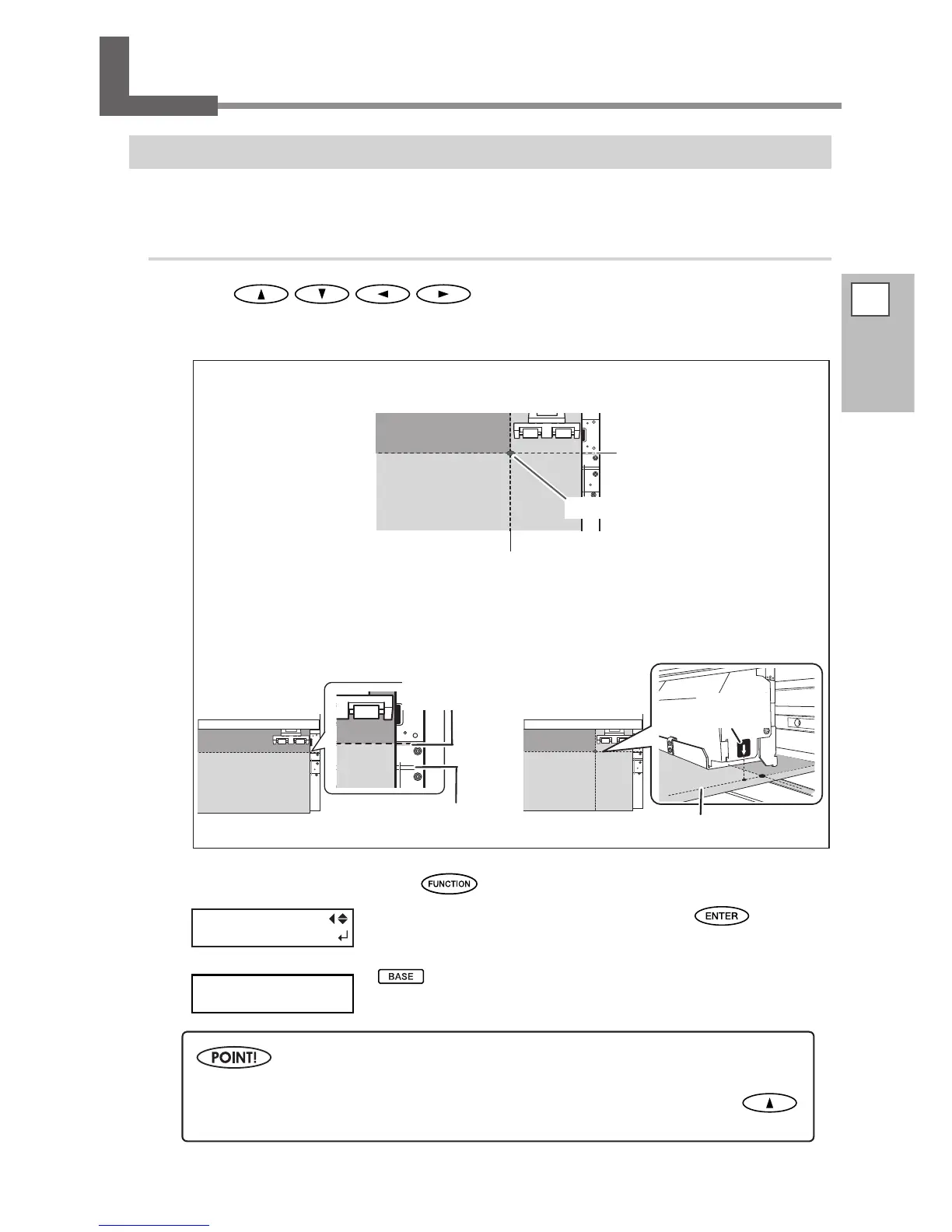
Press to move the media and the print-head carriage.
If you press a cursor key, preparation operation to move the media or the print-head carriage starts. After
the operation nishes, move the media and the print-head carriage to the location where you start the print.
When the location is set, press .
When the screen on the left appears, press to enable
the setting.
remains steadily lighted and when the screen displays the char-
acter "B" together with the print-possible width at the location, setting is
completed.
BASEPOINT
FUNCTION
BASE POINT
W1100mm
B
Note, however, that the left and right positions are not restored to their defaults for test patterns.
If you’re using the separately available media take-up system, never adjust by pressing
.
Doing so may pull the media with undue force, resulting in an error or malfunction.
Scan-direction start location
Knife guide
Feed-direction start location
Scan (horizontal) di-
rection start location
Print-start location
Feed (vertical) direction
start location
Scan (horizontal) direction start location
The settings of feed-direction and scan-direction locations determine the print-start
location.
Printing area
Move the media to adjust the feed
direction.
The base point mark on the right side of the print-
head carriage indicates scan-direction start location.
Feed (vertical) direction
start location
Base point
mark














 To Next Page