4
Part of
Practice
87
Accommodating to the Types and Condition of Media
Adjusting Print Head Height to Match Media Thickness
Procedure
Press .
Press several times until the screen on the left appears.
Press
.
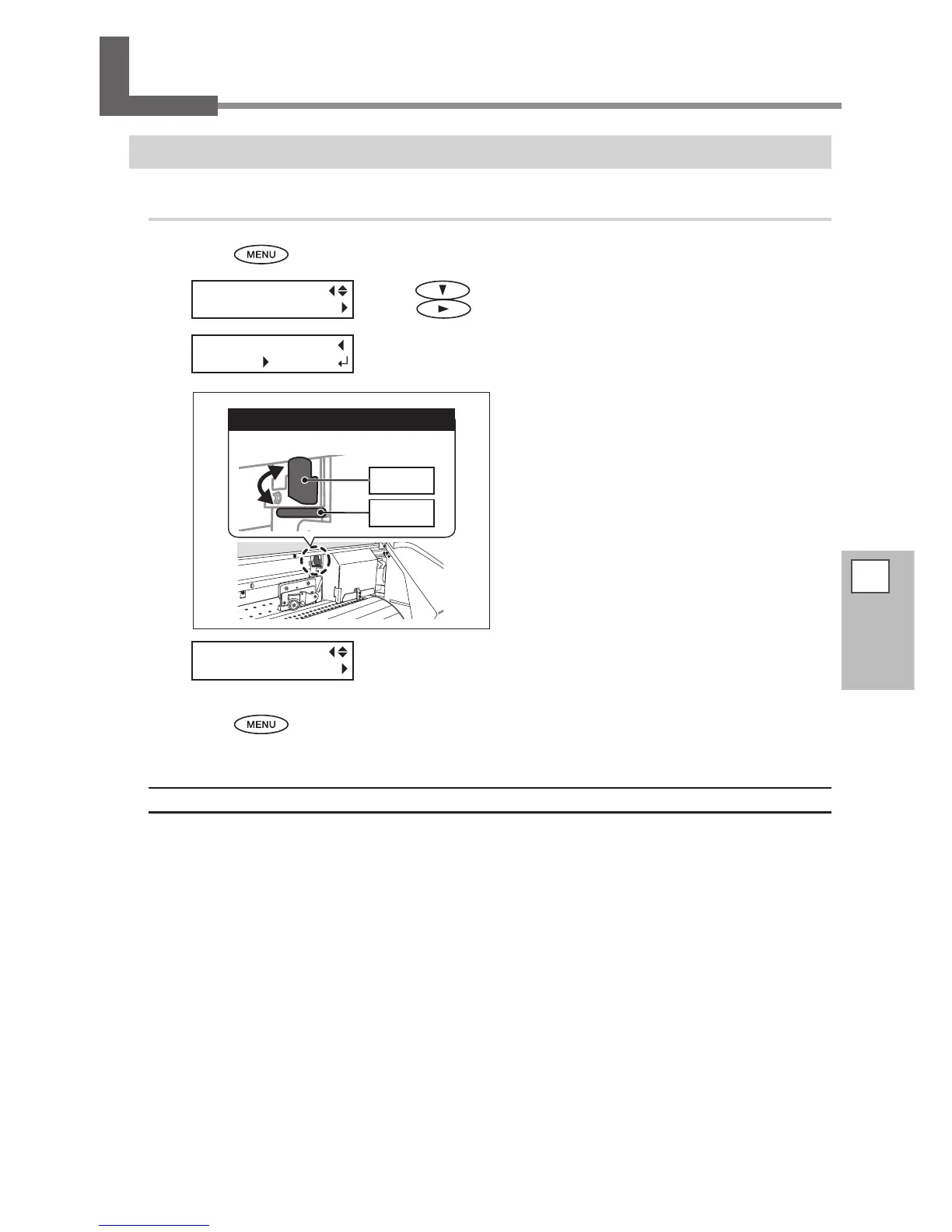
When the screen on the left appears, open the front cover.
Move the height-adjustment lever to adjust
the print head height.
Moving the lever to "HIGH" makes a warning beep
sound twice. Moving it to "LOW" makes the warning
beep sound once.
Close the front cover.
The print-head carriage moves to the original position, and then the screen
on the left appears.
Press to go back to the original screen.
Description
Depending on the media, media may wrinkle or come loose from the platen during printing, increasing the
chance of contact with the print heads. When you are using such media, adjust the print head height to "HIGH."
Print quality when the print head height is set to "HIGH" may be coarser or otherwise lower than when set to
"LOW." If this happens, refer to the pages indicated below.
P. 84, "Correcting for Misalignment in Bidirectional Printing"
P. 31, "Performing the Initial Adjustment (Correcting for Misalignment in Bidirectional Printing More Precisely)"
P. 93, "Preventing Soiling of the Media and Dot Drop-Out"














 To Next Page