EasyManua.ls Logo

Roland VersaEXPRESS RF-640 - Part Names and Functions; Machine

Roland VersaEXPRESS RF-640
132 pages
Print Icon
To Next Page IconTo Next Page
To Previous Page IconTo Previous Page
Loading...
1
Machine
Highlights
7
Part Names and Functions
Machine
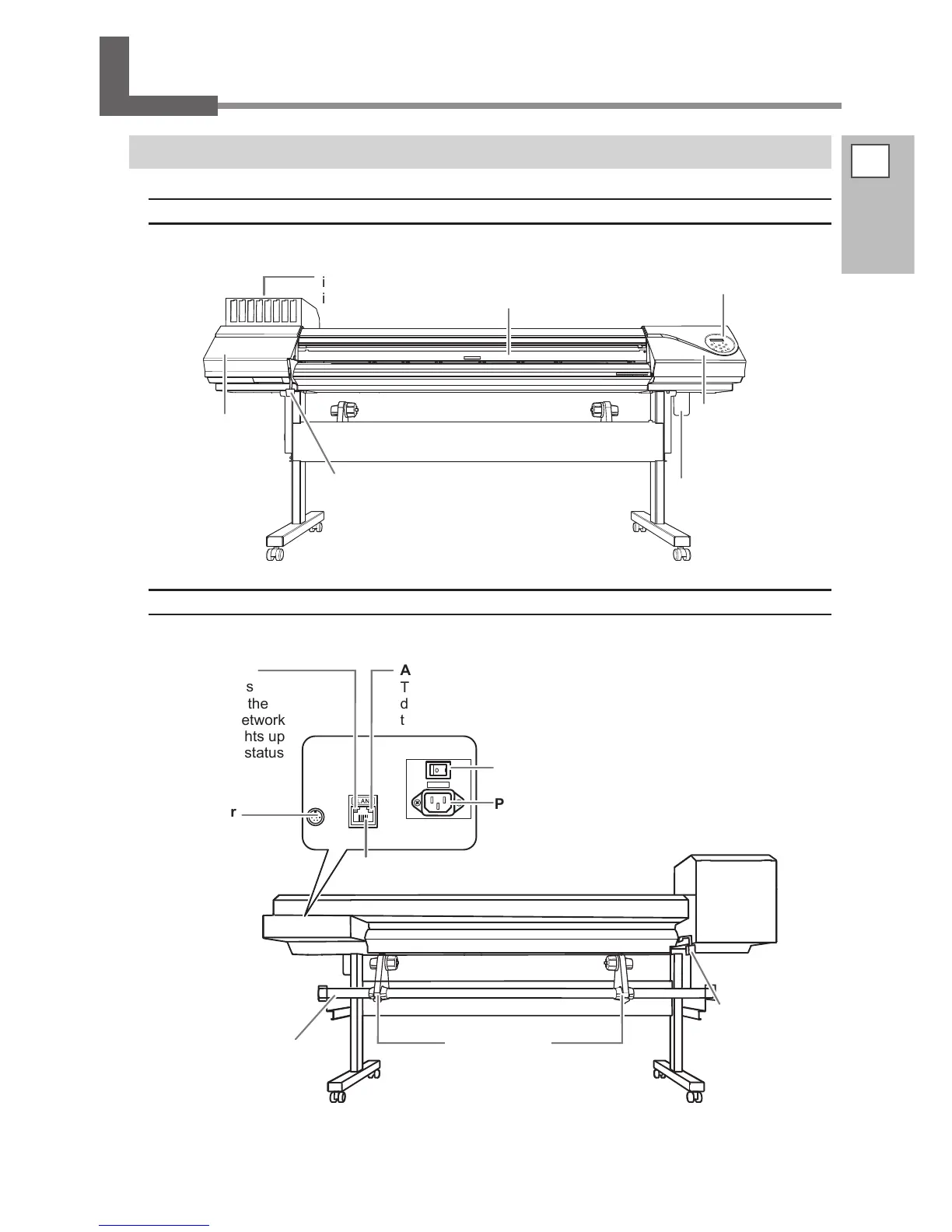
Front
Front cover
Keep this closed except
when necessary, during
when loading media.
Cartridge slots
There are where
ink cartridges are
installed.
Cover R
You remove this
when you perform
maintenance.
Operation panel
P. 9, "Operation
Panel"
Drain bottle
Loading lever (front)
You operate this
when you load media.
Cover L
You remove
this when you
perform main-
tenance.
Rear
Power-cord
connector
Ethernet connector
This is used to connect the machine to a network.
Status LED
This indicates
the status of the
machine's network
feature. It lights up
green when status
is normal.
Activity LED
This ashes yellow while
data is being received from
the network.
Connector
This is employed
when you're using
the media take-up
system available
separately.
Main power
switch
Loading lever (rear)
You operate this when
you load media.
Media holder
Shaft

Table of Contents

Other manuals for Roland VersaEXPRESS RF-640

Related product manuals