2
Basic
Operation
Setup of Media
35
4.
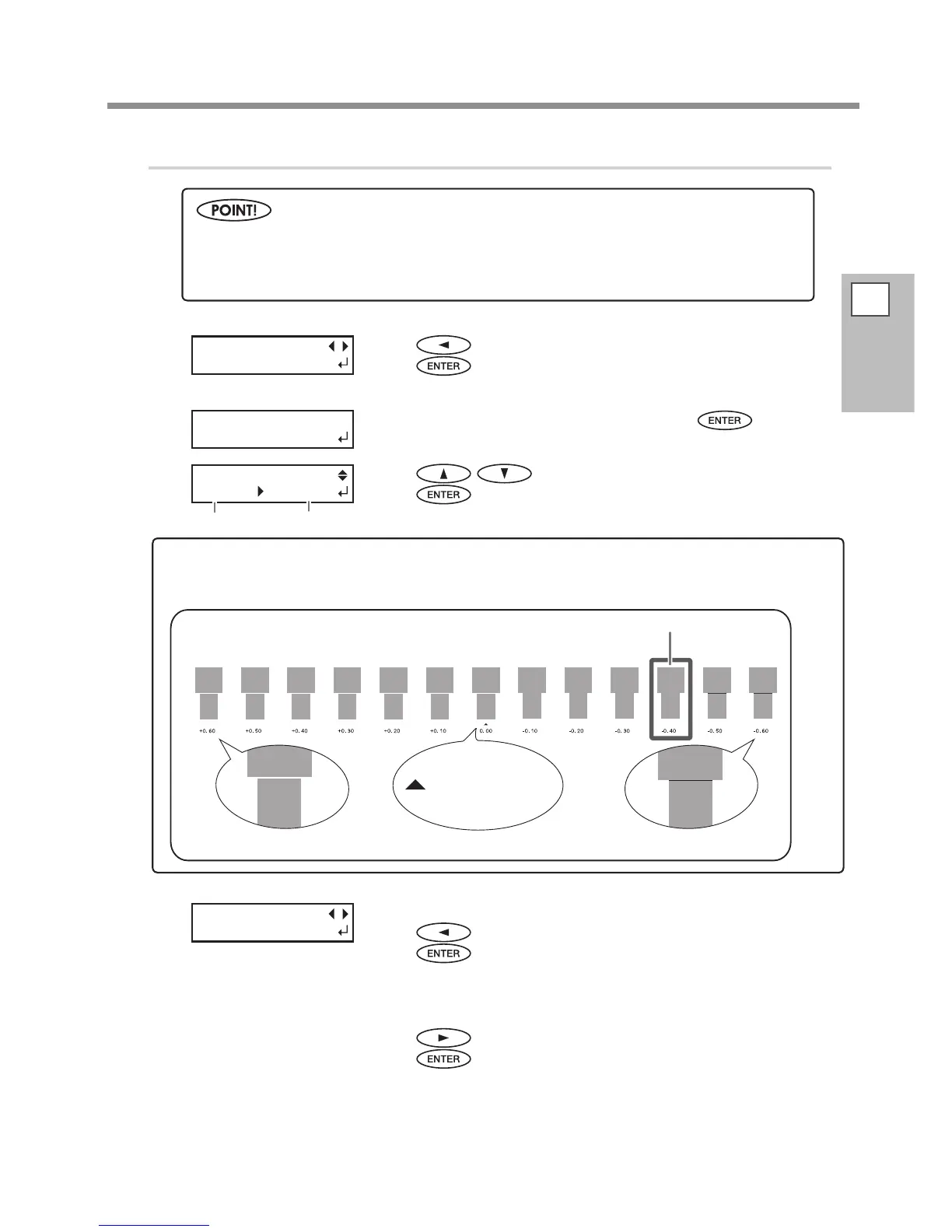
Perform the position correction of feed direction (alleviate horizontal stripes)
Press to select [SET].
Press
to enable the setting.
The test pattern of feed correction is printed.
When the screen on the left appears, press .
Press to set the correction value.
Press
to enable the setting.
[To conrm again/To adjust again]
Press
to select [YES].
Press
to enable the setting.
The test pattern of feed correction is printed again. Go back to the proce-
dure
and set again.
[To go to the next after correction is completed]
Press
to select [DONE].
Press
to enable the setting.
For the individual setting method of this setting item and the description, refer to P. 85, "Alleviating
Horizontal Bands and the Like (Feed Correction Function)".
Feed direction means the feed direction of the media. Perform the correction adjusting to the media
in advance because horizontal stripes are more likely to occur during printing when the movement
distance of the media changes subtly depending on the media's thickness.
CALIBRATION
[SET] NEXT
INPUT
ADJ. VALUES
CALIBRATION
0.10% -0.10%
To decide a Correction Value
Select the value to make the upper/lower rectangular gap and overlap smallest. When wavering between two
numbers, select half value.
Gap present Overlap
Smallest gap and overlap
= Current correction
value
REDO ADJ. ?
YES [DONE]
Current correction value
Value to be set














 To Next Page