Chapter 7 Programming Complex Tax Rates
6 Press the Arrow Down key to select Table. Press the Amount Tend Total
<Enter> key.
7 Do the following:
• E nter the price ranges and the amount of tax for each range. A t the
start of the regular repeating break point, after you enter the fir st
value of the first regular breakpoint, press the #/NS <sym> key.
• C ontinue entering price ranges and the amount of tax for each range
until you completely enter an entire sequence of repeating regular
breakpoints. Press the #/NS <sym> key. You return to the Tax
selection screen.
8 R epeat for each tax you want to set.
Calculating Your Tax
T his section provides instructions for figuring your own tax code if your
specific state uses a tax table. Take the time to follow the E xample Tax
C hart on page 78. Familiarize yourself with the method of determining the
tax code.
T hen, using the worksheet on page 79, duplicate the method of calculating
your state tax code by the steps described in this section. To do this you
need to get a copy of your state's R etail Tax C hart from your local Tax
O ffice. A fter you are done, write down the tax code and save the
information for future reference.
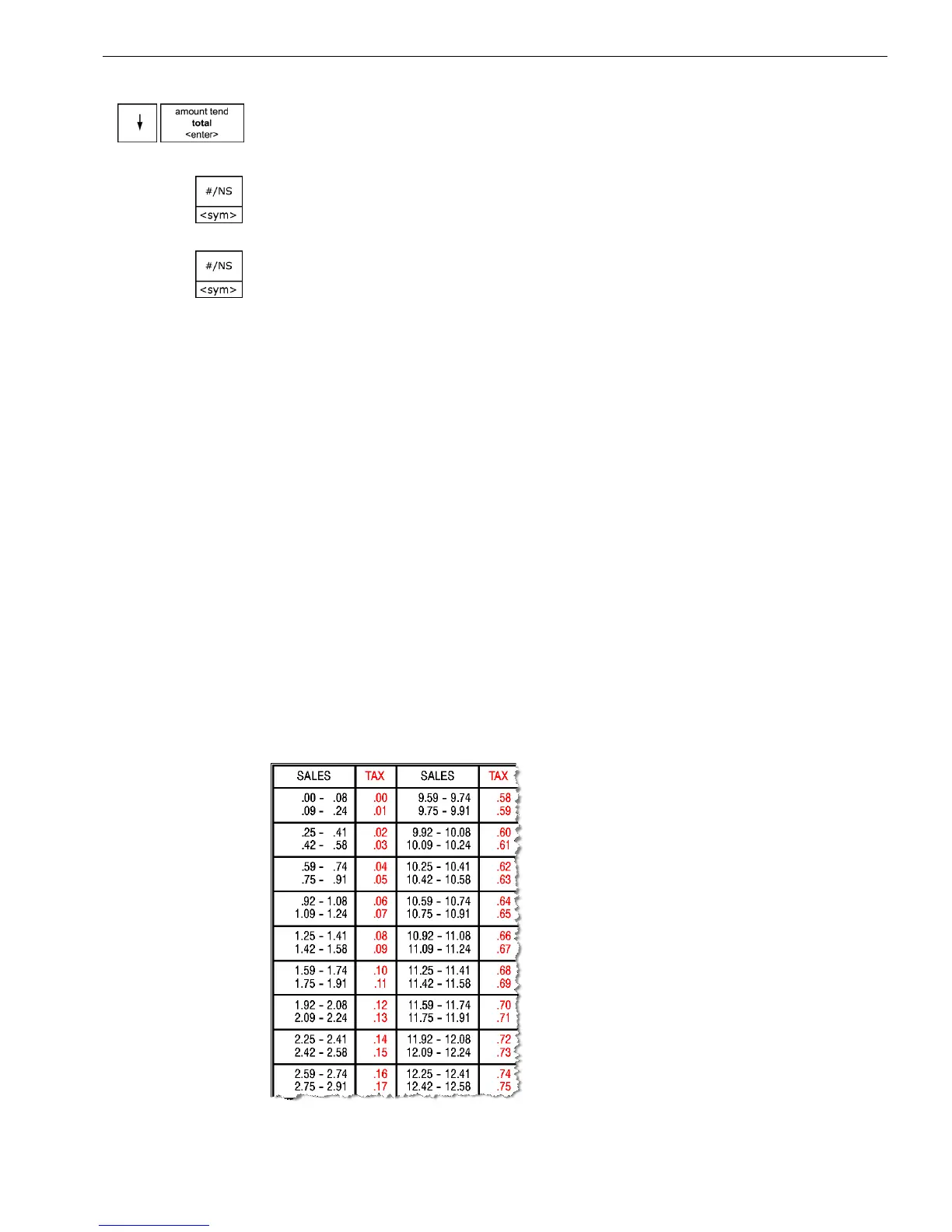
E very tax table consists of tax brackets. E ach consecutive tax bracket is
assigned a tax which is exactly one cent higher than that assigned to the
previous tax bracket. For example, part of a tax table might look like:
67 1000ML User's GuideahplA



 To Next Page