Samsung Electronics 2-9
Adjustment
2-5-4 Check After Adjustment
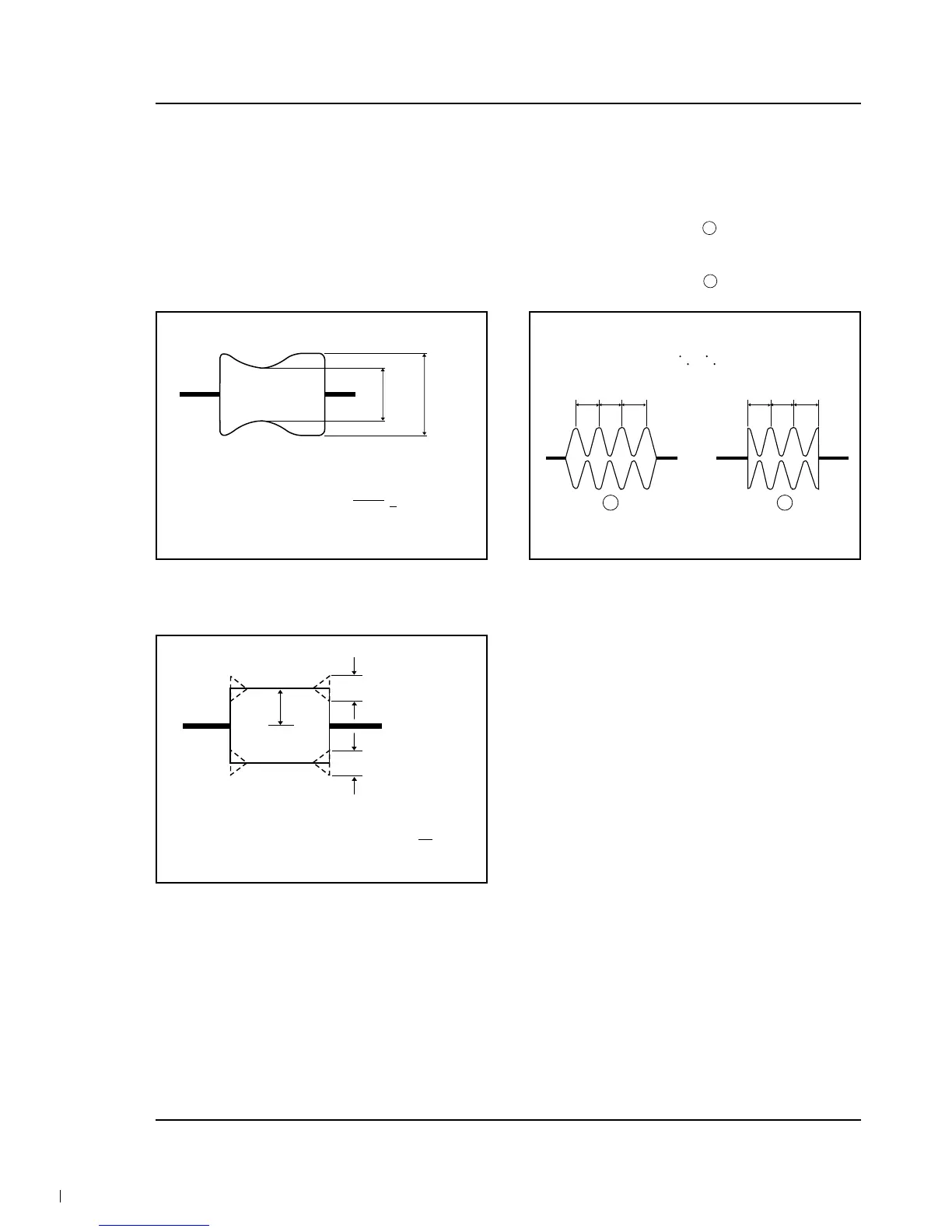
2-5-4 (A) TRACKING CHECK
1. Play back the alignment tape.
2. Then, Confirm that the minimum amplitude
value (E min.) is 65% of the maximum value
(E max.) or larger. (Fig. 2-13)
3. Confirm that no large fluctuations occur on the
waveform. (Fig. 2-14)
Fig. 2-13
E
MIN
E
MAX
E
MIN
65(%)
E
MAX
2-5-4 (B) CUE AND REV CHECK
1. Play back the alignment tape, and set to REV
mode. Confirm that the waveform peaks have a
uniform pitch. (Fig. 2-15 )
2. Set to CUE mode.
Confirm that the waveform peaks still have a
uniform pitch. (Fig. 2-15 )
Fig. 2-15
a b c a b c
Fig. 2-14
A
C
C
C
1
A
8



 To Next Page