SATEL VERSA 9
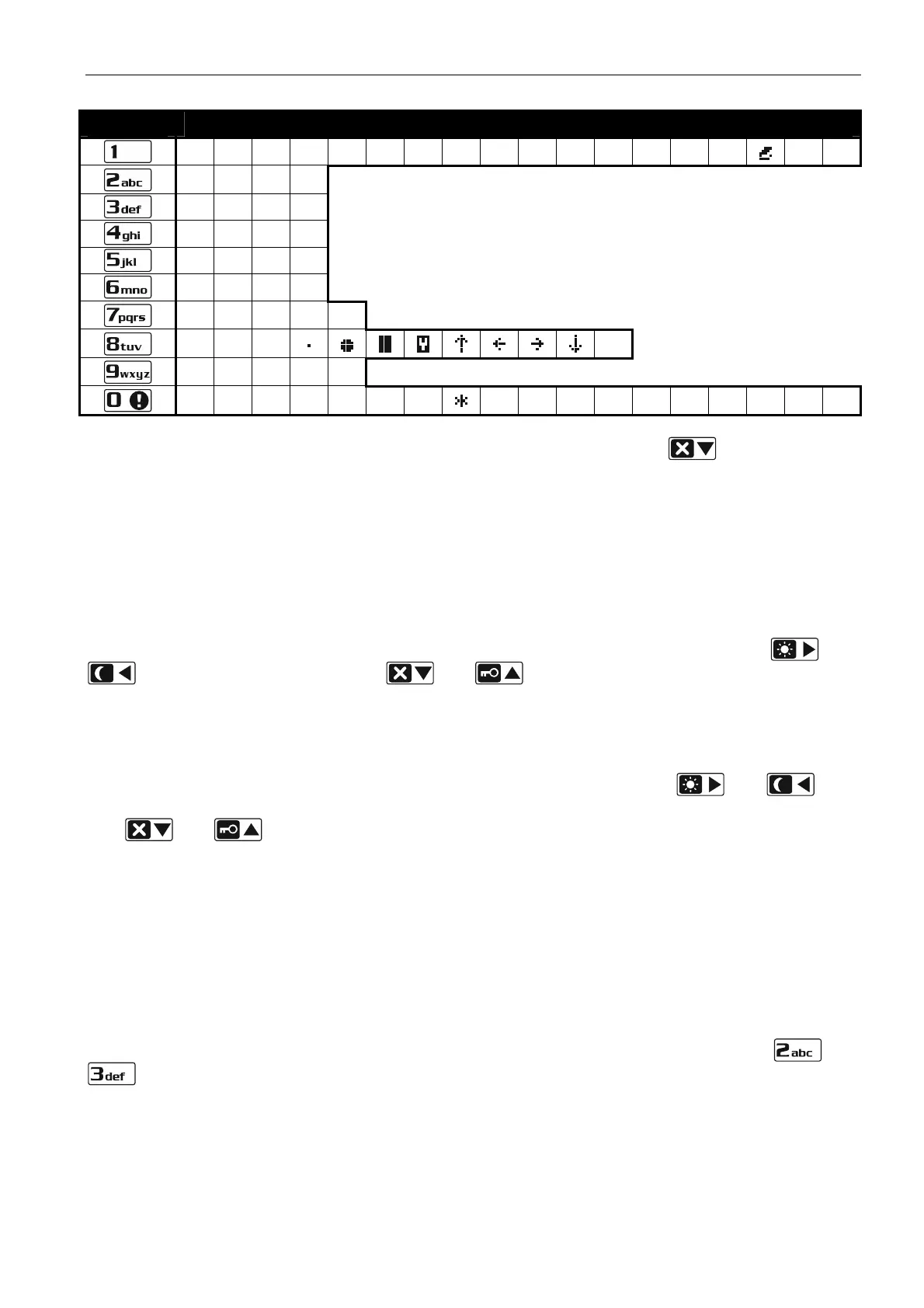
Key Characters available after next keystroke
! ? ' ` " { } $ % & @ \ ^ | # 1
a b c 2
d e f 3
g h i 4
j k l 5
m n o 6
p q r s 7
t u v
8
w x y z 9
/ = _ < > ( ) [ ] 0
. , : ; + -
Table 3. Characters available when entering names. The upper case letters are available
under the same keys (to change the letter case, press
).
2.5.2 LED keypad
The data being entered are presented by means of LEDs. The method of programming
depends on the type of data to be entered by service function.
Selection from the single-choice list
The lit LEDs show the available items on the list. Blinking LED indicates the current position
of the cursor and, consequently, the item which is currently selected. Use the and
keys to move the cursor. The and keys are not used.
Selection from the multiple-choice list
The status of all items available within the function (including e.g. zones, outputs, options,
etc.) is illustrated by LEDs designated by numbers. The steady-on LEDs indicate the selected
items. The blinking LED indicates that that the cursor is there. Use the
and keys
to move the cursor. Press any numeric key to change the LED status (to turn it ON or OFF).
The
and keys are not used.
Entering decimal values
To enter digits, use the numeric keys. Up to 6 digits can be presented on the LEDs. Each
digit is presented on four LEDs – see Table 4. LEDs 1-4 present the first digit, LEDs 5-8 – the
second, LEDs 9-12 – the third, LEDs 16-19 – the fourth, LEDs 20-23 – the fifth, and LEDs
24-27 – the sixth digit. The arrow keys are not used. The value entered can only be corrected
after restarting the function.
Entering hexadecimal values
To enter digits, use the numeric keys, and to enter characters from A to F, use the
and
keys (keep pressing the key until the required character appears). Up to 6 characters
can be presented on the LEDs. Each character is presented on four LEDs – see Table 4.
LEDs 1-4 present the first character, LEDs 5-8 – the second, LEDs 9-12 – the third, LEDs
16-19 – the fourth, LEDs 20-23 – the fifth, and LEDs 24-27 – the sixth character. The arrow
keys are not used. The value entered can only be corrected after restarting the function.





 To Next Page