23 Mega-800 SCINCO
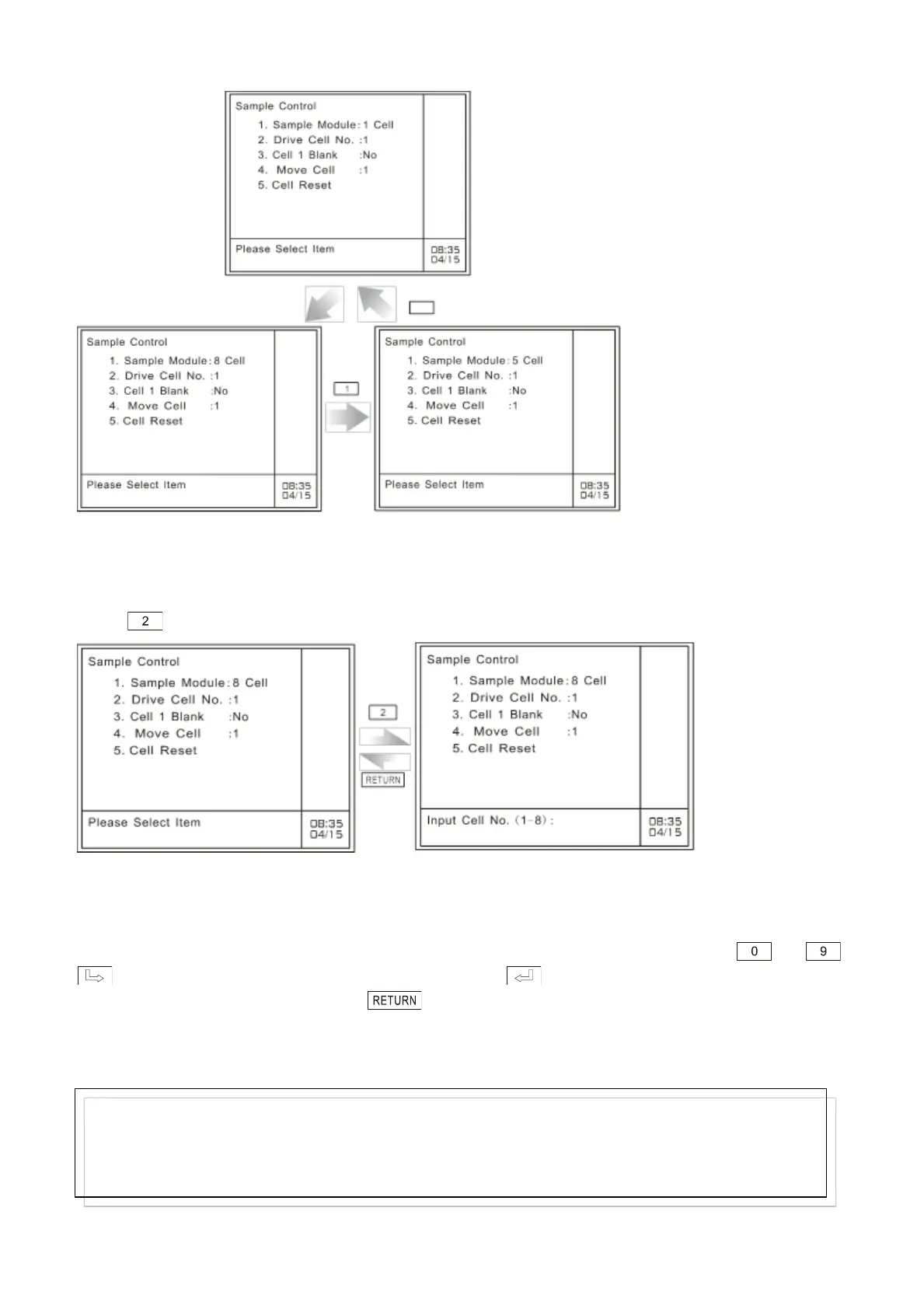
Fig. 3.10 Select sample module
3.3.2 Set sample cell number in use (Drive Cell No.)
This parameter is only available for 5-cell changer and 8-cell changer. In the case of sample module,
press key to gain acees to set cell number in use, as shown in Fig.3-11:
A: Sample cell setting page B: set sample cell number
Fig. 3.11 Set cell number in use
At the bottom of this page, enter the sample cell number by pressing the numeric keys — .
Key is used to clear off the preceding entry. Press key to confirm the numeric entry and
quit. If nothing is to be entered, press to return to the parameters setting page of sample
control. A 1-digit figure entry is allowed. The range is from 1 to 8. If the entered figure exceeds the
range, the system will delete what has been entered. You should start a new entry.
In the measurement procedures, it will measure the samples in sample cells one by one. The serial
number of the sample cells are expressed by n-1, n-2, …
Note:
Only integer is accepted. When the sample module is 8-cell changer, the range is 1-8; when the
sample module is 5-cell changer, the range is 1-5. If the entered figure exceeds the range, the system will
delete what has been entered. You should start a new entry.



 To Next Page