44 Mega-800 SCINCO
5.2.5 Quit parameters setting
On the parameters setting page of quantitative measurement, press key to quit parameters
setting, as shown in Fig. 5.3.
5.3 Construct the calibration curve
Before you construct a calibration curve, you should set parameters.
5.3.1 K-Factor method
K-Factor method is used to perform quantitative measurement, as you know the calibration curve.
You can construct a calibration curve by inputting the factor and the intercept.
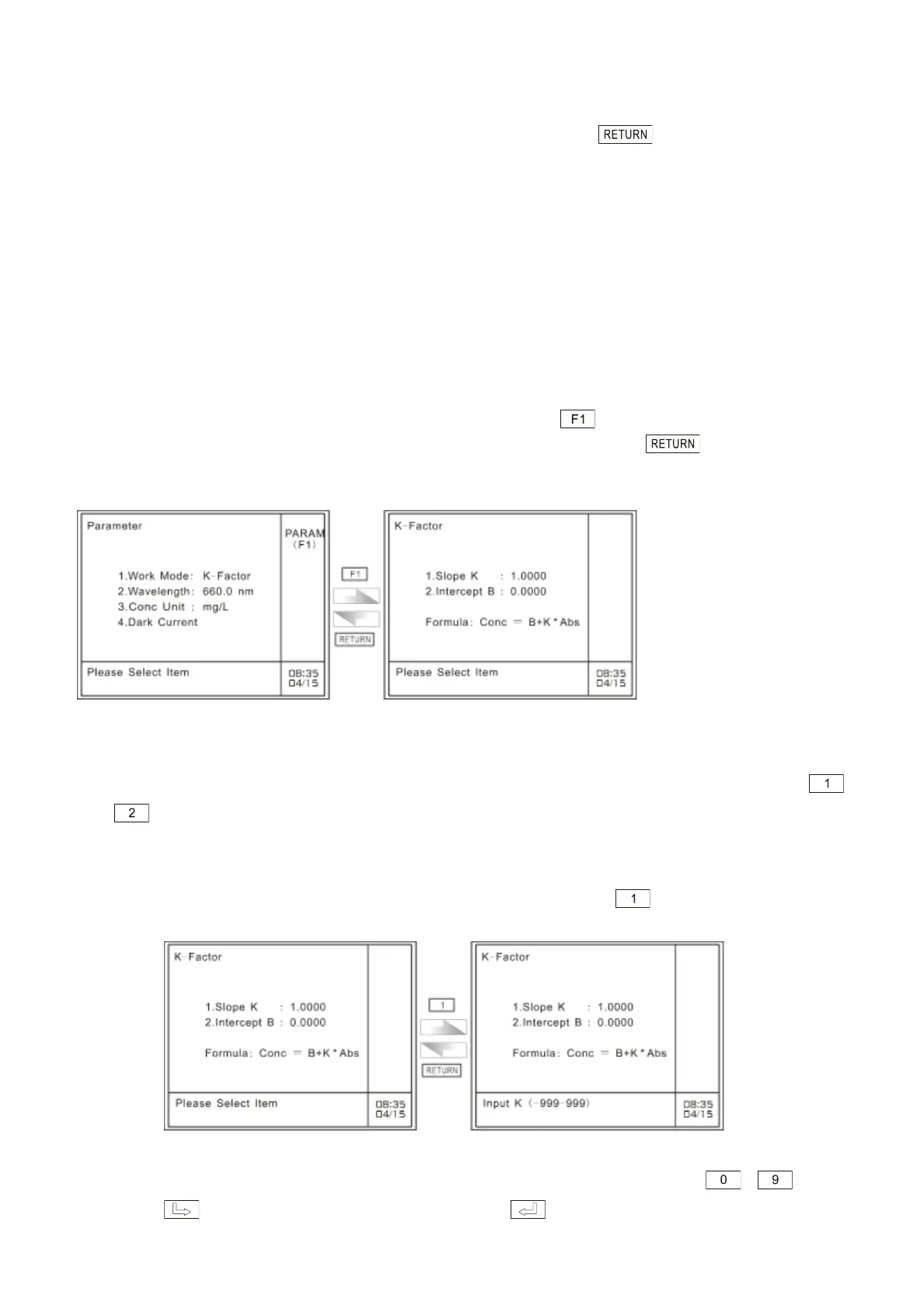
First, make sure the measurement method is ―K-Factor‖. Press key in the case of quantitation
parameters setting page to gain access to parameters setting page. Press key to return to
the preceding page, as shown in Fig. 5.9.
Fig. 5.9 Parameters setting page of K-Factor method
The displayed formula is ―Conc=K*Abs+B‖. Please set the Slope K and Intercept B by pressing
and key separately.
① Set the slope of calibration curve
On the parameters setting page of K-Factor method, press key to set slope K, as
shown in Fig. 5.10.
Fig. 5.10 Set the slope of K-Factor method
At the bottom of this page, enter factor K by pressing the numeric keys ― . The
key is used to clear off the entry. Press key to confirm. If nothing is to be



 To Next Page