41 Mega-800 SCINCO
—— Gain access to parameters setting page;
—— Delete measurement data;
—— set sample control;
—— printout
⑥ In addition, press on this menu can set working wavelength and press
can perform baseline correction.
5.2 Parameters setting
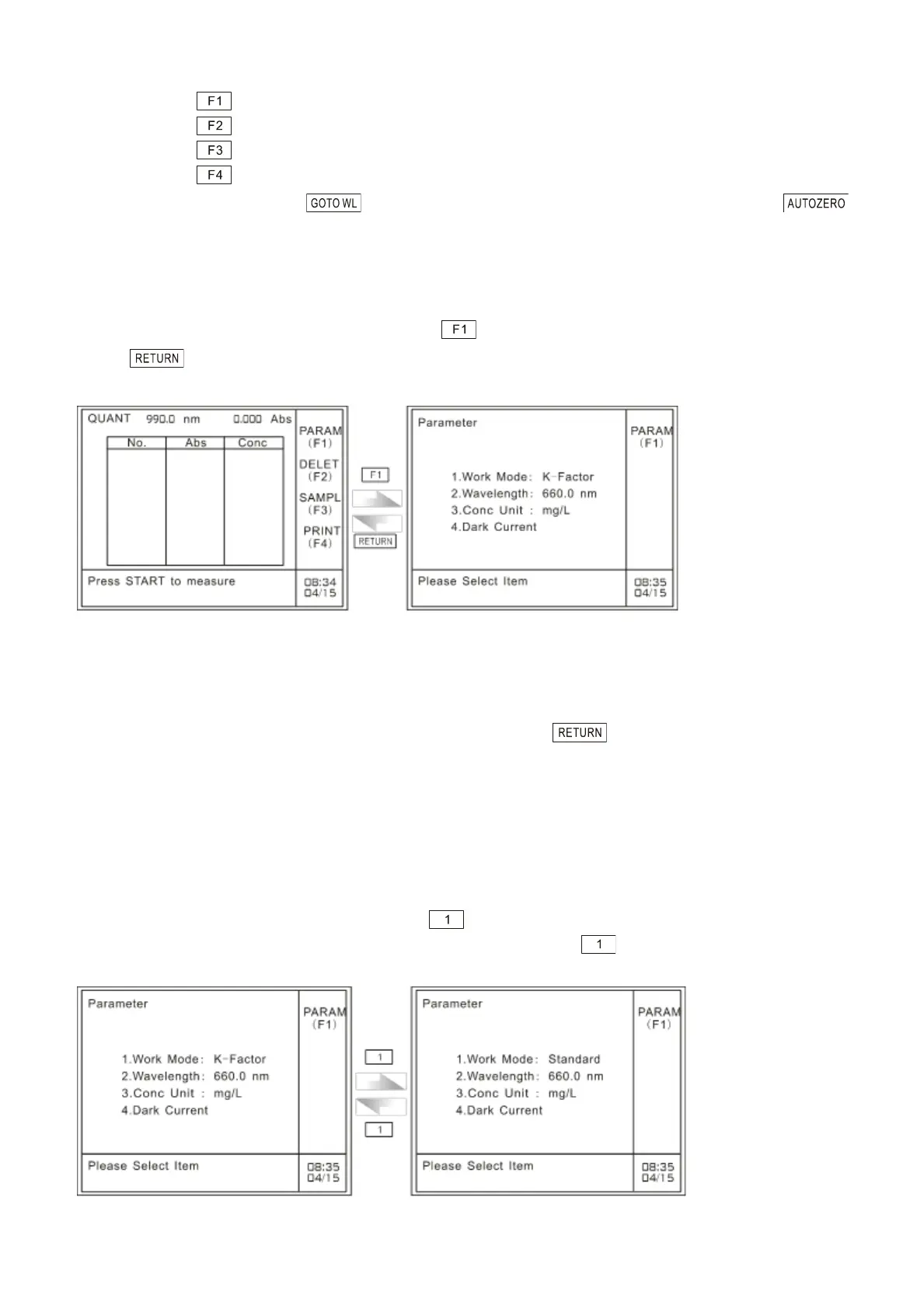
In the case of quantitative measurement, press to gain access to the parameters setting page.
Press to return to the main menu of quantitative measurement, as shown in Fig. 5.3:
A: Main menu of quantitation mode B: Parameters setting page
Fig. 5.3 Gain access to parameters setting page
The parameters setting menu allows the user to set working mode, measuring wavelength, and
concentration by pressing corresponding numeric keys. Press to return to the preceding
page.
5.2.1 Set measurement method
K-Factor Method and Standards Method are available. Please refer to ―5.3 construct calibration curve‖
for constructing calibration curves.
In the case of parameters setting page, press key to set work method of quantitative
measurement. The two methods will be selected alternately when is pressed each time, as
shown in Fig. 5.4:
Fig. 5.4 Set measurement method



 To Next Page