40 Mega-800 SCINCO
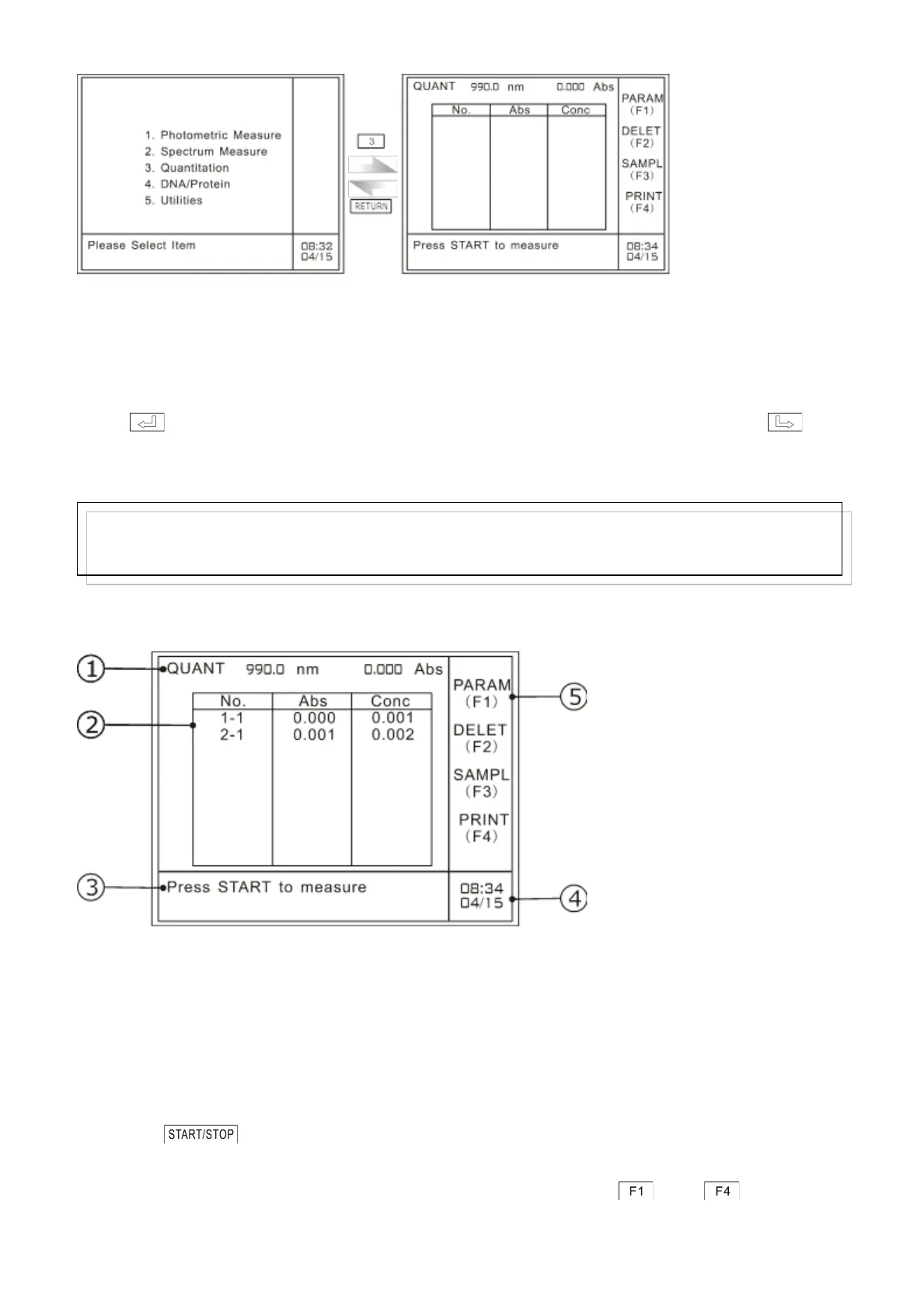
A: Main menu B: Quantitation mode menu
Fig. 5.1 Gain access to quantitation mode
When you exit the quantitation mode, the system will prompt the user with the information ―Delete all
the data? (YES: ENTER, NO: CE)‖.
Press ,it will return to the main menu and the measurement data will be lost. Press ,it
will return to the quantitation mode, and prompt the user with the information ―press START to
measure‖, then you can continue on quantitative measurement.
The following paragraphs introduce the main menu of quantitation mode:
Fig. 5.2 Main menu of quantitative measurement
① “QUANT” here means quantitative measurement, current working mode;“990 nm”refers
to current working wavelength; and“0.000 Abs”refers to real time absorbance value.
② Working area: measurement results are shown in the table. It can show maximum 9
groups of measurement values each time.
③ Information indication area: the current information is prompting the user to press
to begin measurement.
④ Time display area: time in the above picture is eight thirty four on April 15.
⑤ Indication area for function keys: show the function keys —— . The detailed
functions are shown as follows:
Note:
Please print out the measurement data before returning to the main menu, otherwise, the data will be lost.



 To Next Page