30 Mega-800 SCINCO
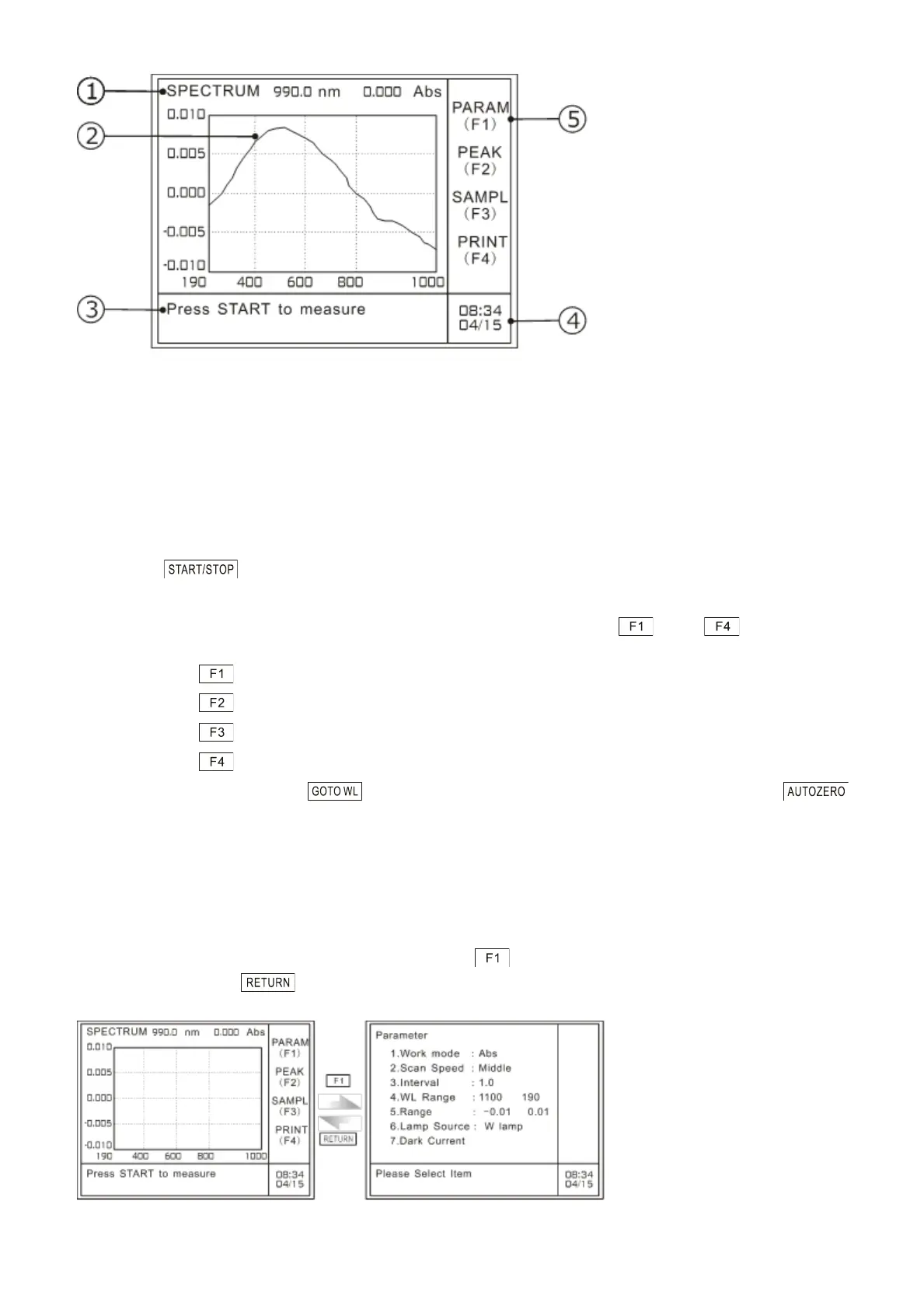
Fig. 4.2 Main menu of spectrum mode
① “SPECTRUM” here means spectrum scanning, current working mode;“990 nm”refers to
current working wavelength; and“0.000 Abs”refers to real time absorbance value.
② Working area: measurement spectrum is shown in terms of coordinate. The abscissa
refers to wavelength value, and the ordinate refers to absorbance value (it also can refer
to T%, Es or Er according to photometric mode).
③ Information indication area: the current information is prompting the user to press
to begin measurement.
④ Time display area: time in the above picture is eight thirty four on April 15.
⑤ Indication area for function keys: show the function keys —— . The detailed
functions are shown as follows:
—— gain access to the parameters setting menu;
—— peak picking;
—— spectrum printout;
—— wavelength correction
In addition, press on this menu can set current wavelength and press
can perform baseline correction.
4.2 Parameters setting
On the main menu of spectrum mode, please press to gain access to the parameters
setting page. Press to return to the main menu of spectrum mode, as shown in Fig. 4.3:
A: Main menu of spectrum mode B: Parameters setting



 To Next Page