48
8009389/YN39/V3-0/2015-08| SICKOPERATING INSTRUCTIONS|GM35
Subject to change without notice
HANDLING THE EVALUATION UNIT
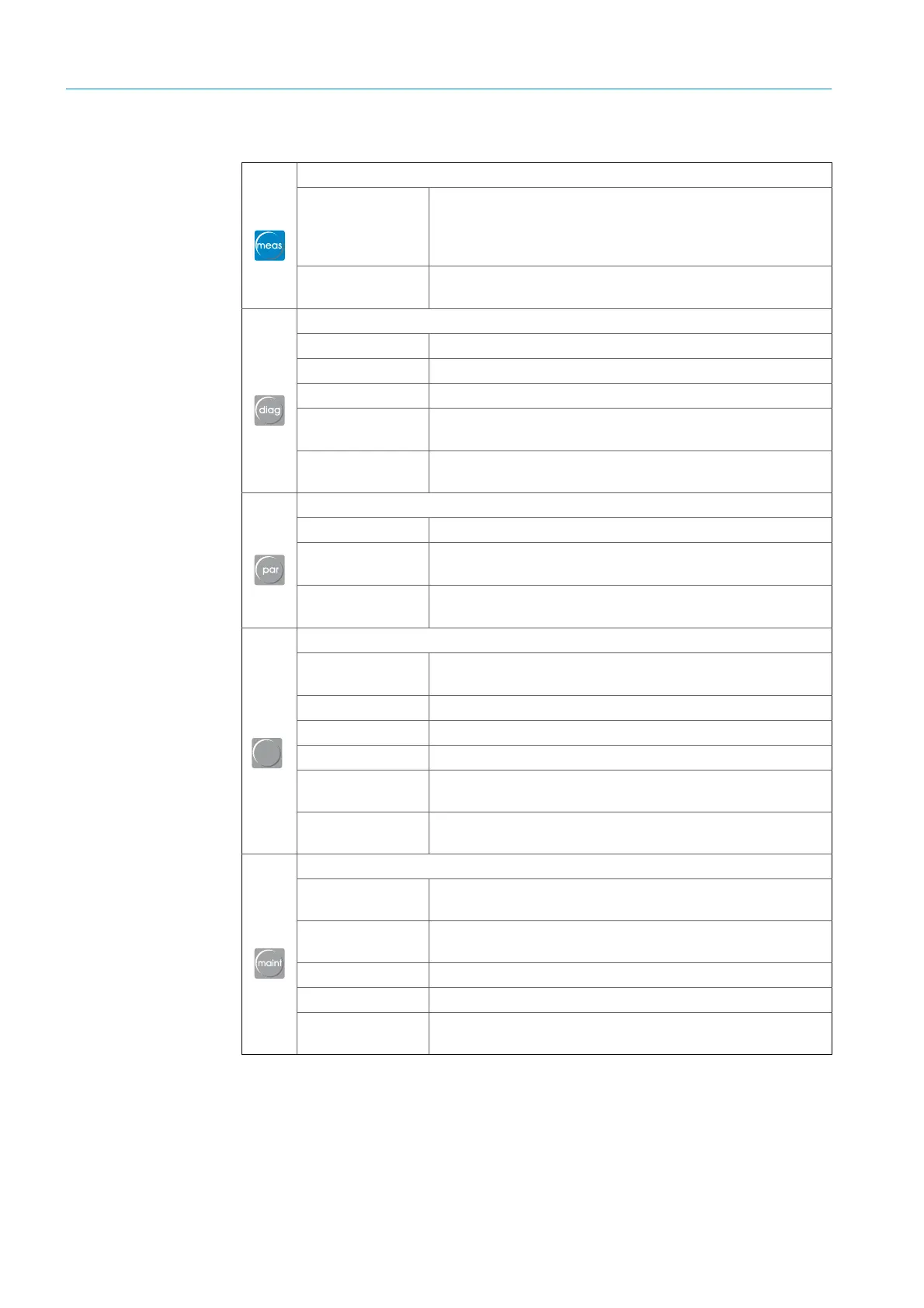
5.2.1 Function buttons and menu overview
Measuring
● CO2875 ppm
Current measured value of the selected measured variable;
the display shows the measured values of the current
measured variables such as CO
2
, H
2
O, temperature and
pressure when selected
● Reference
conditions
Shows the parameterized reference conditions (humidity,
temperature and pressure)
Diagnosis
● Malfunction
Current error messages (plain-text)
● Warning
Current warning messages (plain-text)
● Sensor Values
Displays diagnosis values
● Check values
Displays check values of the measured component (CO or
N
2
O, CO
2
, H
2
O)
● Optical
alignment
Displays the optical alignment
Parameters
● Parametrization
Sets/displays system component parameters
● Device
Displays the serial number (evaluation unit) and software
version (system components)
● Service
Displays calibration coefficients of the measuring
components
Calibration
● Check cycle
For test purposes, e.g., after maintenance work on the
analyzer
● Zero point
Zero point determination, e,g,, for startup procedures
● Box Measuring
Starts filter box measurement (control filter, test gas)
● Manual Test
Manual test by feeding test gases
● Press. sensor
adjust.
Starts the adjustment procedure for the pressure sensor
● Temp. sensor
adjust.
Starts the adjustment procedure for the temperature sensor
Maintenance
● Maintenance
mode
Activates maintenance mode
● Optical
alignment
Optical alignment of the SR-unit and reflector
● Tests
Tests analog and relay outputs
● Reset System
System cold start
● Reset
Parameter
Resets parameters to the factory settings
Table 5: Function buttons and menu overview
cal


 To Next Page