7 CONFIGURATION OF THE DEVICE SETTINGS
8027311 / V1-0/2022-04|SICK
OPERATING INSTRUCTIONS|TDC-E (Telematic Data Collector)
Subject to change without notice
7 Configuration of the device settings
7.1 The Device Manager
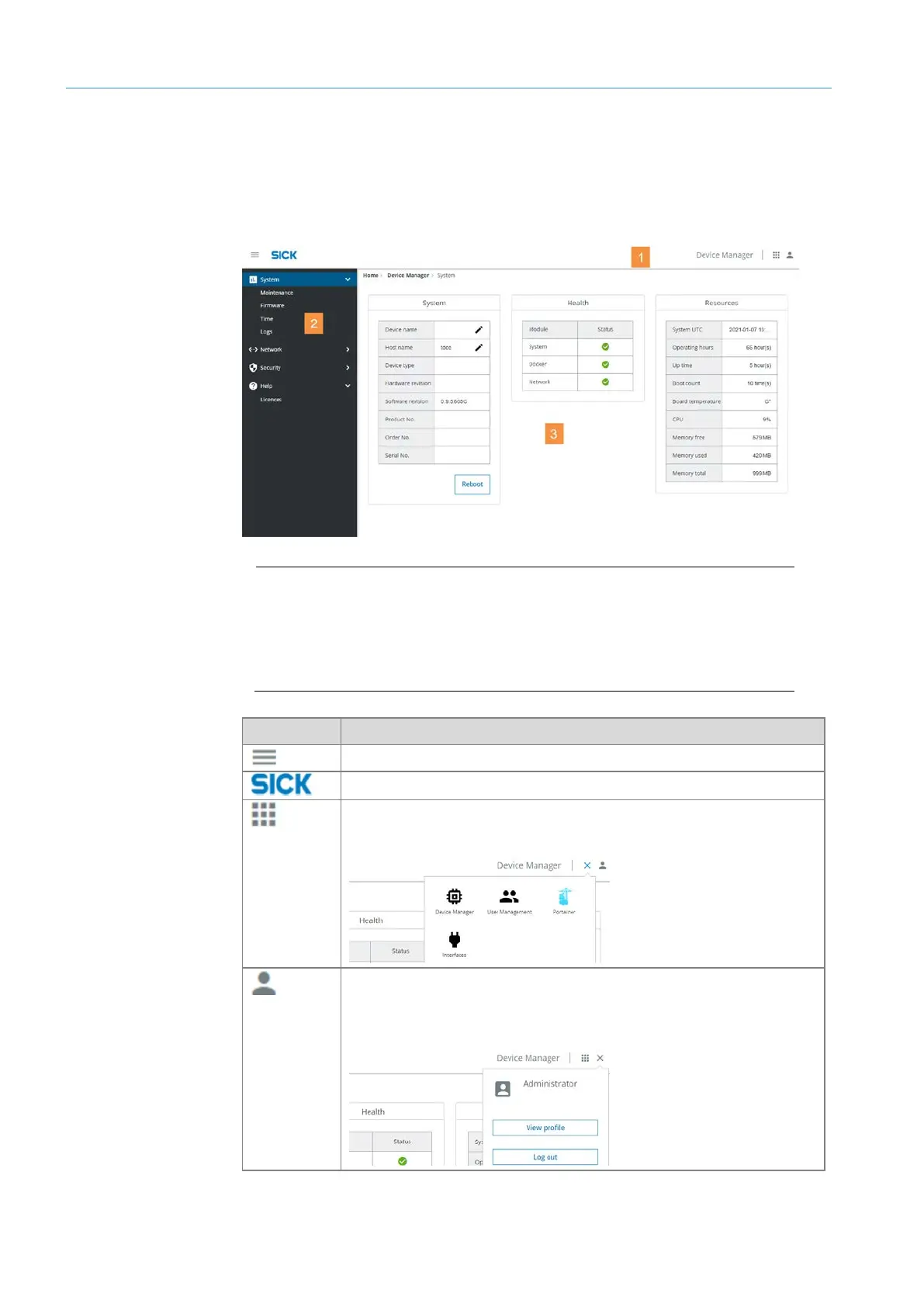
The Device Manager has a web-based interface. It is used to configure the device
settings.
Legend
1 Menu bar.
2 Navigator. Contains the Device Manager functions in a tree structure.
3 Display and input area depending on the selected function. After starting
the program, this is the overview with the system settings.
Icon Meaning
Display and hide navigator.
Opens the home page of the configuration interface.
Allows calling up of configuration tools as well as the user
administration of the Device Manager.
Displays the logged in user.
It can switch to the user administration here and log out of the
Device Manager.
Menu bar



 To Next Page