4 MOUNTING
8027311 / V1-0/2022-04|SICK
OPERATING INSTRUCTIONS|TDC-E (Telematic Data Collector)
Subject to change without notice
4.2.2 Mounting on DIN mounting rails
For mounting the TDC-E on DIN mounting rails, use the mounting rail holder with mounting
material available as an accessory.
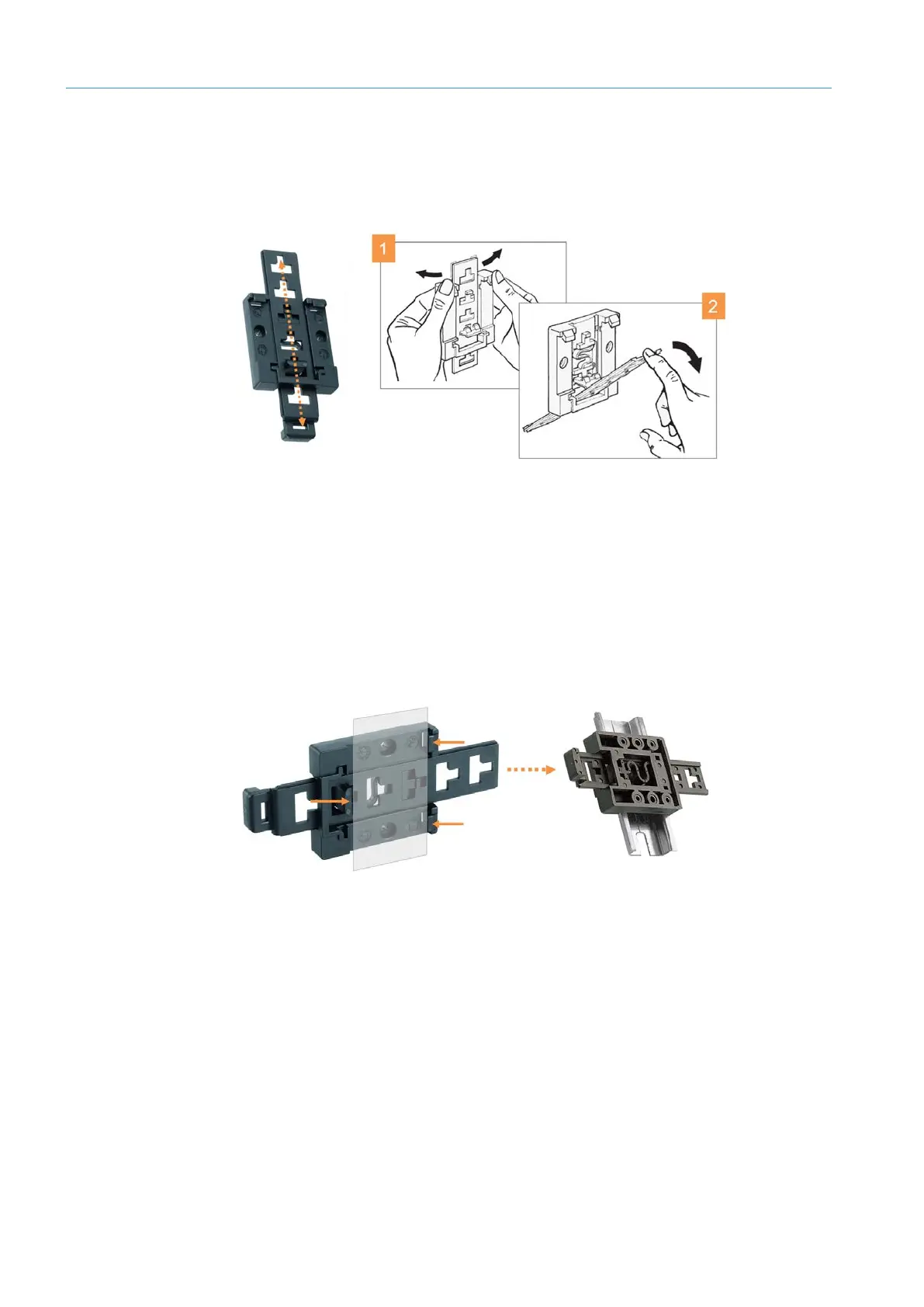
Fig. 14: Mounting on a mounting rail – Adjusting the mounting rail bracket
▸
Move the bar of the mounting rail bracket into the appropriate position and click it into
place.
▸
While clicking the bar out of one position and into another, gently bend the top section
of the base with your hands.
▸
At the same time, push the actuating bar forward. This will avoid damaging the lug in
the bar guide.
Fig. 15: Mounting on a mounting rail – Attaching the mounting rail bracket to the mounting rail
▸
Attach the mounting rail bracket to the mounting rail via the lugs, making sure it
audibly engages.
Adjusting the mounting
rail bracket to the
housing dimensions
Attaching the mounting
rail bracket to the
mounting rail



 To Next Page