106
SJ12 E, SJ16 E, SJ20 E
241914ACA
Section 5 – Procedures Tilt Switch
5.5-3 Program the tilt switch
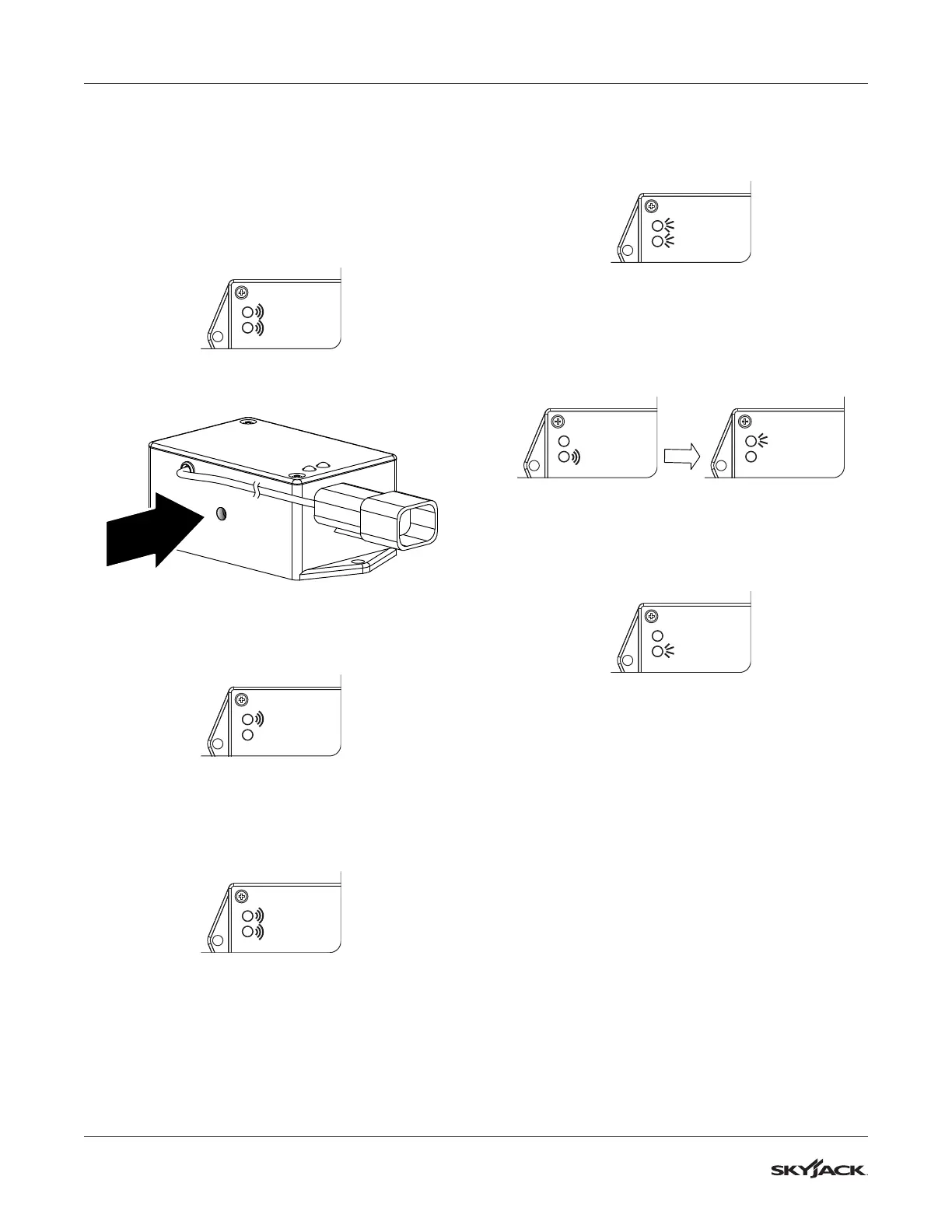
1. Pull the emergency stop on the base control
console. Turn the main disconnect switch to the
on position.
Power on the MEWP.
Results: The red and green lights ash
repeatedly.
Red LED
Green LED
2. Press and release the set zero button 3 times.
3. Monitor the program delay/stabilization time.
Results: Only the red LED blinks for 4 seconds.
Red LED
Green LED
4. Both LEDs ash for 1 second.
Results: The switch is learning the new zero
position.
Red LED
Green LED
5. Both LEDs turn on solid for 1 second.
Results: The new zero position has been
learned.
Red LED
Green LED
6. The green LED ashes and then the red LED
turns solid for 2 seconds.
Results: The switch is verifying the new zero
position.
Red LED
Green LED
Red LED
Green LED
7. The green LED turns on solid.
Results: The switch is ready for normal
operation.
Red LED
Green LED
8. Do all of the function tests given in your unit’s
Operation manual.



 To Next Page