112
SJ12 E, SJ16 E, SJ20 E
241914ACA
Section 5 – Procedures Display Module
5.7 Display Module
5.7-1 Calibration and Diagnostic Tool Key
Functions
WARNING
Only trained and authorized personnel shall be
permitted to service an MEWP.
WARNING
Read all instructions closely before attempting each
phase of the calibration procedure.
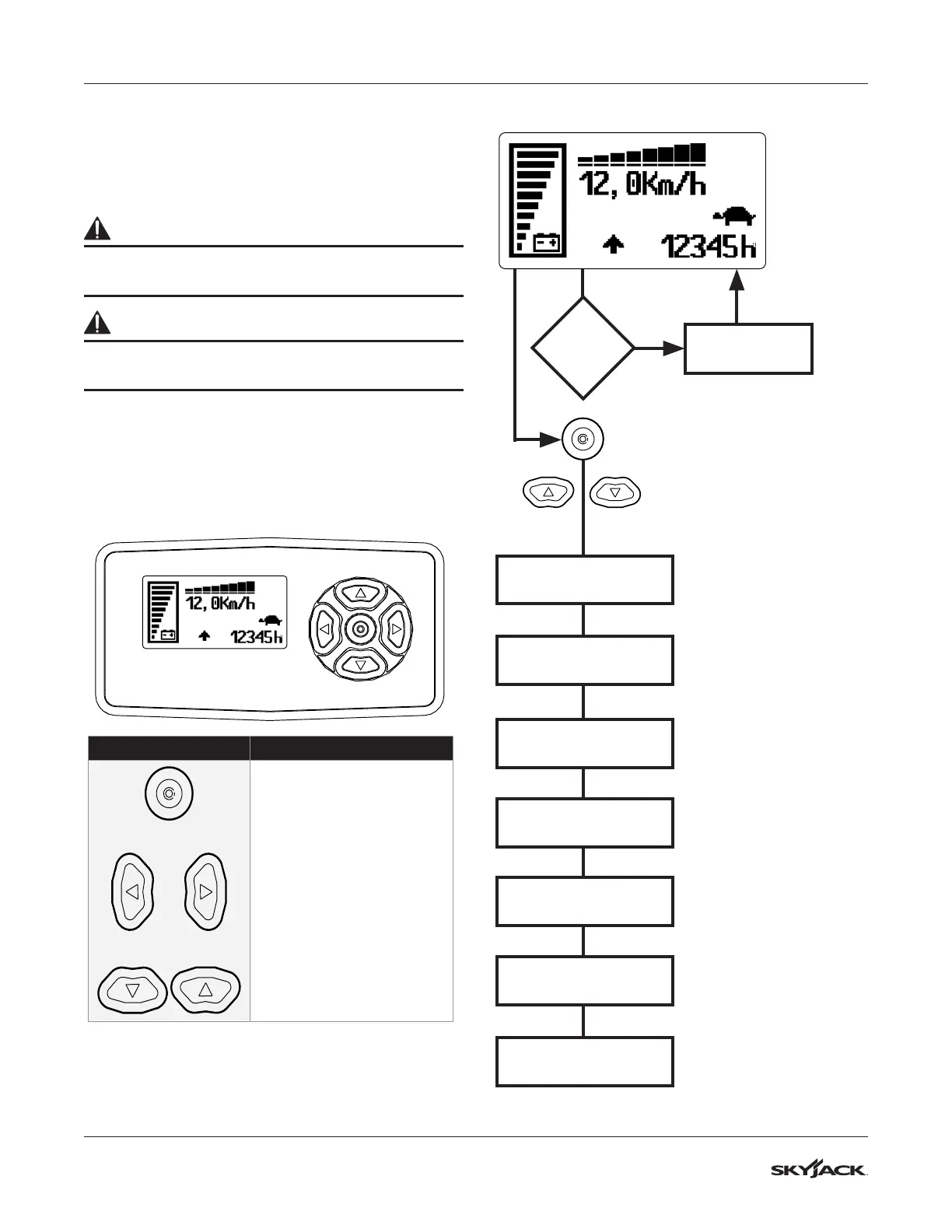
The display module can be used to calibrate and
diagnose MEWP issues.
The display module can be found in the base control
cnosole. The display shows the battery charge, hour
meter and traction speed.
Display Controls
Symbol Key Function
ENTER Button
Choose the current selection
or save the changes
LEFT Button
Go back to the previous
menu or move the cursor to
the left.
RIGHT Button
Move the cursor to the right
UP/DOWN Buttons
Scroll through the display
menu or change the value.
PASSWORD
Select this menu and
select the correct code to
enable adjustments and
calibrations.
CALIBRATION
This menu is to be used
by Skyjack engineers
only!
CONSOLE
Select this menu to
change which console
you are connected to.
BATTERY TYPE
Select this menu to change
what type of battery is
installed on the machine.
REGION
Select this menu to
change the region where
the machine is being
used.
MACHINE TYPE
Select this menu to
change the type of
machine where the display
is installed.
LANGUAGE
ALARMS
PAGE
Select this menu to
change the language of
the display.
Press the middle button twice to
enter the display option
Press the up or down buttons to
scroll through the display menu.
Initial State
Main Menu
If Alarm
Occurs
Shows alarm code
and node number.


 To Next Page