Identifying parts and controls
[]
[]
[]
[]
[]
[]
[]
[]
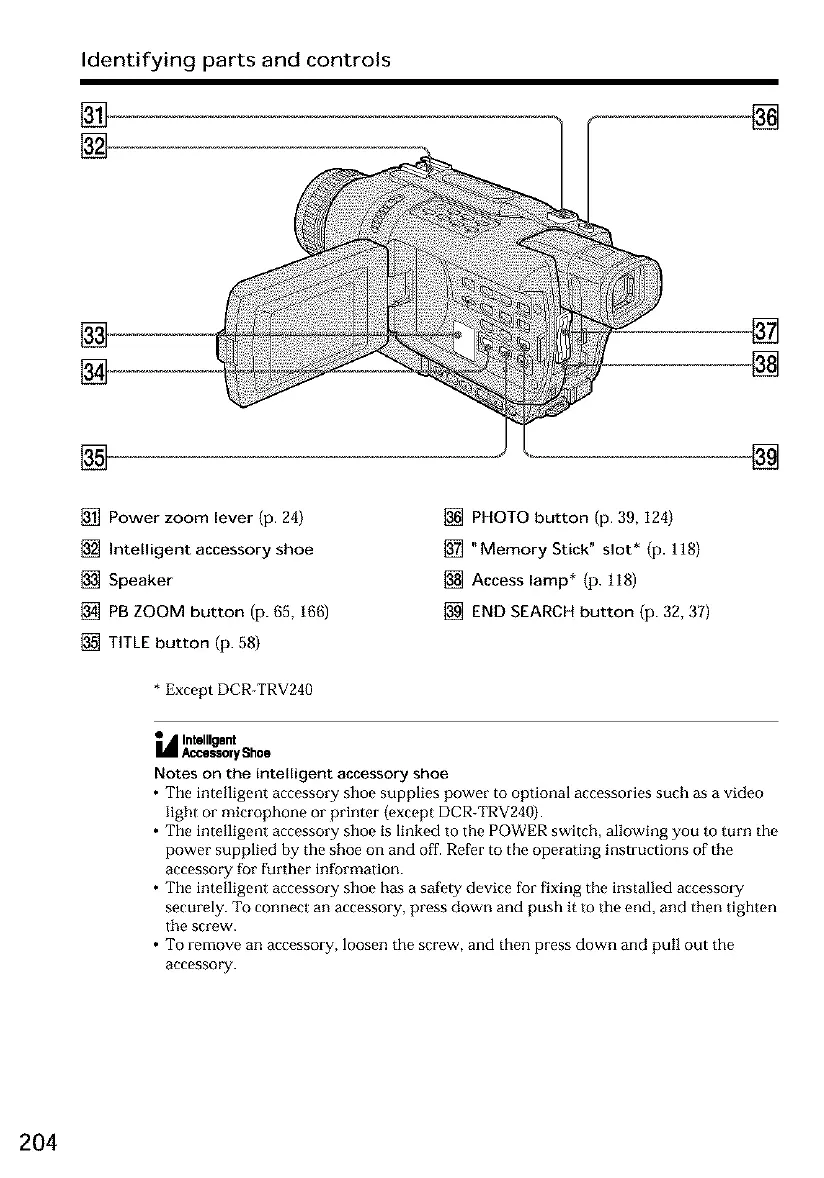
[] Power zoom lever (p. 24)
[] Intelligent accessory shoe
[] Speaker
[] PB ZOOM button (p. 65, 166)
[] TITLE button (p. 58)
[] PHOTO button (p. 39, 124)
[] "Memory Stick" slot* (p. 118)
[] Access lamp* (p. 118)
[] END SEARCH button (p. 32, 37)
* Except DCR-TRV240
• Intelligent
i_ AccessoryShoe
Notes on the intelligent accessory shoe
• The intelligent accessory shoe supplies power to optional accessories such as a video
light or microphone or printer (oxcept DCR-TRV240).
• The intelligent accessory shoe is linked to the POWER switch, allowing you to turn the
power supplied by the shoe on and off. Refer to the operating instructions of the
accessory for further information.
• The intelligent accessory shoe has a safety device for fixing the installed accessory
securely. To connect an accessory, press down and push it to the end, and then tighten
the screw.
• To remove an accessory, loosen the screw, and then press down and pull out the
accessory.
204













 To Next Page