Inserting a scene
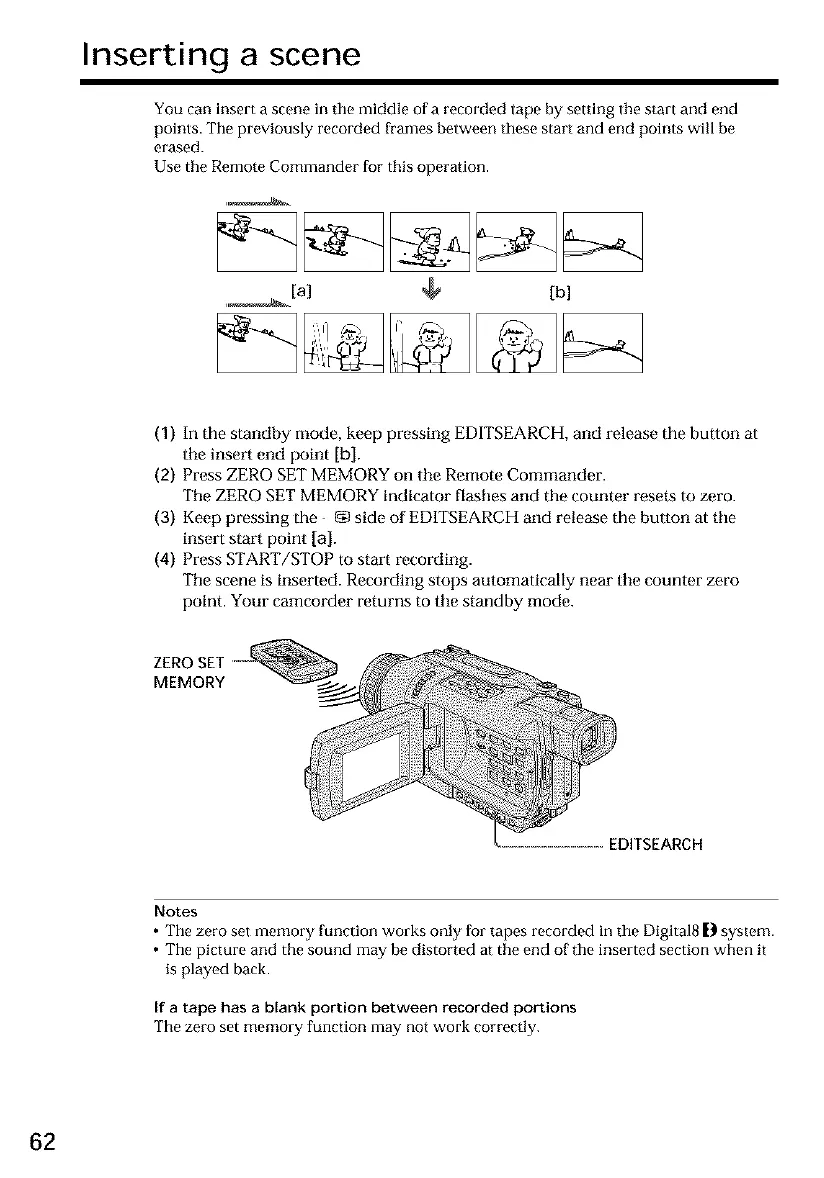
You can insert a scene in the middle of a recorded tape by setting the start and end
points. The previously recorded frames between these start and end points will be
erased.
Use the Remote Commander for this operation.
,_[a] [b]
(1) In the standby mode, keep pressing EDITSEARCH,and release the bu|ton at
the insert end point [b].
(2) Press ZERO SETMEMORYon tile Remote Commander.
Tile ZERO SET MEMORYindicator flashes and the counter resets to zero.
(3) Keef)pressing the _g)side of ED1TSEARCHand release the bu|ton at the
insert start point [a].
(4) Press START/STOP to start recording.
The scene is inserted. Recording stops automatically near tile counter zero
point. Your camcorder returns to the standby mode.
ZERO SET
MEMORY
EDITSEARCH
Notes
• The zero set memory ['unction works only for tapes recorded in the Digital8 [} system.
• The picture and the sound may be distorted at the end of the inserted section when it
is played back.
If a tape has a blank portion between recorded portions
The zero set memory function may not work correctly.
62













 To Next Page