39
4.6 Recording
The priority order for recording is: Alarm -> Motion detection -> Schedule.
4.6.1 Stream
4.6.1.1 Stream
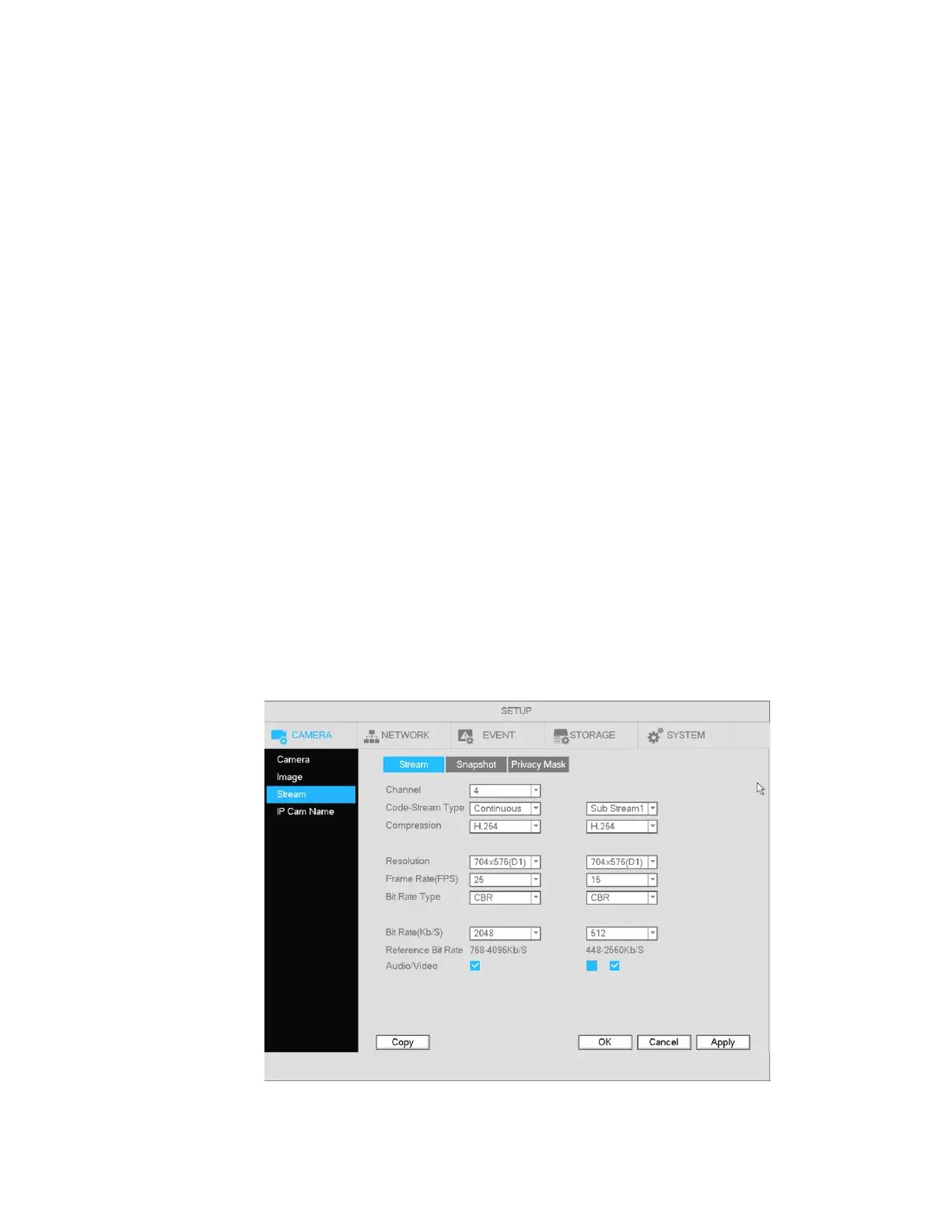
The Stream section is used to set the IP camera’s stream settings.
The interface is shown in Figure 4-24.
Channel: Select the desired channel.
Type: The NVR can process two streams for viewing, main and sub.
Compression: The NVR supports H2.65, H.264 (HP, MP, BP profiles) and MJPEG.
Resolution: The current setting of the camera will be displayed. Changes made in the NVR will be
reflected in the camera.
Frame rate: The current setting of the camera will be displayed. Changes made in the NVR will be
reflected in the camera.
Bit rate type: The NVR supports two types: CBR (constant bit rate) and VBR (variable bit rate). In VBR
mode, you can set the video quality. The current setting of the camera will be displayed. Changes made
in the NVR will be reflected in the camera.
Quality: Options will be available in VBR mode. There are six levels ranging from 1 to 6. The sixth level
has the highest image quality.
Video/audio: Check the box to enable audio for the channel. Please note, once you enable audio
function for one channel, the system may enable audio function of the rest of the channels by default.
Copy:After you complete the setup, you can click Copy button to copy the current setup to other
channel(s). The current channel number will be highlighted gray. Select the desired channels and click
the OK button to complete the setup.
Figure 4-24



 To Next Page