76
4.10.1.7 Email
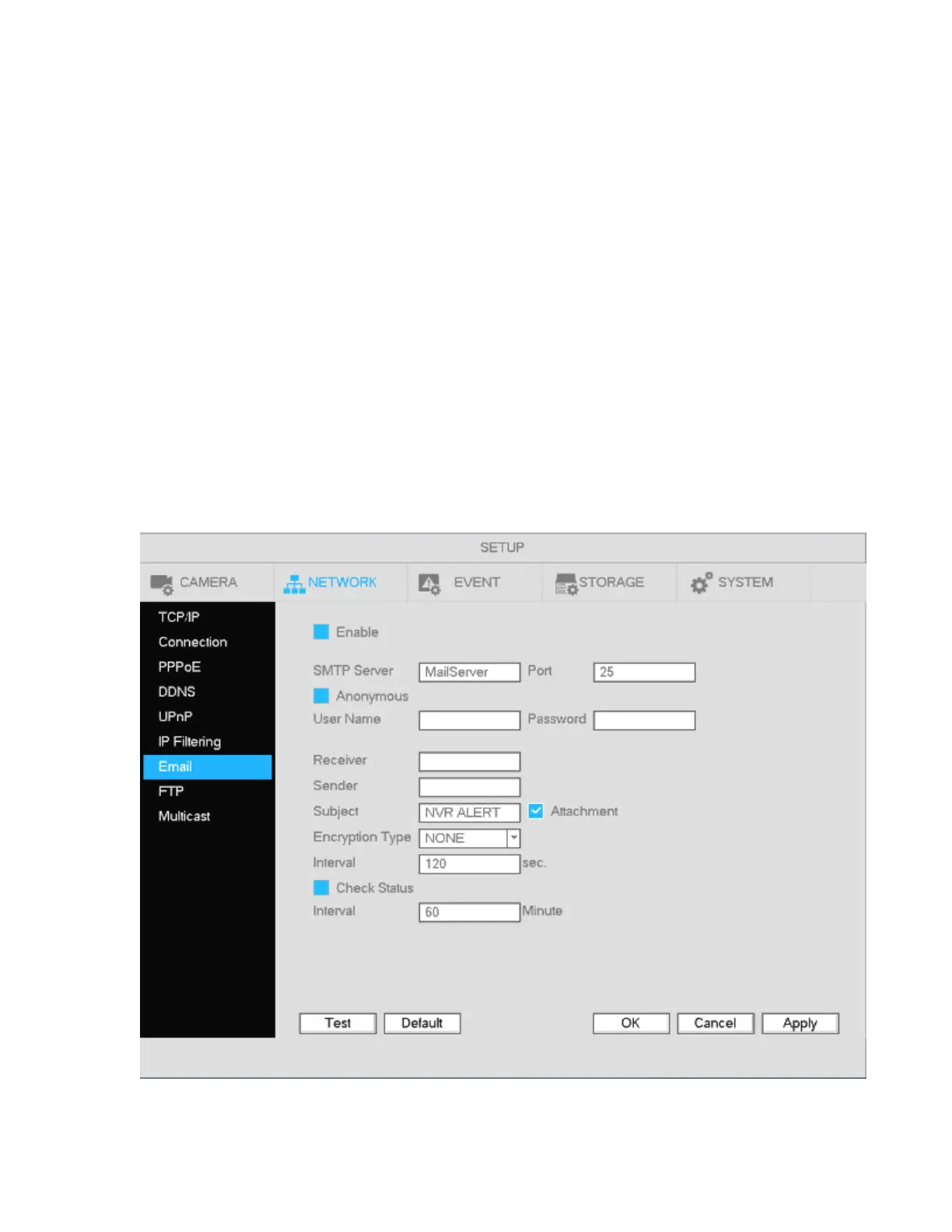
The email interface is shown below in Figure 4-71.
SMTP server: Enter the mail server information.
Port: Enter the corresponding port for the mail server.
User name: Enter the user name of the email account.
Password: Enter the password of the email account.
Sender: Enter sender email address that will be displayed in the emails.
Subject: A maximum of 32 characters are supported for the subject.
Receiver: Enter the recipient’s emails address. A maximum of 3 email addresses are supported.
Encryption Type: Choose between SSL and TLS.
Interval: This is to set how often the email gets sent. The range is from 0 to 3600 seconds. 0 means
there is no interval.
Check Status: This function allows the system to send out a test email to check the connection.
Interval: This is for the Check Status interval.
Please note that system will not send out the email immediately when an alarm occurs. The system sends
out the email according to the interval that’s specified. The purposed of this is to reduce heavy loads on the
email server if/when there are too many false alarms occurring.
Figure 4-71



 To Next Page