108
5.3 Live View
Click on a channel to view the image.
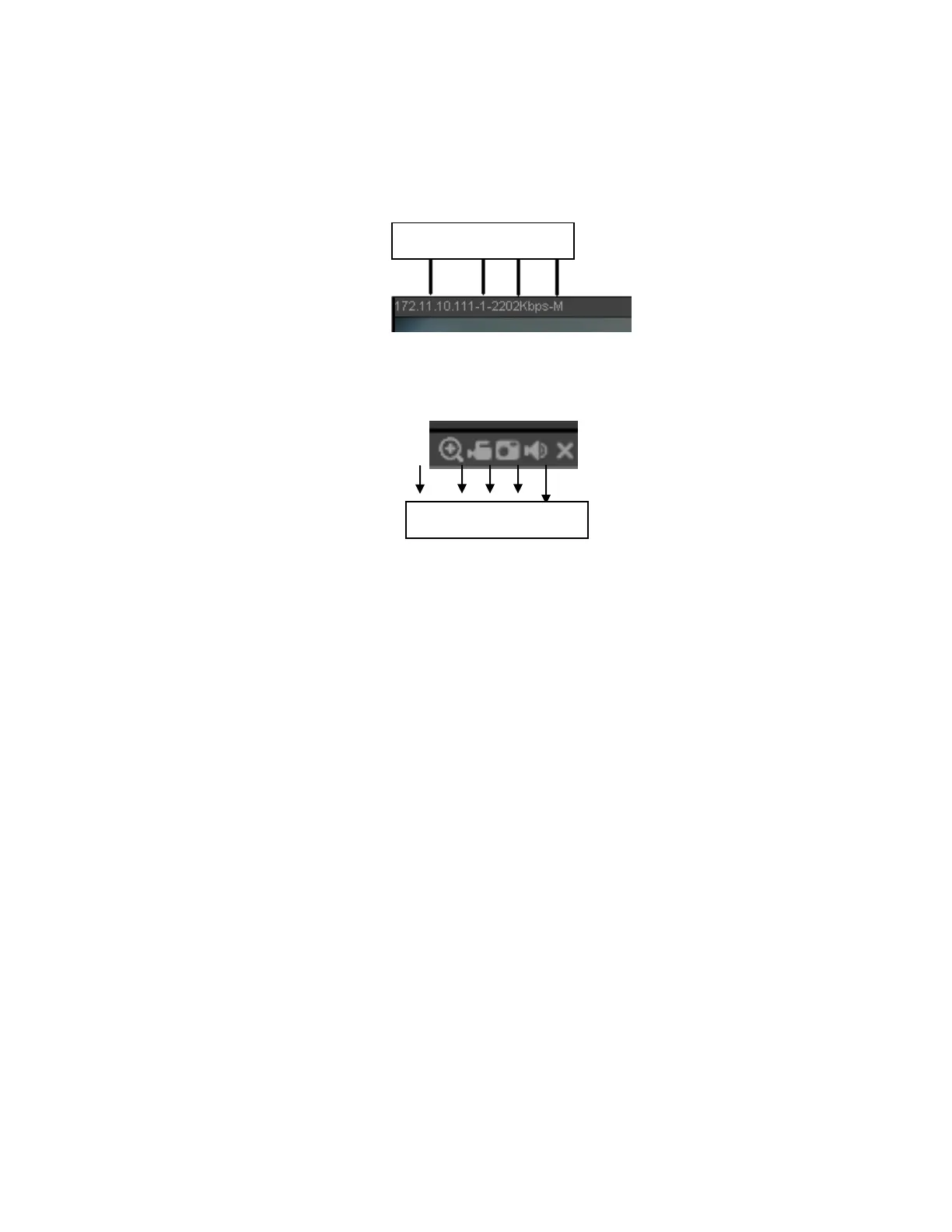
On the top left corner of the channel, view the following information: device IP(172.11.10.11), channel
number(1), camera bitrate(2202Kbps) and stream type(M=main stream, S=sub stream). See Figure 5-10.
Figure 5-10
On the top right corner, there are five function buttons. See Figure 5-11.
Figure 5-11
1: Digital zoom: Click this button and then left drag the mouse in the zone to zoom in. Right click to
restore the image.
2: Record: Click to begin local recording. This button will be highlighted. Go to the system folder
C:\RecordDownload to view the recorded file.
3: Snapshot: Take a snapshot. All images are saved in C:\PictureDownload (default).
4: Audio :Turn audio on/off
5: Close the channel live view
5.4 PTZ
There are eight direction keys for controlling PTZ. In the middle of the eight direction keys, there is a 3D
intelligent positioning key.
Click the 3D intelligent positioning key to go to a single screen mode. Drag the mouse on the screen to
automatically pan, tilt, and zoom to the area that was identified.
For PTZ setup, refer to the following table:



 To Next Page