8 — Routine Maintenance
87
10085896_H
V-PRO
®
maX 2
Operator Manual
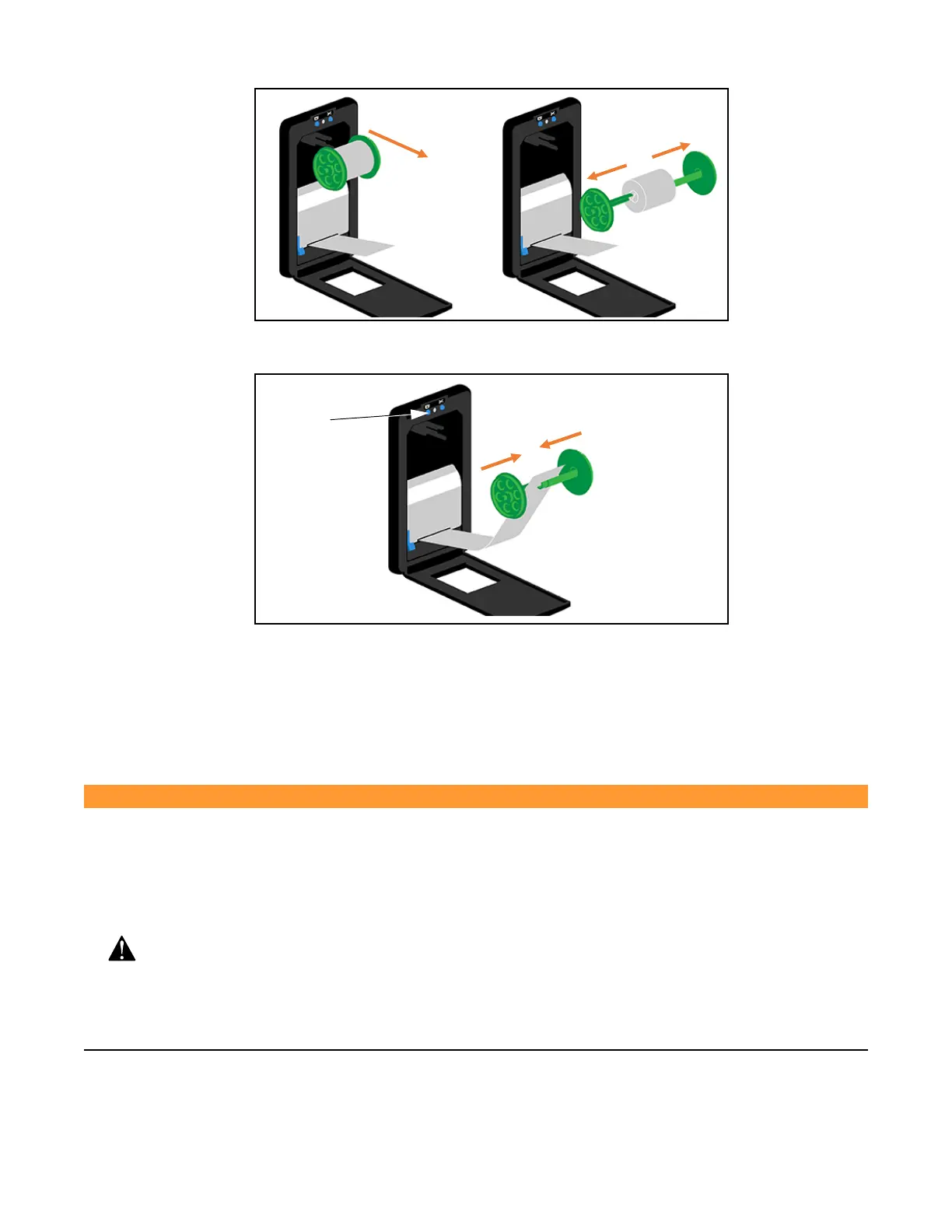
Pull Spool Apart
Remove
Take-Up
Spool
6. Place paper between take-up spool halves and push halves together.
Push Spool Together
Feed Button
7. Place spool back in original position, at top of printer compartment, with green spool gear firmly seated against
paper take-up motor gear. If printer is buzzing, cycle power to Unit.
8. Press Feed Button until paper is tight.
9. Close printer cover.
8.7 Preventive Maintenance Schedule
WARNING
PERSONAL INJURY AND/OR EQUIPMENT DAMAGE HAZARD
● Repairs and adjustments to this equipment must be made only by STERIS or STERIS-
trained service personnel. Maintenance performed by unqualified personnel or
installation of unauthorized parts could cause personal injury, result in improper
equipment performance, invalidate the warranty or result in costly damage. Contact
STERIS regarding service options.
● Regularly scheduled preventive maintenance is required for safe and reliable
operation of this equipment. Contact STERIS to schedule preventive maintenance.












 To Next Page