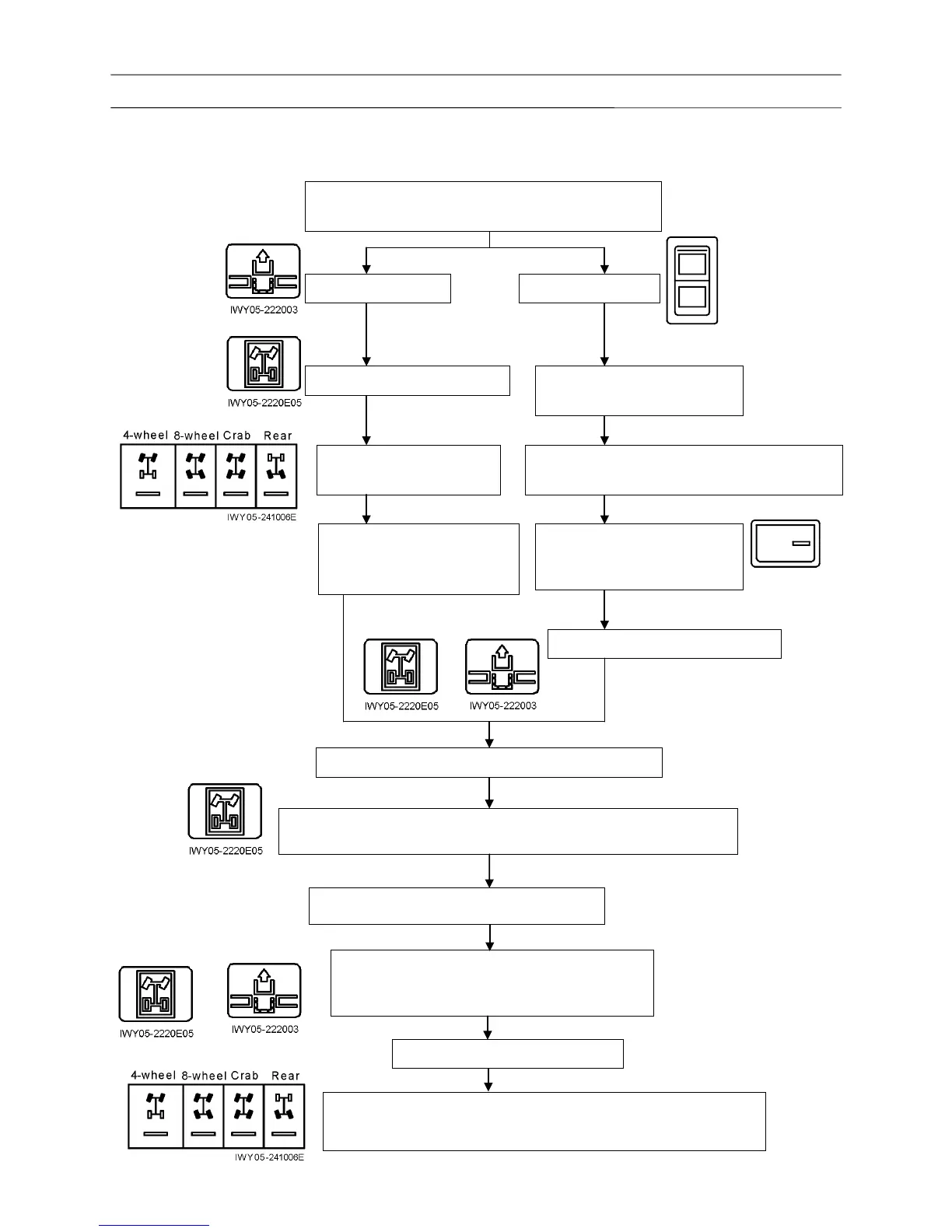
Operation Check (Traveling Device)
3. Rear steering lock
3.1 Operation check A
Turn the rear steering lock switch to "Release".
(The indicator turns on.)
The indicator is on. The indicator is off.
Check that the indicator is on.
Switch to 8-wheel, crab, or
rear steering.
Switch to 8-wheel, crab, or
rear steering.
Check that the indicator is on.
(8-wheel, crab, or rear
steering)
4-wheel steering indicator remains on and the
8-wheel, crab, or rear steering indicator flashes.
With the steering release
switch pressed, slowly turn the
steering wheel left and right.
Check that the indicators are ON.
Turn the steering wheel and check the steering.
After checking that the indicator turns off and on, turn the steering
wheel to a position where the indicator is on.
Turn the rear steering lock switch to "Lock".
If the pin does not engage, adjust the position of
the detector cam so that the detector switch
activates when the pin can be inserted.
Check that the indicators are OFF.
8-wheel, crab or rear steering indicator flashes. Switch to 4-wheel
steering, and check that 4-wheel steering indicator
turns on and the
8-wheel, crab, or rear steering indicator turns off.












 To Next Page