2 - Names and Functions of Parts
T PHONES knob
Use this to adjust the headphone output level.
V
CAUTION
Before connecting headphones, minimize the volume with
the PHONES knob. Failure to do so could result in a sudden
loud noise that could harm hearing, for example.
NOTE
The output levels of the 1 and 2 PHONES jacks cannot be
adjusted individually.
Y MUTE switches and indicators (AUX 1–5)
When these switches are on (indicators lit), signals to the
corresponding AUX OUTPUT (1–5) jacks are muted.
U PFL/AFL MASTER knob
Use this to adjust the send level from the PFL/AFL L/R bus.
I AFL switches and indicators (AUX 1–5)
When these switches are on (indicators lit), the output signals
of the AUX OUTPUT jacks (1–5) are sent to the PFL/AFL L/R
bus.
NOTE
When these switches are on, the sound of the PFL/AFL L/R
bus can be monitored with headphones.
O CONTROL ROOM knob
Use to adjust the output levels of the CONTROL ROOM L/R
jacks.
P AUX knobs (FX)
Use these to adjust the levels of signals sent from the built-in
eect processor to each AUX bus.
A MUTE switch and indicator (FX)
When the MUTE switch are on (pushed in, MUTE indicator lit),
the signal from the built-in eect is muted.
S SELECT button
Open the EFFECT Screen and make built-in eect settings.
(see "Using the built-in eects" on page 31.)
D AUX 1/2 switch (FX)
When this switch is on, signals from the built-in eect
processor are sent to the AUX 1–2 bus.
F AUX 3/4 switch (FX)
When this switch is on, signals from the built-in eect
processor are sent to the AUX 3–4 bus.
G MAIN switch (FX)
When this switch is on, signals from the built-in eect are
sent to the MAIN MIX L/R bus.
H SUB 1–2/3–4/5–6/7–8 switches (FX)
When these switches are on, signals from the built-in eect
processor are sent to the SUB buses.
J FX fader
Use to adjust the levels of signals sent from the built-in eect
to the following buses
o MAIN MIX L/R bus
o PFL/AFL L/R bus
o AUX 1–4 buses
o SUB buses
K PFL switch and indicator
When this switch is on, signals from the built-in eect are
sent to the PFL/AFL L/R bus.
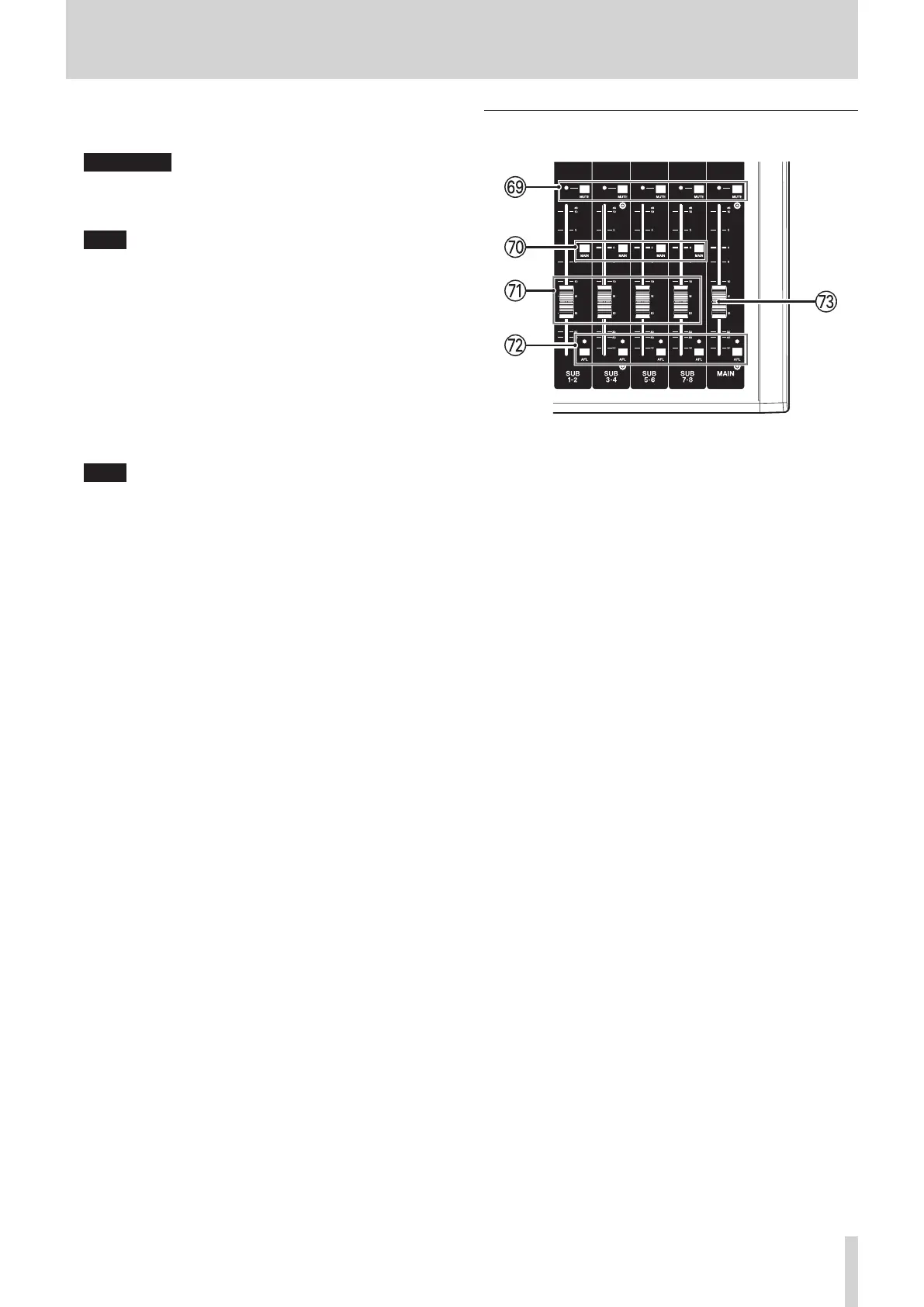
Analog output adjustment section
L MUTE switches and indicators (SUB, MAIN)
When MUTE switches are on (MUTE indicators lit), signals to
the SUB OUTPUT/MAIN OUTPUT jacks are muted.
: MAIN switch (SUB)
When this switch is on (pushed in), the SUB OUTPUT jack
output signal is sent to the MAIN MIX L/R bus.
Z SUB faders (1–2/3–4/5–6/7–8)
Use to adjust the output level of the SUB OUTPUT jacks.
X AFL switches and indicators (SUB, MAIN)
When these switches are on, the output signals of the SUB
OUTPUT or MAIN OUTPUT jacks are sent to the PFL/AFL L/R
bus.
C MAIN fader
Use to adjust the output level of the MAIN OUTPUT jacks.
TASCAM Model 2400 13


 To Next Page